





Redmine Knowledge Base Plugin — Centralised Documentation Inside Your Projects
The Redmineflux Redmine Knowledge Base Plugin adds a structured, searchable documentation system directly inside Redmine. Create, organise, and find internal knowledge without leaving your project management environment or maintaining a separate wiki tool.
What Happens When Documentation Lives Elsewhere
When project knowledge is scattered across external tools, teams pay an ongoing operational cost that compounds over time. Documentation ends up distributed across Confluence, Google Docs, email, and chat threads with no connection to the project context it describes. Onboarding takes longer when relevant guides are not findable or not centralised in one place. Teams repeat the same questions because answers were never structured or stored. Version history becomes unclear — teams cannot tell whether a document is current, outdated, or superseded by something written elsewhere.
What is the Redmine Knowledge Base Plugin?
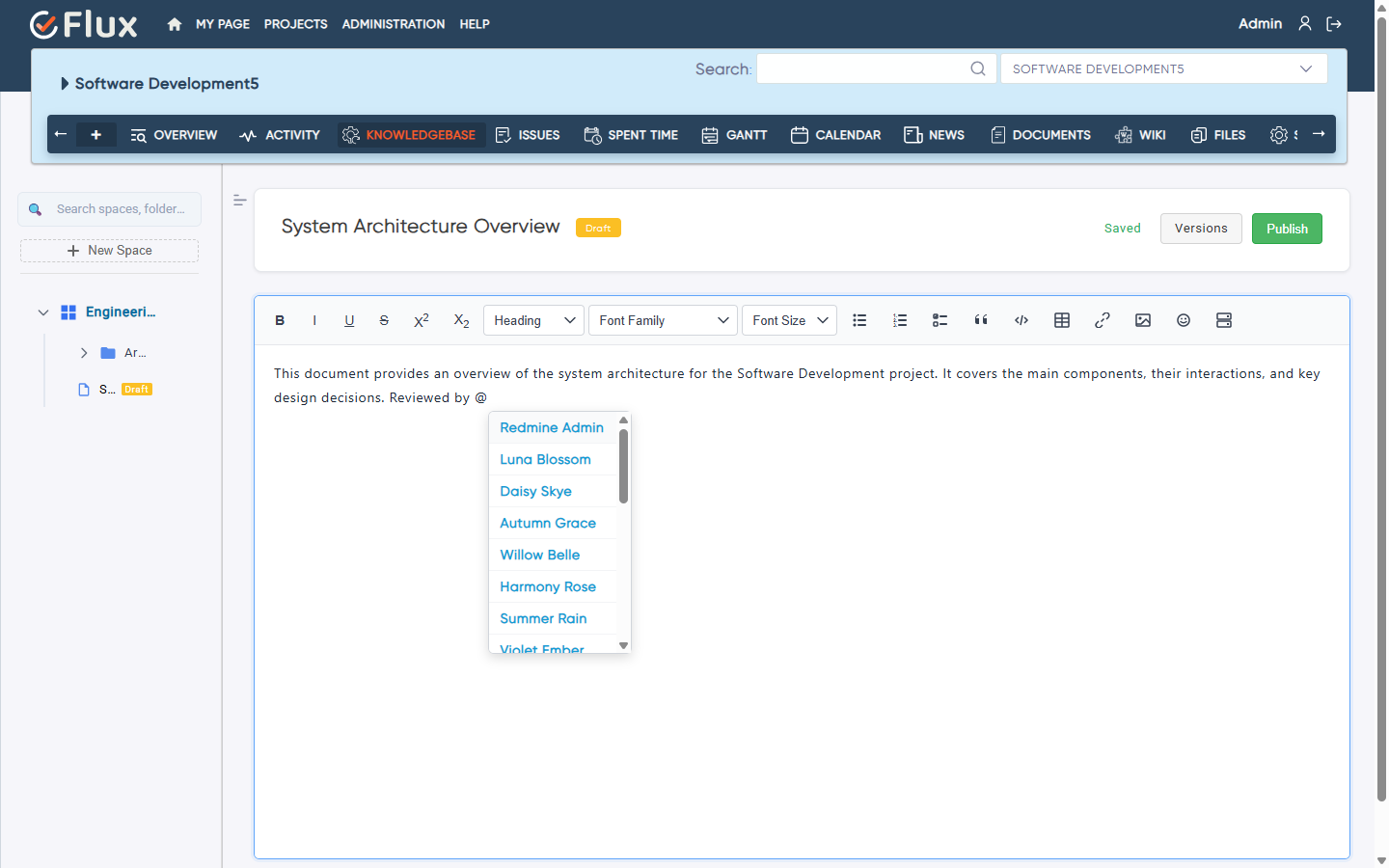
The Redmineflux Knowledge Base Plugin is a structured internal documentation system built natively inside Redmine. It lets teams create articles, organise them into categories, and search across all documentation — with every article linkable to specific projects and issues for direct operational context.
Documentation That Belongs Inside Your Project Tool
The Knowledge Base Plugin enhances Redmine without replacing it. Every article sits next to the issues it supports. Every team member finds answers in the same tool where work gets done. Teams that previously maintained a separate wiki alongside Redmine can consolidate documentation into one environment — which eliminates synchronisation overhead, version confusion, and the context-switching cost of maintaining two tools. The result is faster onboarding, clearer process documentation, and a searchable knowledge layer that grows with the team rather than drifting out of sync.
What Your Team Gains with the Redmine Knowledge Base Plugin
Every internal guide, SOP, runbook, and technical article is stored inside Redmine and findable through full-text search. Teams stop spending time looking across multiple tools for the same information.
Articles connect directly to the Redmine projects and issues they relate to. When a team member opens an issue, the relevant guides are surfaced in the same view — not buried in a separate application that requires a separate search.
New engineers and project staff find the process documentation they need without asking repeatedly. Onboarding time decreases when the knowledge is centralised, searchable, and linked to the actual work being done.
Remote and distributed teams work from the same documented standards stored in Redmine. Knowledge drift — where different team members follow different undocumented conventions — becomes addressable when the standard is written down and accessible.
Documentation lives inside the Redmine environment your team already uses daily. There is no additional login, no separate subscription, and no synchronisation work required to keep documentation aligned with project reality.
Core Capabilities of the Redmine Knowledge Base Plugin
Article Creation and Organisation
Structure Knowledge So Teams Can Navigate It Reliably
- Rich text article editor operates natively inside Redmine
- Category and sub-category hierarchies provide logical navigation for teams browsing the knowledge base
- Tags support cross-category discovery and related article linking for content that spans multiple project areas.
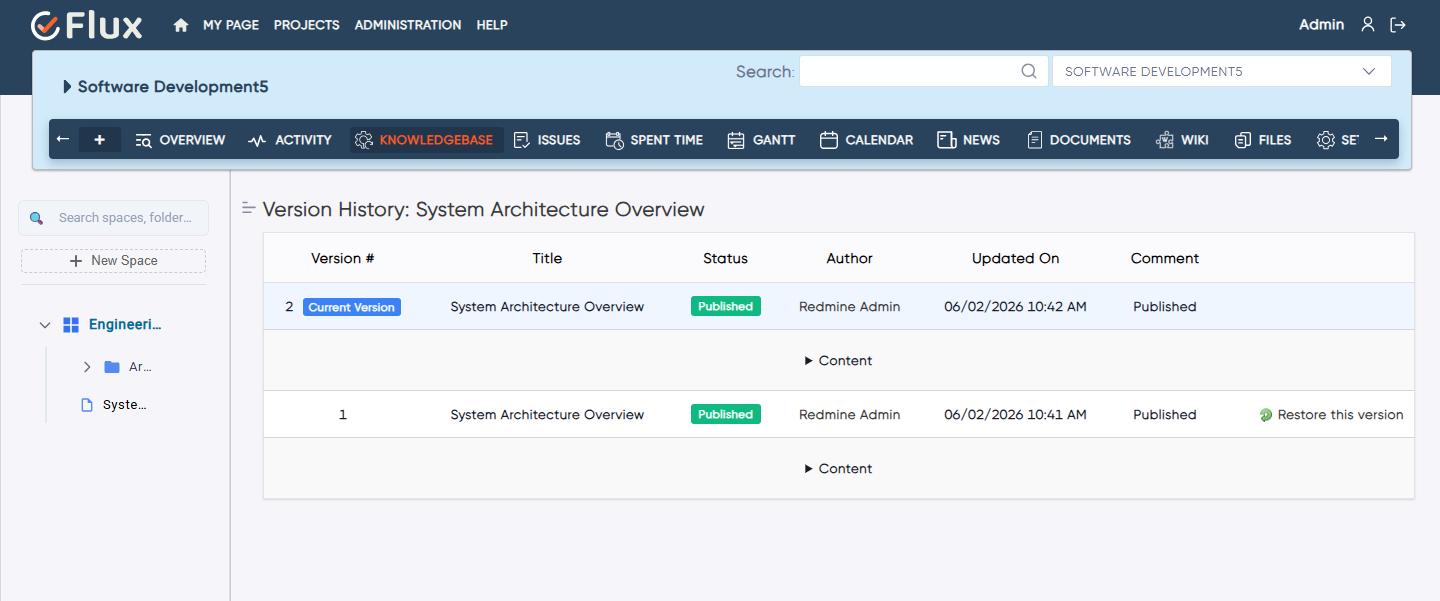
- Article versioning with edit history and rollback support ensures that knowledge can be updated without losing previous versions.
Full-Text Search
Find Answers Without Knowing Exactly Where They Are Stored
- Full-text search covers all articles across entire Redmine instance or scoped to specific projects
- Search results include highlighted term matching within article previews, which makes it faster to identify the most relevant result without opening every article individually.
- Recent and popular article suggestions surface high-traffic content for teams browsing without a specific query.
Project and Issue Linking
Connect Documentation to the Context Where It Is Needed
- Articles link directly to Redmine projects and individual issues
- Related documentation surfaces within the relevant issue or project page, which means team members access the exact guide they need without navigating away from their work.
- Cross-referencing articles from issue descriptions and comments allows teams to embed knowledge links directly into the work context.
Access Control
Manage Who Can Read, Create, and Edit Documentation
- Role-based read and edit permissions apply per article and category
- Project-scoped visibility restricts articles to relevant teams
- Public and private article settings per knowledge base section allow organisations to maintain client-facing documentation alongside internal-only content in the same system.
- Audit logs record article changes and permission updates for compliance purposes.
Version History
Keep Documentation Current and Traceable
- Full edit history per article includes timestamps and author attribution
- Version comparison shows exactly what changed between revisions, which makes it straightforward to review content updates before applying them.
- Any previous version can be restored with a single action
- Change notifications alert the teams assigned to specific articles when content is updated.
How the Knowledge Base Plugin Works with Other Redmineflux Plugins
The Knowledge Base Plugin connects directly to the issue context managed through other Redmineflux plugins. Link SOPs and technical guides to Issue Template Plugin templates so that every new issue includes a reference to the relevant documentation. Connect test case runbooks to test plans managed through the Test Case Management Plugin. Embed project documentation links inside Checklist Plugin items to guide completion steps with structured references.
Trusted by Teams That Own Project Knowledge
What People are Saying!

Project Manager, Newyork

Project Manager

Project Manager, Singapore

Project Lead, Spain

Team Lead, Rochester, U.S.

CEO, Brazil

Project Manager

Project Manager, Moscow, Russia


Redmineflux plugins have been a game-changer for our Redmine setup. The enhanced features like advanced time tracking, custom workflows, and improved reporting have significantly boosted our productivity. The integration was seamless, and the support team was fantastic. Highly recommend these plugins to any Redmine user!
Getting all of my business data organized in one place is all I wanted. With Redmineflux, I can filter data and simplify my agile operations.
Redmineflux themes have completely transformed the look and feel of our Redmine instance. We were looking for a way to make our Redmine more visually appealing and user-friendly, and these themes delivered on both fronts. The customization options are fantastic, allowing us to tailor the design to our company’s branding.
The Redmineflux Timesheet plugin has made it so much easier for our team to track their time. The ability to easily log time for multiple tasks at once and bulk edit or delete entries is a huge time saver.
Redmineflux Gantt Chart improved visibility and Efficiency, it provides a clear view of tasks, improves communication, & streamlines workflows for faster project completion.
Redmineflux themes are not just about aesthetics; they’re designed with user experience in mind. The improved navigation and clarity have streamlined our workflows significantly. The support team was also incredibly helpful in assisting us with customization.
Highly recommend!”
Redmineflux has an easy-to-use interface & is easily customizable. It helps active coordination and focuses project resources in one direction.
The self-hosted version of Redmineflux has transformed our enterprise project management. The customization options and reliable performance have greatly improved our workflows. The support team is responsive, ensuring our needs are met. Highly recommended for organization looking to streamline project management.
Deployment Options
Self-Hosted
When deployed on your own infrastructure, your team manages server uptime, Redmine upgrades, backups, and plugin compatibility. The Knowledge Base Plugin adds documentation capability without changing who owns the infrastructure. Full control stays with your team.
Managed Cloud
The Knowledge Base Plugin runs within Redmineflux Managed Cloud. Infrastructure is fully managed by the Redmineflux team. Updates are automated, backups are secured, and uptime is SLA-backed. If infrastructure management is overhead your team does not need, Redmineflux Managed Cloud transfers that responsibility entirely.
Built for Teams That Own Project Knowledge
| Role | What they gain |
|---|---|
| Project Manager | Linked project documentation, SOPs, and runbooks in one searchable location |
| Engineering Lead | Technical docs connected directly to the issue context they support |
| IT Director | Governance over internal knowledge assets with access control and audit trails |
| Support Lead | Structured troubleshooting guides and customer-facing documentation templates |
Frequently Asked Questions
Yes. Articles in the Redmineflux Knowledge Base Plugin can be linked directly to Redmine projects and individual issues. Linked articles surface within the relevant issue or project page, giving team members access to the exact documentation they need without navigating away from their work context.
Yes. Full-text search is available across all articles in the knowledge base. Search globally across the entire Redmine instance or scope results to a specific project. Search results include highlighted term matches within article previews to help teams locate relevant content quickly without opening each article individually.
Yes. Article and category visibility can be configured with role-based permissions. Restrict read and edit access per project, per role, or per individual category. This lets teams maintain public-facing guides alongside internal-only documentation in the same knowledge base without mixing audiences.
The Redmineflux Knowledge Base Plugin is tested and maintained against the three most recent stable Redmine releases. Compatibility is verified with each plugin update. Check the plugin documentation for the confirmed supported version list before installing on your instance.
How long are updates and support included with a plugin purchase?
Every Redmineflux plugin purchase includes 12 months of technical support, bug fixes, and both minor and major version updates. After the initial 12-month period, you can renew your subscription for 30% of the plugin price to continue receiving support, bug fixes, and future updates for another year.
