
Redmine Inline Editor – edit issues without leaving your view.
For engineering leads and project managers who need faster triage in Redmine.
no licence required
Free forever · open-source · install in 5 minutes
Today in Redmine
Ten issues to update. Ten full-page loads to do it.
Small updates compound into significant time waste when every change requires a full form navigation cycle. Updating status or priority on ten issues means ten full-page loads – which adds up quickly during triage or sprint planning sessions. Sprint planning requires navigating into each issue to reassign or re-estimate, which stretches what should be a focused session into a prolonged administrative task.
In plain words
What is the Redmineflux Inline Editor Plugin?
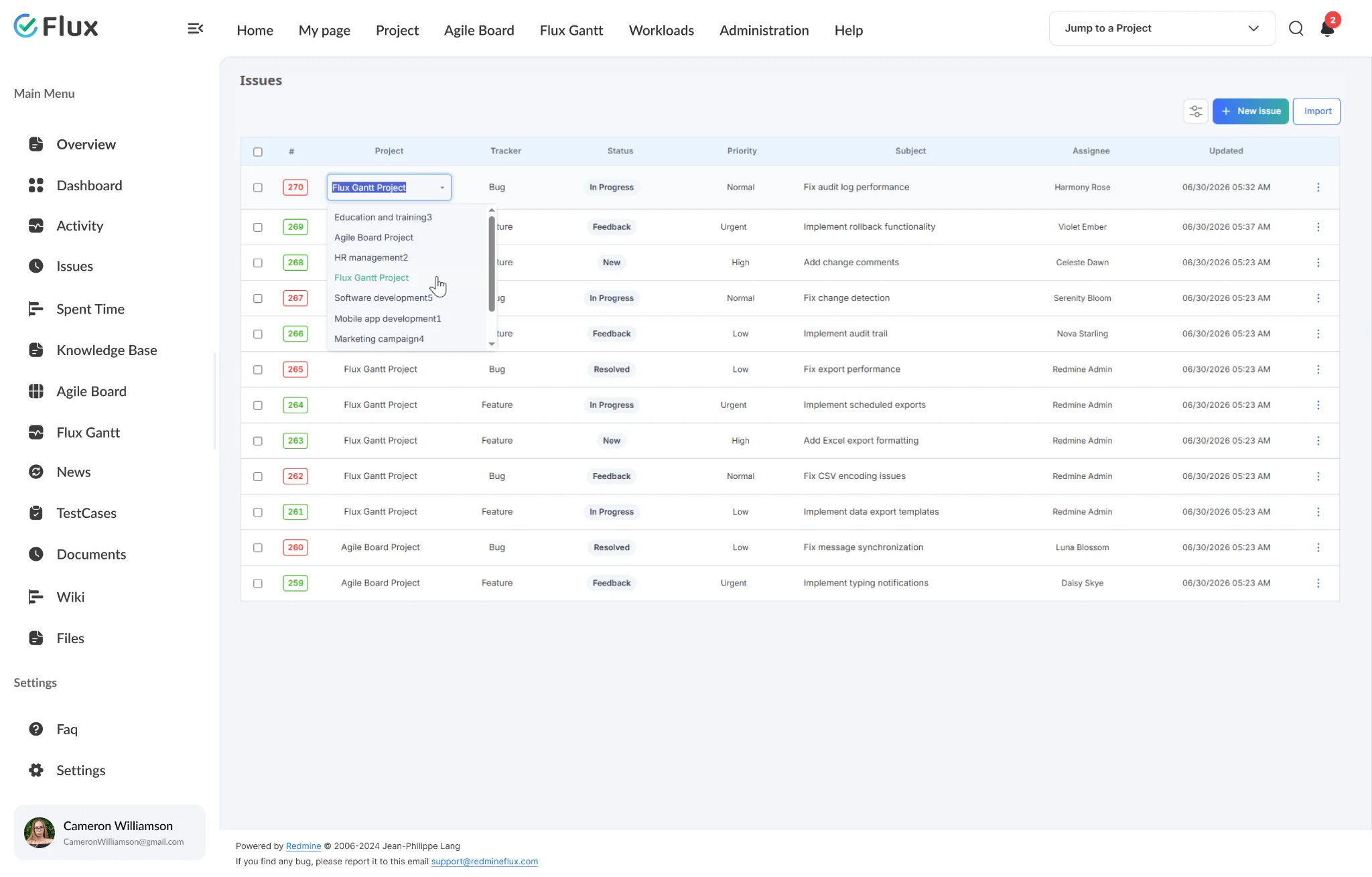
The Redmineflux Inline Editor Plugin adds click-to-edit capability to any Redmine issue field – directly from the issue list or the issue detail page. Status, priority, assignee, due date, estimated time, and custom fields are all editable inline without navigating to the full edit form. Changes save immediately without a page reload.
The change happens in context, not in a separate form.
Triage sessions, sprint planning reviews, and daily standups move faster when the team is not waiting on page loads between every field update.
Ten-issue triage sessions that previously required ten navigation cycles complete from the list view in a fraction of the time. Sprint planning stays in the backlog view from start to finish.
What your team gains
Faster issue management, same governance.
Click any shift to see what changes in the product.
01
Triage and review without opening each issue.
Change status, assignee, and priority directly in the list view without a navigation step. A ten-issue triage session takes a fraction of the time it takes when every change requires a full-page load.
02
Sprint planning from the backlog view, start to finish.
Re-estimate and reassign issues directly from the backlog without navigating into each issue individually. Sprint preparation becomes a focused planning session rather than an administrative cycle.
03
Hover any row to reveal the inline edit control.
Move the cursor over any issue row in the list and a pencil icon appears. Click it to activate inline editing for that row — the change happens in place, with no page reload required.
04
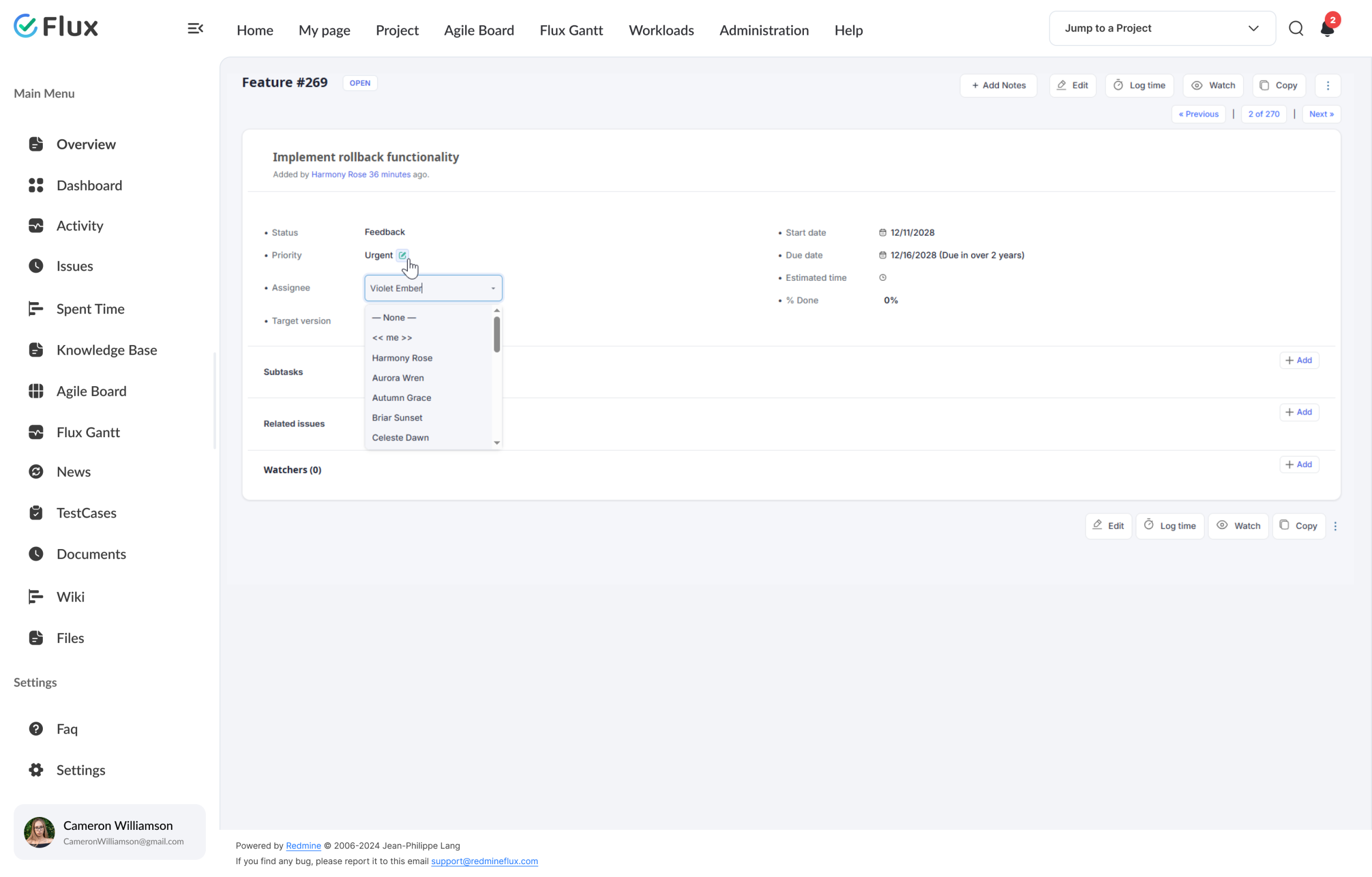
Edit any field on the Show Issue page without a form reload.
Open any issue and click an editable field — status, priority, assignee, dates, percentage, or custom fields — to update it inline. No full-page form required.
05
Edit descriptions with a rich-text editor, no page reload.
Click the edit icon on any issue description to open CKEditor inline. Apply headings, bullet points, bold, quotes, and other formatting — then save without leaving the issue view.
Core capabilities
The specifics, for people who want them.
Update issue fields directly without the edit form.
- Click any inline-editable field to activate edit input
- Status, priority, assignee, due date, estimated time all editable
- Custom fields support for all fields configured in the Redmine instance
- Save with Enter · Esc to cancel
Update fields without opening individual issues.
- All inline-editable fields available from the standard Redmine issue list
- Changes save instantly — no full page reload required after each inline edit
- No page reload after each save – context maintained throughout triage
- Works with all standard Redmine issue list views
Edit any field on the issue detail page without a form reload.
- Click any editable field on the Show Issue page to edit it inline
- Status, priority, assignee, start date, end date, and percentage all editable
- Custom fields configured in your Redmine instance are also editable inline
- Changes save immediately on the same page — no form navigation required
Edit issue descriptions with a full rich-text editor.
- Click the edit icon on any issue description to open CKEditor inline
- Format with heading styles, bullet points, bold, italic, and block quotes
- CKEditor fully compatible — bring your own CKEditor licence
- Save the edited description without leaving the issue page
All edits respect existing Redmine permission rules.
- Inline editing respects all existing Redmine field-level permissions
- Users can only edit fields their role permits – no permission bypass
- Works across all Redmine versions — field permissions consistent across versions
- Free to install — no licence fee, no activation, unlimited users
200+
teams trust Redmineflux worldwide
6 yrs
focused on Redmine, nothing else
5000+
plugin downloads powering real projects
Sprint planning used to mean opening thirty issues one by one to update estimates and assignments. With inline editing, the same session takes half the time – we stay in the list view the whole time.
Deployment
Run it your way.
Self-hosted · Free
- Install on any Redmine instance
- No licence required · install in 5 minutes
- Your infrastructure, your control
Free · forever
Download free →Redmineflux Cloud
- Inline Editor is free on every Cloud plan
- SLA-backed uptime · priced by project capacity
- No per-plugin licences – all-inclusive pricing
$1.99 / user / month
See Cloud plans →Role by role
What Inline Editor changes for each role.
Engineering LeadSprint planning, triage
Faster sprint planning and triage – no page-load overhead per issue update. Ten-issue triage sessions complete from the list view.
Project ManagerStandups, review sessions
Quick field updates during standups and review sessions without navigation. Status and assignee changes happen in context, not across a series of full-page reloads.
QA LeadTest execution queue
Status and assignee changes during test execution without leaving the issues list. Hover any issue row to reveal the edit icon and update fields without a page reload.
IT DirectorOperational efficiency
Operational efficiency gains across all teams working in Redmine daily – no new tool, no training overhead, no infrastructure change.
Pricing
Three ways to use Inline Editor.
Self-hosted · Free
Download free
No licence required · install on any Redmine version · install in 5 minutes.
Free forever, no licence required.
Download free →Bundle with paid plugins
All Plugins Bundle
Inline Editor is already free. The All Plugins Bundle gives you every paid plugin at 10% off.
Save 10% See Bundle →Or use Managed Cloud
Redmineflux Cloud
Inline Editor is free and included in every Cloud plan. Managed Redmine, no infrastructure work.
See Cloud plans →SEE INLINE EDITING IN REDMINE
See Inline Editor working inside your Redmine.
Install the Inline Editor Plugin on your existing Redmine and edit your first issue inline in seconds. No trial period, no licence activation – it’s free.
Frequently asked
Frequently Asked Questions
The questions teams ask before adopting Inline Editor. If yours isn’t here, check pricing or contact support.
Does inline editing bypass any Redmine permissions?
No. The Inline Editor Plugin respects all existing Redmine role and field-level permissions. A user can only edit a field inline if their role permits editing that field through the standard form. No permission rules are bypassed – inline editing is a UI improvement, not a security change.
Which fields can be edited inline?
Standard Redmine fields – including status, priority, assignee, due date, estimated time, and category – are all editable inline. Custom fields configured in your Redmine instance can also be enabled for inline editing. The available fields depend on your Redmine version and field configuration.
Which fields can be edited inline from the Show Issue page?
On the Show Issue page, you can edit status, priority, assignee, start date, end date, percentage done, and custom fields inline. Click any editable field to activate the editor and save without a page reload. On the issues list view, hover any row to reveal the edit icon — click it to edit the field inline without navigating away.
Which Redmine versions are supported?
The Redmineflux Inline Editor Plugin is compatible with all Redmine versions. Compatibility is tested and maintained with each plugin update.