The Redmineflux Redmine Gantt Chart Plugin replaces Redmine's static timeline view with a fully interactive planning tool. Drag to reschedule, link dependencies, and track milestones — without opening individual issues or leaving Redmine.
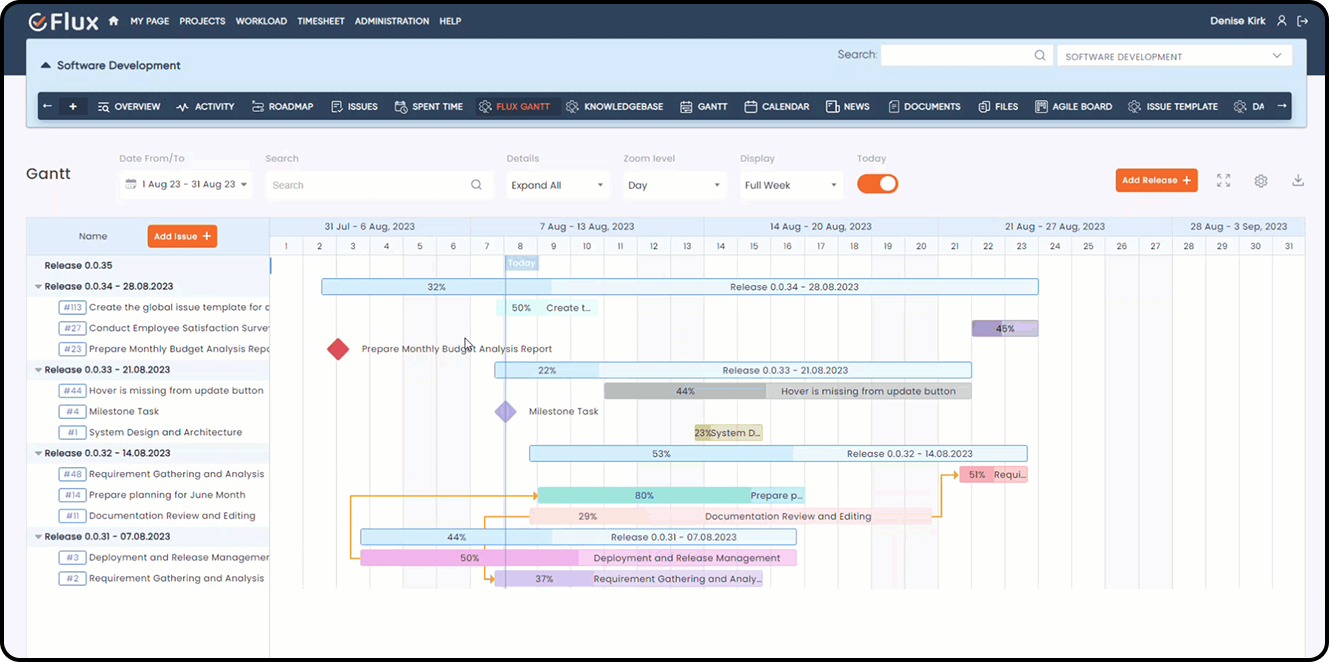
Redmine includes a basic Gantt view, but it is read-only — which creates real planning problems for project managers and delivery leads who need to adjust timelines as delivery evolves. Dragging or editing tasks directly on the chart is not possible. Dependency linking between tasks is absent, so cascade delays go undetected until they have already affected downstream work. Reschedules require opening and editing each issue individually, which makes timeline adjustments slow and error-prone. There is no critical path visibility for complex multi-task project timelines.
The Redmineflux Gantt Chart Plugin adds interactive timeline editing directly to Redmine. It lets project managers drag tasks to reschedule, link dependencies, create milestones, and see the full project timeline in a single view — all without leaving the Redmine environment or importing data to an external planning tool.
The Gantt Chart Plugin enhances Redmine without replacing it. Every task is draggable. Every dependency is visible with cascade logic. Every milestone is tracked with a dedicated marker on the timeline. Project managers who previously maintained a separate Gantt tool can consolidate timeline planning into Redmine — the same environment where issues are created, tracked, and closed. Redmine, upgraded for operational maturity.
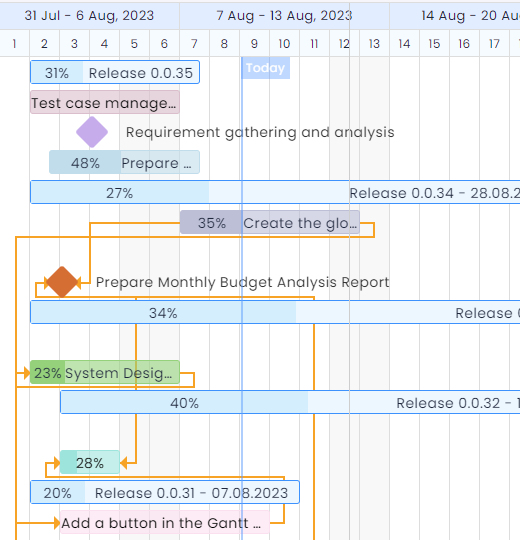
Drag tasks on the chart to adjust dates. Duration changes update immediately across the timeline, and dependent tasks cascade automatically when upstream work shifts. Schedule management takes minutes rather than a full session of individual issue edits.
Link tasks to define finish-to-start and start-to-start relationships. When a linked upstream task moves, the dependency relationship makes the downstream impact immediately visible on the chart — before it becomes a missed deadline.
Create milestone markers for key delivery checkpoints — release dates, client review points, sign-off gates. Milestones appear on the chart alongside task bars, which keeps delivery targets visible throughout the project lifecycle.
Schedule changes made by one project manager are visible to every team member and stakeholder with access to the project. There is no lag between a planning decision and its reflection in the timeline view.
Critical path highlighting identifies the tasks that directly determine the project end date. When the schedule-sensitive path is visible, project managers can prioritise risk mitigation before delays accumulate.
Timeline data from the Gantt Chart Plugin shares the same issue base as the Agile Board Plugin, so sprint scope and milestone dates stay aligned without manual synchronisation. Actual hours from the Timesheet Plugin connect directly to the tasks on the Gantt chart, which allows schedule-vs-effort comparison in one environment. Team capacity from the Workload Plugin informs realistic timeline planning before dates are committed.

Project Manager, Newyork

Project Manager

Project Manager, Singapore

Project Lead, Spain

Team Lead, Rochester, U.S.

CEO, Brazil

Project Manager

Project Manager, Moscow, Russia


Redmineflux plugins have been a game-changer for our Redmine setup. The enhanced features like advanced time tracking, custom workflows, and improved reporting have significantly boosted our productivity. The integration was seamless, and the support team was fantastic. Highly recommend these plugins to any Redmine user!
Getting all of my business data organized in one place is all I wanted. With Redmineflux, I can filter data and simplify my agile operations.
Redmineflux themes have completely transformed the look and feel of our Redmine instance. We were looking for a way to make our Redmine more visually appealing and user-friendly, and these themes delivered on both fronts. The customization options are fantastic, allowing us to tailor the design to our company’s branding.
The Redmineflux Timesheet plugin has made it so much easier for our team to track their time. The ability to easily log time for multiple tasks at once and bulk edit or delete entries is a huge time saver.
Redmineflux Gantt Chart improved visibility and Efficiency, it provides a clear view of tasks, improves communication, & streamlines workflows for faster project completion.
Redmineflux themes are not just about aesthetics; they’re designed with user experience in mind. The improved navigation and clarity have streamlined our workflows significantly. The support team was also incredibly helpful in assisting us with customization.
Highly recommend!”
Redmineflux has an easy-to-use interface & is easily customizable. It helps active coordination and focuses project resources in one direction.
The self-hosted version of Redmineflux has transformed our enterprise project management. The customization options and reliable performance have greatly improved our workflows. The support team is responsive, ensuring our needs are met. Highly recommended for organization looking to streamline project management.
When deployed on your own infrastructure, your team manages server uptime, Redmine upgrades, backups, and plugin compatibility. The Gantt Chart Plugin adds interactive timeline planning capability without changing who owns the infrastructure. Full control stays with your team.
The Gantt Chart Plugin runs within Redmineflux Managed Cloud. Infrastructure is fully managed by the Redmineflux team. Updates are automated, backups are secured, and uptime is SLA-backed. If infrastructure management is overhead your team does not need, Redmineflux Managed Cloud transfers that responsibility entirely.
| Role | What they gain |
|---|---|
| Project Manager | Interactive timeline editing, dependency visibility, and milestone tracking in one view |
| Delivery Head | Full project timeline clarity and schedule drift detection before deadlines slip |
| IT Director | Governance over schedule, delivery risk, and resource commitment visibility |
| Engineering Lead | Realistic scheduling with dependency context and critical path awareness |
Can I export the Gantt chart to PDF or an image?
Yes. The Redmineflux Gantt Chart Plugin supports export to PDF and image formats. Configure the date range and task scope before exporting to produce clean timeline reports for clients, leadership, or internal planning reviews. The export layout is print-ready without requiring additional formatting.
Does the plugin support baseline comparisons?
Yes. Set a baseline from your original schedule and compare it against the current plan at any point during the project. Baseline comparison shows schedule drift visually on the chart, making it straightforward to identify which tasks have shifted and by how much since the project started.
Can multiple users edit the Gantt chart simultaneously?
Yes. Multiple project managers or team leads can work on the Gantt chart at the same time. Changes made by one user are reflected in real time for others viewing the same project. Conflict handling follows Redmine's standard issue locking behaviour for concurrent edits.
Which Redmine versions are supported?
The Redmineflux Gantt Chart Plugin is tested and maintained against the three most recent stable Redmine releases. Compatibility is verified with each plugin update. Check the plugin documentation for the confirmed supported version list before installing on your instance.