The Redmineflux Redmine Tags Plugin adds freeform tagging to Redmine issues. Label any issue with one or more tags, then filter and group across projects without adding trackers, categories, or custom fields to maintain.
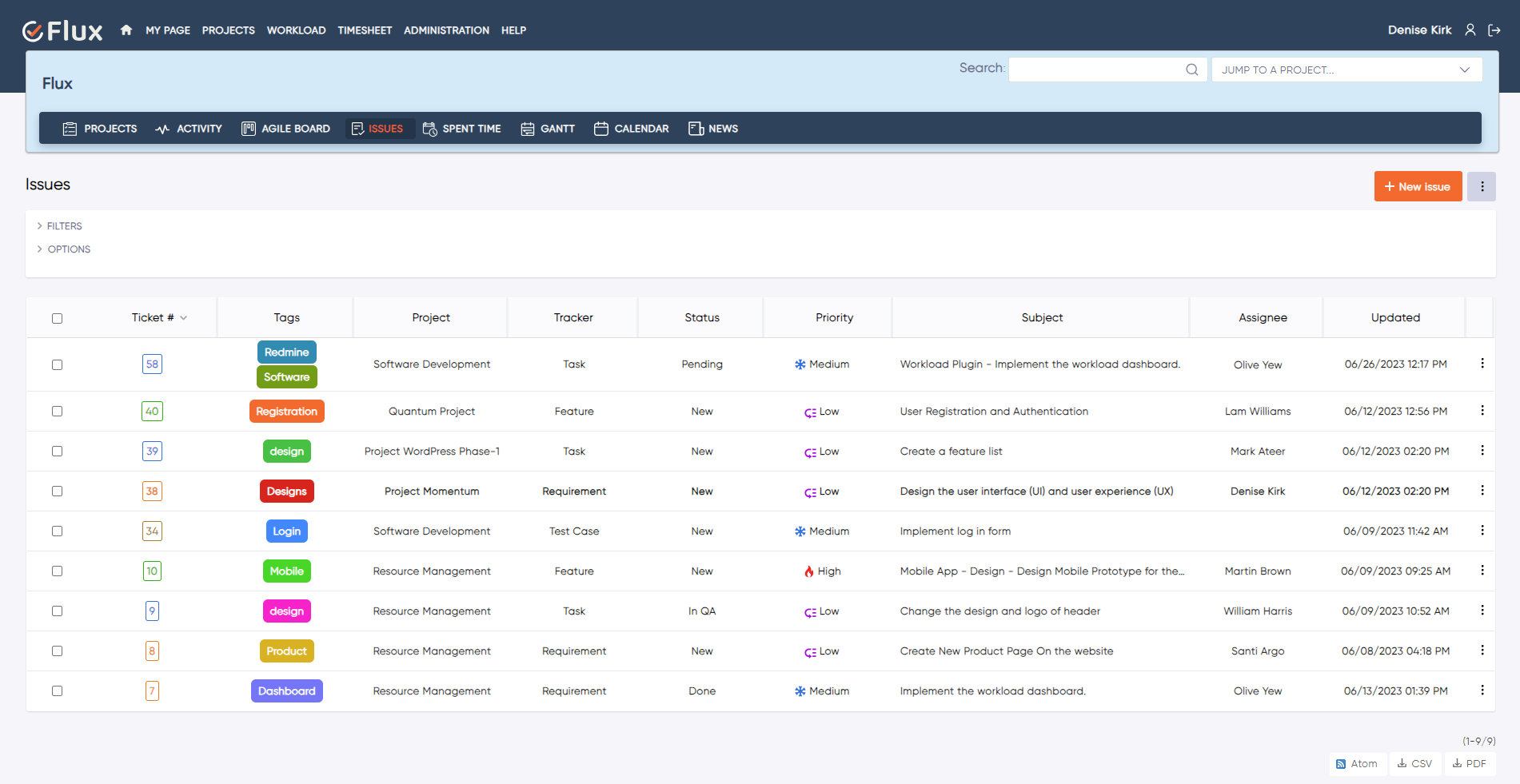
Redmine's built-in classification tools — trackers, categories, and custom fields — work well for structured workflow data. But not every classification need is structured. Ad-hoc groupings like "performance", "client-X", or "tech-debt" do not fit neatly into a formal category without inflating the Redmine configuration. Adding a new tracker or custom field for every emerging classification creates administration overhead that grows with team size. Cross-project views filtered by a concept that is not a formal field require workarounds or saved queries that break when team members use different naming conventions.
The Redmineflux Tags Plugin adds lightweight, freeform tagging to any Redmine issue. Tags are created on the fly, applied to one or many issues, and used as filter criteria across issue lists, queries, and cross-project views. No schema changes, no additional configuration — just flexible classification where the standard fields are not sufficient.
The Tags Plugin enhances Redmine without replacing it. Tags work alongside trackers, categories, and custom fields — not instead of them. When your team needs a quick, shared classification label that does not warrant a formal field, tags provide it without touching the Redmine configuration. An autocomplete library prevents duplicate tag creation and naming drift without requiring admin involvement for every new classification need.
Filter and view issues by tag across all projects simultaneously. A tag like "client-X" or "regression-cycle" surfaces all relevant issues regardless of which project or tracker they belong to — without adding a new category or custom field to every project.
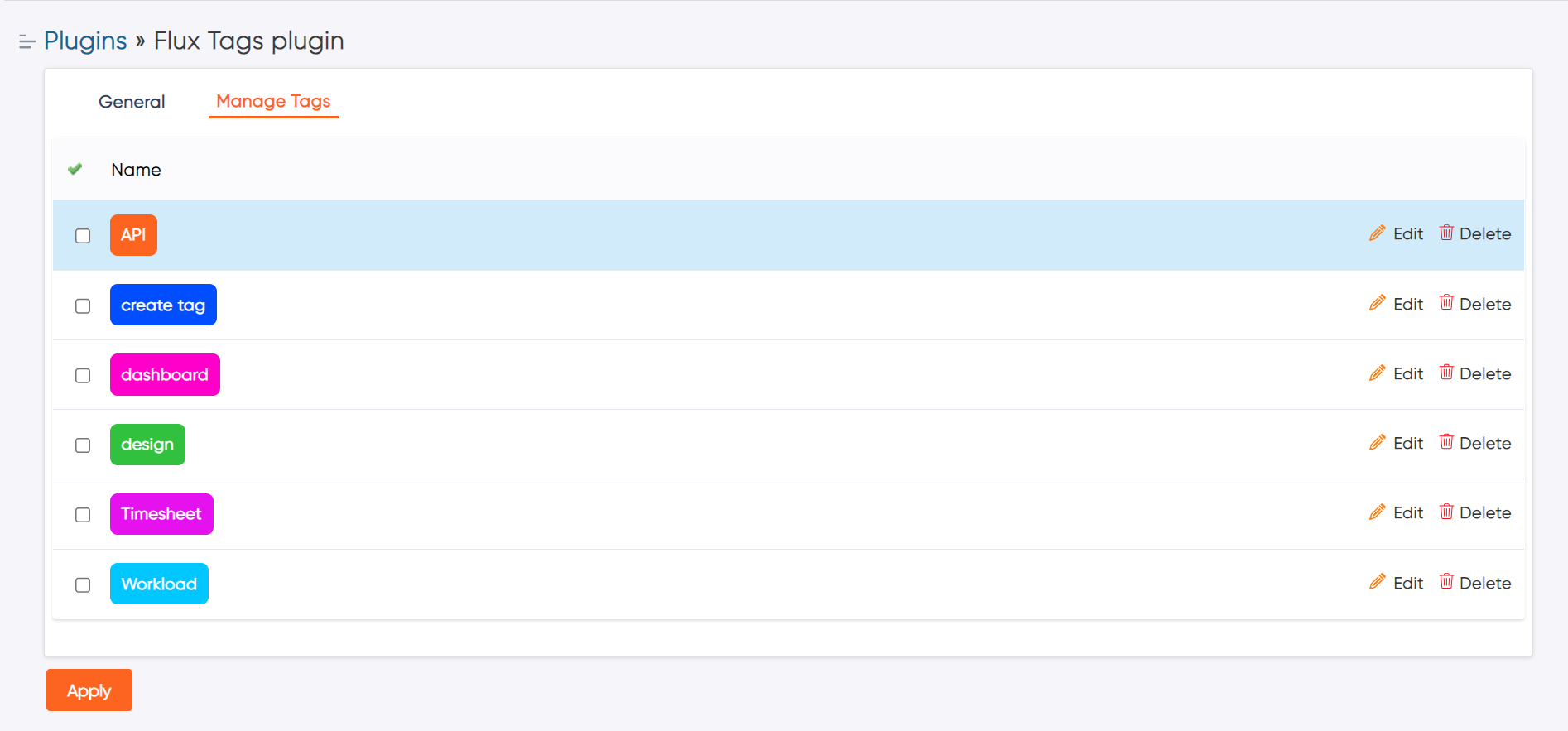
Any team member can create a new tag on the fly during issue creation or editing. The autocomplete library keeps naming consistent across the team without requiring centralised administration of every new classification concept.
Autocomplete from existing tags prevents duplicate creation and naming drift. When one engineer tags an issue as "performance" and another searches for it, they find the same set of issues — because the tag library provides a shared vocabulary.
Tag-based filtering surfaces related issues regardless of project, tracker, or category. Teams find the full set of issues related to a concept — tech-debt, a client name, a release scope — in a single filtered view rather than navigating project by project.
Using tags for ad-hoc groupings keeps trackers, categories, and custom fields reserved for structured workflow data. The Redmine configuration stays clean and maintainable, even as the team's classification vocabulary grows.
Tags integrate naturally with the broader Redmineflux workflow. Apply release-scope tags to issues being tracked through the Agile Board Plugin to filter sprint views by release context. Tag regression test issues managed through the Test Case Management Plugin for faster filtering during test plan assembly. Apply client tags to support tickets managed through the Helpdesk Plugin for cross-project client issue reporting.

Project Manager, Newyork

Project Manager

Project Manager, Singapore

Project Lead, Spain

Team Lead, Rochester, U.S.

CEO, Brazil

Project Manager

Project Manager, Moscow, Russia


Redmineflux plugins have been a game-changer for our Redmine setup. The enhanced features like advanced time tracking, custom workflows, and improved reporting have significantly boosted our productivity. The integration was seamless, and the support team was fantastic. Highly recommend these plugins to any Redmine user!
Getting all of my business data organized in one place is all I wanted. With Redmineflux, I can filter data and simplify my agile operations.
Redmineflux themes have completely transformed the look and feel of our Redmine instance. We were looking for a way to make our Redmine more visually appealing and user-friendly, and these themes delivered on both fronts. The customization options are fantastic, allowing us to tailor the design to our company’s branding.
The Redmineflux Timesheet plugin has made it so much easier for our team to track their time. The ability to easily log time for multiple tasks at once and bulk edit or delete entries is a huge time saver.
Redmineflux Gantt Chart improved visibility and Efficiency, it provides a clear view of tasks, improves communication, & streamlines workflows for faster project completion.
Redmineflux themes are not just about aesthetics; they’re designed with user experience in mind. The improved navigation and clarity have streamlined our workflows significantly. The support team was also incredibly helpful in assisting us with customization.
Highly recommend!”
Redmineflux has an easy-to-use interface & is easily customizable. It helps active coordination and focuses project resources in one direction.
The self-hosted version of Redmineflux has transformed our enterprise project management. The customization options and reliable performance have greatly improved our workflows. The support team is responsive, ensuring our needs are met. Highly recommended for organization looking to streamline project management.
When deployed on your own infrastructure, your team manages server uptime, Redmine upgrades, backups, and plugin compatibility. The Tags Plugin adds time tracking and approval capability without changing who owns the infrastructure. Full control stays with your team.
The Tags Plugin runs within Redmineflux Managed Cloud. Infrastructure is fully managed by the Redmineflux team. Updates are automated, backups are secured, and uptime is SLA-backed. If infrastructure management is overhead your team does not need, Redmineflux Managed Cloud transfers that responsibility entirely.
| Role | What they gain |
|---|---|
| Project Manager | Cross-project issue grouping without adding new trackers or categories per concept |
| Engineering Lead | Tech-debt, performance, and release-scoped tagging without schema changes |
| QA Lead | Test coverage, regression, and environment tags applied across issue types |
| IT Director | Consistent classification library with admin governance over tag management |
Can tags be used to filter issues across multiple projects at once?
Yes. Tags are available as filter criteria on cross-project issue list views. Filter by one or more tags across all projects simultaneously — making it straightforward to find all issues tagged "performance" or "client-X" regardless of which project they belong to.
Is there a limit to how many tags can be applied to a single issue?
No. You can apply as many tags as needed to a single issue. The tag input field supports multiple comma-separated values and provides autocomplete suggestions from the existing tag library to keep naming consistent across team members.
Can admins control which tags team members can create?
Yes. The Tags Plugin can be configured to allow free tag creation by any team member, or restricted mode where only admins can create new tags and team members select from the existing library. Restricted mode prevents tag sprawl on large teams without removing the flexibility of tag-based classification.
Which Redmine versions are supported?
The Redmineflux Tags Plugin is tested and maintained against the three most recent stable Redmine releases. Compatibility is verified with each plugin update. Check the plugin documentation for the confirmed supported version list before installing on your instance.