





Redmine Scarlet Theme — A Professional Dark Interface for Teams Who Work in Redmine All Day
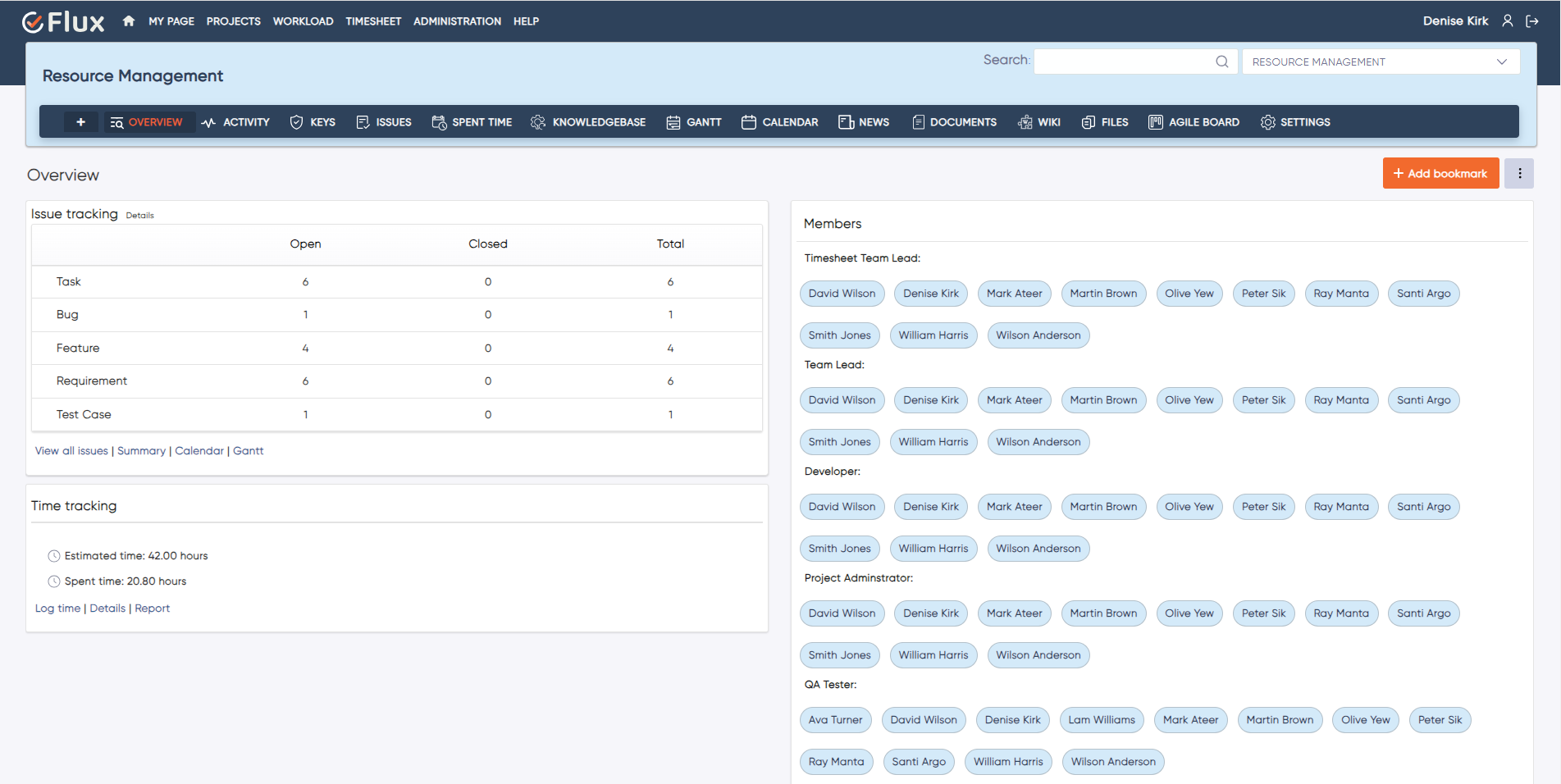
The Redmineflux Redmine Scarlet Theme replaces Redmine's default interface with a structured dark design. Better contrast, refined typography, and a modern sidebar layout — for teams that spend their working day inside Redmine and need an interface that reflects that.
What the Default Redmine Interface Costs in Daily Usability
What is the Redmine Scarlet Theme?
The Redmineflux Scarlet Theme is a professional dark UI skin for Redmine. It applies a structured dark colour palette, a redesigned sidebar, improved typographic hierarchy, and accessible contrast ratios to every Redmine view — without changing any functionality. Same Redmine, better to work in.
Better Interface. Same Redmine.
The Scarlet Theme enhances Redmine's presentation layer without changing its behaviour or configuration. All existing plugins, custom fields, workflows, and integrations continue to work exactly as before. Teams using the Dashboard Plugin or Agile Board Plugin see those views styled consistently within the dark theme — no visual conflicts, no layout breaks. The theme is a visual upgrade applied once across the entire instance.
What Your Team Gains with the Redmine Scarlet Theme
A dark background reduces screen brightness and high-contrast glare during extended Redmine sessions. For developers and project managers who spend most of their working day in the interface, this difference is noticeable by mid-afternoon when the default white interface begins to cause strain.
The redesigned sidebar provides clearer separation between project groups, menu sections, and active states. Team members find their way to the right project and view faster because the navigation has defined visual weight — not a flat list of equal-weight items.
Refined typography and intentional spacing make issue content easier to scan at speed. During triage sessions or sprint reviews, reading twenty issue titles in sequence is significantly faster when the typographic hierarchy distinguishes titles, labels, and metadata clearly.
A modern dark interface communicates that the team works in a structured, professional environment. The Timesheet Plugin and project report views that are shared with clients and billing contacts look polished rather than dated.
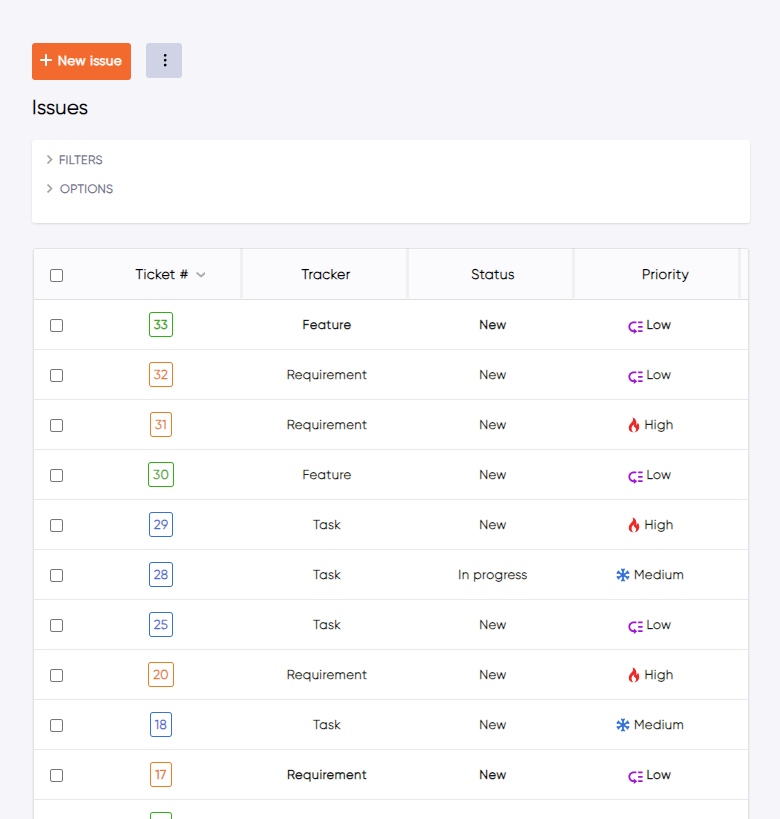
Status badges, priority indicators, and tracker type labels are styled with distinct colours and visual weights. Team members scanning a large issue list identify critical items and blocked statuses without reading every label individually.
Redmine Scarlet Theme Features
A Carefully Balanced Design That Reduces Strain Without Sacrificing Clarity
- Deep navy and charcoal backgrounds apply consistently across all Redmine views — issue lists, project pages, admin panels, and modal dialogs.
- Accessible colour contrast ratios meet WCAG 2.1 AA standards for all text and interactive elements so the dark palette does not compromise readability.
- Accent colours differentiate priority indicators, status badges, and interactive hover states at a glance.
- Dark mode consistency extends to dropdowns, popup menus, and inline edit panels — there are no jarring white flash moments when interacting with secondary interface elements.
Clearer Navigation Without Extra Clicks
- The project list uses visual grouping with expand and collapse support for teams managing large numbers of projects.
- Menu items include icon labels for faster visual navigation when scanning for a specific section.
- Active state indicators show the current page and context without requiring the user to read each menu item.
- A collapsible sidebar mode is available for full-width issue list views when screen space is more valuable than persistent navigation.
A Better Reading Experience Across All Redmine Content
- A defined heading scale differentiates issue titles, section headers, and field labels clearly.
- Improved line spacing makes issue descriptions and comment threads easier to read in sequence during review sessions.
- Monospace code blocks for technical content in issue descriptions make it straightforward to distinguish configuration snippets, error logs, and code references from prose text.
- Consistent font weight differentiation between labels and their values makes field-by-field scanning faster on issue detail pages.
Visual Indicators That Surface Important Information Faster
- Colour-coded status badges give each workflow state a distinct visual style — so a team member scanning an issue list identifies Open, In Progress, Blocked, and Resolved statuses without reading the text of each badge
- Priority indicators use consistent colours and icon support across all views.
- Tracker type labels are visually differentiated without requiring colour memorisation.
- Overdue and at-risk issues are highlighted in issue list views so they stand out during daily triage without filtering.
Works Across Screen Sizes and Meets Accessibility Standards
- The responsive layout adapts to wide monitors, standard displays, and compact screen configurations without layout breaks.
- Keyboard navigation and focus states are preserved from default Redmine — all existing keyboard workflows continue to function.
- WCAG 2.1 AA contrast compliance applies throughout for all text and interactive elements.
- The theme is designed and tested to work alongside all Redmineflux plugins with no visual conflicts on themed views.
Trusted by Teams That Work in Redmine Every Day
What People are Saying!

Project Manager, Newyork

Project Manager

Project Manager, Singapore

Project Lead, Spain

Team Lead, Rochester, U.S.

CEO, Brazil

Project Manager

Project Manager, Moscow, Russia


Redmineflux plugins have been a game-changer for our Redmine setup. The enhanced features like advanced time tracking, custom workflows, and improved reporting have significantly boosted our productivity. The integration was seamless, and the support team was fantastic. Highly recommend these plugins to any Redmine user!
Getting all of my business data organized in one place is all I wanted. With Redmineflux, I can filter data and simplify my agile operations.
Redmineflux themes have completely transformed the look and feel of our Redmine instance. We were looking for a way to make our Redmine more visually appealing and user-friendly, and these themes delivered on both fronts. The customization options are fantastic, allowing us to tailor the design to our company’s branding.
The Redmineflux Timesheet plugin has made it so much easier for our team to track their time. The ability to easily log time for multiple tasks at once and bulk edit or delete entries is a huge time saver.
Redmineflux Gantt Chart improved visibility and Efficiency, it provides a clear view of tasks, improves communication, & streamlines workflows for faster project completion.
Redmineflux themes are not just about aesthetics; they’re designed with user experience in mind. The improved navigation and clarity have streamlined our workflows significantly. The support team was also incredibly helpful in assisting us with customization.
Highly recommend!”
Redmineflux has an easy-to-use interface & is easily customizable. It helps active coordination and focuses project resources in one direction.
The self-hosted version of Redmineflux has transformed our enterprise project management. The customization options and reliable performance have greatly improved our workflows. The support team is responsive, ensuring our needs are met. Highly recommended for organization looking to streamline project management.
Deployment Options
Self-Hosted
Install Scarlet on your existing Redmine instance. Theme installation follows standard Redmine theme procedures — copy the theme folder to the public/themes directory and select it from the admin display settings. No plugin dependency — the theme runs independently of any Redmineflux plugins you may have installed.
Managed Cloud
Scarlet Theme is available as a theme option within Redmineflux Managed Cloud. Apply it from the admin panel without any manual file installation. Infrastructure and updates are fully managed by the Redmineflux team.
Built for Every Role That Spends the Day in Redmine
| Role | What they gain |
|---|---|
| Developer | A dark interface that matches the IDE and terminal environment — reduced visual switching cost |
| Project Manager | Clear priority and status styling that speeds daily issue triage without extra filtering steps |
| QA Lead | Issue states and test results styled distinctly — no ambiguity in status at a glance during test execution |
| IT Director | A professional interface for screen-sharing, client reviews, and stakeholder demos that reflects the team's standards |
Frequently Asked Questions
Does the Scarlet Theme affect Redmine's functionality?
No. The Scarlet Theme only changes the visual presentation of Redmine. All functionality, workflows, custom fields, permissions, and plugin integrations continue to work exactly as before. Theme changes are purely cosmetic — they do not modify any Redmine data or configuration.
Will Scarlet work alongside Redmineflux plugins?
Yes. Scarlet is designed and tested to work alongside all Redmineflux plugins. Plugin-added views, panels, and UI elements are styled consistently with the theme. No visual conflicts or layout issues occur when plugins are installed alongside the theme.
Can individual users choose a different theme, or is it applied instance-wide?
Theme application in Redmine is instance-wide by default — the admin selects the theme and it applies to all users. Some Redmine configurations allow users to select a personal theme preference from their account settings. Whether per-user theme selection is available depends on your Redmine version and configuration.
Which Redmine versions is the Scarlet Theme compatible with?
The Redmineflux Scarlet Theme is tested and maintained against the three most recent stable Redmine releases. Compatibility is verified with each theme update. Check the theme documentation for the confirmed supported version list before installing on your instance.
