The Redmineflux Redmine Time Tracker is a desktop application for Windows and macOS that connects to your Redmine instance. Start a timer on any issue from your system tray, log time offline, and sync to Redmine automatically — without navigating to a browser every time you need to record a minute of work.
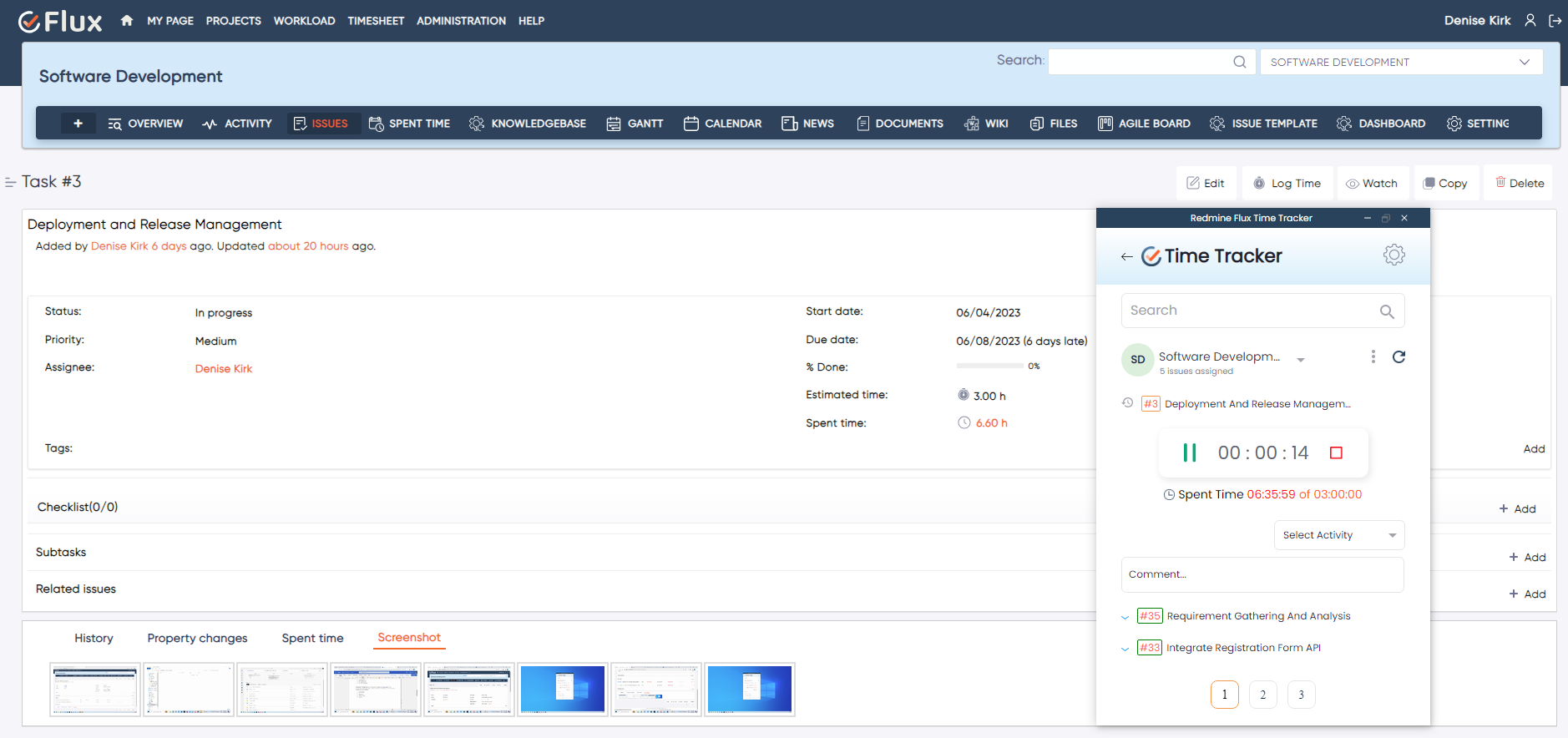
Accurate time tracking requires logging as work happens, not reconstructing it at the end of the day from memory. Developers switch contexts dozens of times per day, and opening Redmine to log each switch is impractical during focused work sessions. End-of-day reconstruction is inaccurate — 30-minute tasks get rounded to one-hour estimates and the cumulative error makes project billing and resource reporting unreliable. Remote and offline work cannot be logged when Redmine requires a live connection, which means time from travel, client sites, and connectivity gaps disappears entirely. Browser-based logging breaks flow in a way that system tray access does not — switching to the browser during concentrated development work is a context switch that compounds across the day.
The Redmineflux Redmine Time Tracker is a lightweight desktop app that sits in the system tray and connects directly to your Redmine instance. Browse and search your assigned issues, start and stop timers with a single click, and sync logged time automatically. Work offline and let it sync when you reconnect. Time logging becomes a background habit, not a separate workflow step.
The Redmine Time Tracker extends Redmine capability to the desktop without requiring a browser. It removes the friction between doing work and recording it. Accurate time data flows into Redmine without requiring anyone to stop, navigate, and manually enter hours after the fact. Teams that use the Timesheet Plugin for project billing get better input data when the Time Tracker is logging hours in real time rather than reconstructed at day's end.
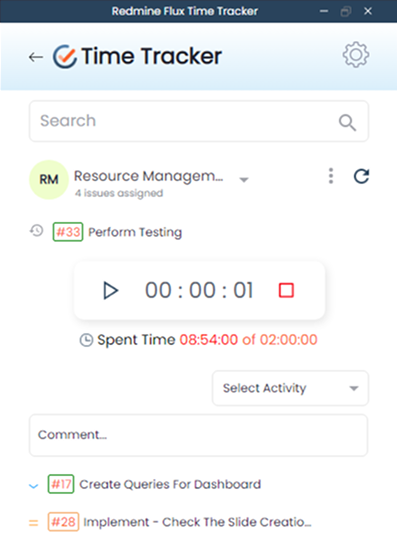
Timers start and stop at the moment of task switching, which means entries reflect actual time spent rather than estimated totals. Project billing and client reporting are based on real data, not approximations made under end-of-day pressure.
The tray icon provides one-click timer access from anywhere on the desktop without switching windows or applications. Developers log time without interrupting the focused work session that time is being logged against.
All time entries are stored locally when Redmine is unreachable. The app syncs pending entries automatically when the connection restores — no manual upload, no lost time from connectivity gaps during travel or remote work.
When the system is idle for a configurable threshold — five, ten, or fifteen minutes — the timer pauses and prompts the user to discard or adjust the idle period on return. This keeps entries accurate without requiring manual corrections.
All time recorded through the desktop app flows into the standard Redmine time entry records. Project managers reviewing workload through the Workload Plugin see hours that reflect actual work, not manual estimates.

Project Manager, Newyork

Project Manager

Project Manager, Singapore

Project Lead, Spain

Team Lead, Rochester, U.S.

CEO, Brazil

Project Manager

Project Manager, Moscow, Russia


Redmineflux plugins have been a game-changer for our Redmine setup. The enhanced features like advanced time tracking, custom workflows, and improved reporting have significantly boosted our productivity. The integration was seamless, and the support team was fantastic. Highly recommend these plugins to any Redmine user!
Getting all of my business data organized in one place is all I wanted. With Redmineflux, I can filter data and simplify my agile operations.
Redmineflux themes have completely transformed the look and feel of our Redmine instance. We were looking for a way to make our Redmine more visually appealing and user-friendly, and these themes delivered on both fronts. The customization options are fantastic, allowing us to tailor the design to our company’s branding.
The Redmineflux Timesheet plugin has made it so much easier for our team to track their time. The ability to easily log time for multiple tasks at once and bulk edit or delete entries is a huge time saver.
Redmineflux Gantt Chart improved visibility and Efficiency, it provides a clear view of tasks, improves communication, & streamlines workflows for faster project completion.
Redmineflux themes are not just about aesthetics; they’re designed with user experience in mind. The improved navigation and clarity have streamlined our workflows significantly. The support team was also incredibly helpful in assisting us with customization.
Highly recommend!”
Redmineflux has an easy-to-use interface & is easily customizable. It helps active coordination and focuses project resources in one direction.
The self-hosted version of Redmineflux has transformed our enterprise project management. The customization options and reliable performance have greatly improved our workflows. The support team is responsive, ensuring our needs are met. Highly recommended for organization looking to streamline project management.
The Redmine Time Tracker connects to any self-hosted Redmine instance via the Redmine REST API. Enter the instance URL and API key in app settings. Works on the same network or over VPN for remote teams. No server-side plugin installation required.
The Time Tracker works natively with Redmineflux Managed Cloud. API connection is pre-configured. Your team installs the app and logs in — no infrastructure configuration required. Infrastructure is fully managed by the Redmineflux team.
Download on Windows or macOS. Connect to your Redmine instance in minutes.
| Role | What they gain |
|---|---|
| Developer | System tray timer that logs against Redmine issues without breaking focus or switching windows |
| Engineering Lead | Accurate team time data in Redmine without chasing end-of-day manual entries from the team |
| Project Manager | Reliable time-based reporting and billing data synced from real work sessions, not estimates |
| IT Director | Structured time governance with offline resilience and a full Redmine audit trail for every entry |
Does the Time Tracker work when I am not connected to the internet?
Yes. Time entries logged offline are stored locally in the app. When your connection is restored, the app syncs all pending entries to Redmine automatically. An offline indicator in the system tray shows when the app is operating in local-only mode so you always know the sync status.
Can multiple team members use the Time Tracker against the same Redmine instance?
Yes. Each team member installs the app independently and authenticates with their own Redmine credentials. Time entries sync to each user's Redmine account. There is no shared configuration — each installation is independent and maps to one Redmine user.
Does the app work with Redmine's existing time tracking and reporting features?
Yes. All time logged through the Time Tracker appears in Redmine's standard time entry records, timesheets, and project time reports. The app submits entries via the standard Redmine time entry API — logged time is indistinguishable from manually entered Redmine time entries.
Which operating systems are supported?
The Redmineflux Time Tracker is available for Windows (Windows 10 and later) and macOS (macOS 11 Big Sur and later). Check the product download page for the current supported OS version list and release notes before installing.