
Most teams land on this question the same way. They are running Redmine and someone asks whether Jira would be better. Or they are on Jira and the bill has grown to a point where the question is unavoidable.
Redmine and Jira both handle issue tracking and project delivery. They have been direct competitors for over a decade. The teams they suit best are genuinely different, though.
This guide is a practical Redmine vs Jira comparison not a verdict shaped by a marketing angle. It covers what each tool does well, where each runs into limits, and what the decision usually comes down to in 2026.
Redmine suits teams that want self-hosted infrastructure, full data ownership, and predictable one-time licensing. Jira suits teams that want a managed cloud platform with deep Atlassian integrations. At 15+ users, Redmine costs significantly less annually. The decision comes down to deployment preference and long-term pricing tolerance.
Redmine vs Jira 2026 — Which Should Your Team Choose?
The short answer: Redmine is an open-source project management and issue tracking platform that you host and control. Jira is a commercial SaaS product from Atlassian, built for software teams at any scale. Both track work and manage workflows — but they sit in fundamentally different deployment and pricing models.
Redmine has been around since 2006. It is open-source, built on Ruby on Rails, and free to download. You run it on your own infrastructure. That means you control the data, the configuration, and the upgrade schedule. Issue tracking, Gantt views, time tracking, role-based permissions, and project wikis all ship with the base platform.
Jira launched around the same time but moved in a very different direction. Atlassian built Jira into the centrepiece of a wider product suite. Confluence handles documentation. Jira Service Management handles support tickets. Bitbucket handles code. Advanced Roadmaps handles portfolio planning. Each of those is a separate product with its own pricing.
That context matters before any feature comparison. Choosing between Redmine and Jira is partly a question of philosophy. Do you want a single self-hosted platform you extend with plugins? Or a cloud ecosystem you subscribe to layer by layer?
See how Redmineflux replaces Jira without increasing costs as your team grows
Redmine vs Jira: How the Core Features Compare
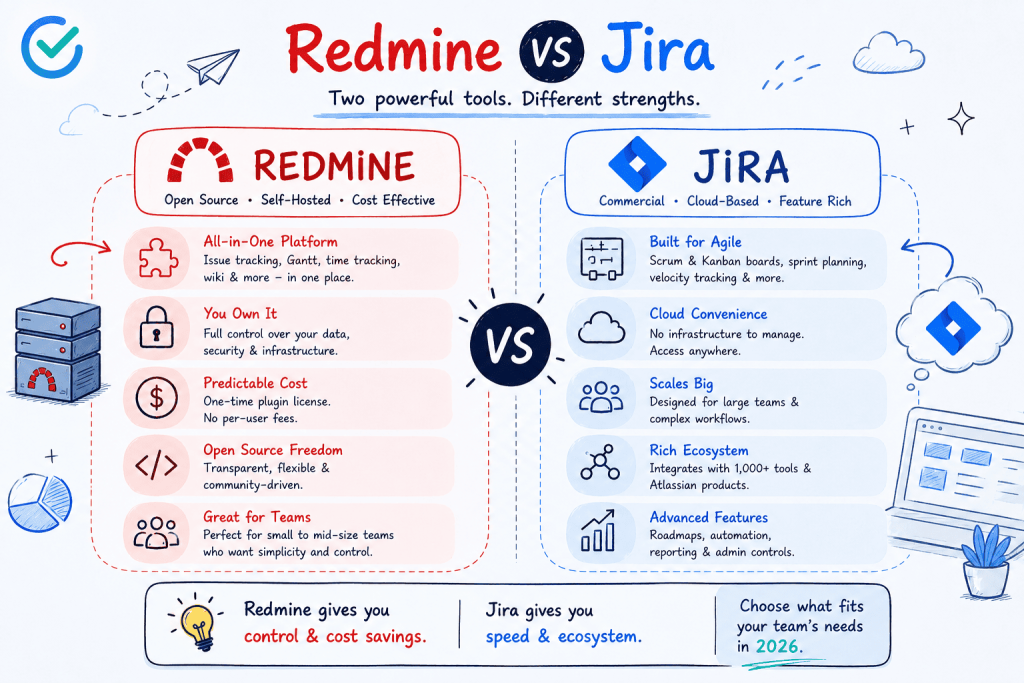
A visual comparison of Redmine and Jira highlighting pricing, flexibility, hosting, scalability, and team use cases in 2026.
Issue Tracking
Both tools handle issue tracking competently. Redmine calls them issues. Jira calls them tickets or stories. Both support custom fields, workflow states, priorities, assignees, and due dates.
The real difference is in how workflows get configured. Jira uses schemes workflow schemes, permission schemes, notification schemes. Administrators get precise control, but the setup adds significant complexity. Redmine’s workflow is simpler: you configure transitions by tracker and role, and the logic stays readable.
For small to mid-size teams, Redmine works well without a dedicated tool administrator. For enterprise teams running dozens of projects with complex permission structures, Jira’s scheme-based model is more powerful.
Agile Boards
Jira’s Scrum and Kanban boards are genuinely strong. Sprint planning, backlog grooming, velocity tracking, and burndown charts all ship at the Standard plan level and above.
Redmine has no agile board in its default installation. The built-in feature set is issue-list-based. To get Scrum and Kanban boards and sprint planning on Redmine, you need a plugin such as the Redmineflux Agile Board Plugin. Once that plugin is in place, the day-to-day capability is comparable for most teams. Sprint management, WIP limits, swimlanes, and backlog planning all work as expected.
Gantt and Timeline Planning
Redmine ships with a basic Gantt view read-only, no drag-and-drop, no dependency lines. Jira’s timeline view requires a paid plan, and Advanced Roadmaps (Premium tier) adds cross-team dependency planning.
Both platforms need either an upgrade or a plugin to reach full Gantt capability. Redmine with the Redmineflux Gantt Chart Plugin delivers dependencies, baselines, milestones, drag-and-drop rescheduling, and resource loading. That covers what most teams actually use in Jira’s timeline features. The Redmine Gantt chart guide walks through setup in full.
Time Tracking
Redmine includes basic time tracking natively. Jira includes basic time logging on all paid plans, but advanced reporting requires Tempo Timesheets a third-party add-on at additional per-seat cost.
For teams that need detailed time reports, approval workflows, or billing integration, the Redmineflux Timesheet Plugin extends Redmine’s native capability significantly. It sits inside the same system where issues and sprints already live.
Test Case Management
This is one area where Redmine holds a clear structural advantage. The Redmineflux catalogue includes a dedicated Test Case Management Plugin. It integrates QA workflow directly into the issue tracker.
Jira has no native test case management. Teams on Jira use Xray or Zephyr both third-party add-ons, both at additional per-seat cost. If QA and test tracking inside the issue tracker matter to your team, that gap is meaningful.
Redmine vs Jira: Feature Summary Table
For teams that want a reference before reading the full breakdown:
| Feature | Redmine + Redmineflux | Jira Standard | Jira Premium |
|---|---|---|---|
| Pricing model | Plugin: per-install one-time · Cloud: from $1.99/seat/mo* | Per-user/month | Per-user/month |
| 15-user annual cost | ~$588.6 yr Pro Plan | $1,350/yr | $2,750/yr |
| 50-user annual cost | ~$1962 yr Pro Plan | $4,550/yr | $9,150/yr |
| Self-hosted | ✅ Yes | ❌ No | ❌ No |
| Agile boards | ✅ Plugin | ✅ Built-in | ✅ Built-in |
| Gantt / roadmap | ✅ Plugin | ❌ Basic only | ✅ Advanced Roadmaps |
| Time tracking | ✅ Native + plugin | ✅ Basic | ✅ Basic (Tempo extra) |
| Test case management | ✅ Built-in plugin | ❌ Xray / Zephyr (paid) | ❌ Xray / Zephyr (paid) |
| Knowledge base | ✅ Built-in plugin | ❌ Confluence (paid add-on) | ❌ Confluence (paid add-on) |
| Data ownership | ✅ Full | ❌ Atlassian-hosted | ❌ Atlassian-hosted |
| Interactive Themes | Scarlet + Daisy + Lotus | ❌No | ❌No |
† Self-hosted: 3 core plugins (Agile Board + Gantt + Timesheet at $499 each = $1,497 one-time per installation).
Note: Jira pricing is approximate and updated frequently. Verify at atlassian.com before making a final decision.
Pricing: Where Redmine vs Jira Diverges Most
This is where the two platforms separate most sharply in 2026.
Jira Pricing
Jira Cloud charges per user per month. The Standard plan runs approximately $8.15 per user per month. The Premium plan which includes Advanced Roadmaps, capacity planning, and automation runs approximately $16 per user per month.
That is Jira alone. Add Confluence for documentation, Jira Service Management for support, and Xray for test cases. Each carries its own per-seat subscription. A 50-person development team running Jira Premium, Confluence, and Jira Service Management can reach $25,000–$35,000 per year or more.
Redmine Pricing
Redmine itself is free and open-source. You pay for hosting and for any plugins you add.
Redmineflux plugins are licensed per installation, not per user. A 10-person team and a 100-person team pay the same licence fee. Key plugin prices (per installation, one-time): Agile Board $499 · Gantt Chart $499 · Timesheet $499 · Workload $499 · Custom Dashboard $499 · Testcase Management $499 · Knowledge Base $299 · Issue Template $99 · Checklist $49. Three plugins cost $1,497 total. Six cost $2,994. The licence does not change as your team grows. Get Full Redmine cost breakdown.
At 50 users, the annual Jira Premium licence alone ($9,150/year) costs more than the entire Redmineflux plugin catalogue combined. If you prefer managed hosting, Redmineflux Managed Cloud (Pro plan) is $3.99/seat/month billed monthly, or $3.27/seat/month billed yearly (save 18%) — about $199.50/month, or $1,962/year, for 50 users.
A Scenario That Shows the Difference Clearly
Consider a 30-person development team at a growing MSME. They run three projects simultaneously. They need sprint boards, a Gantt view for the release timeline, and time tracking for client billing.
On Jira Standard, that team pays roughly $2,900 per year for Jira alone. Advanced Roadmaps for Gantt planning requires an upgrade to Jira Premium now roughly $5,800 per year. Add Tempo Timesheets for billing-quality time reports another $3,000 or more per year. Total cost: close to $9,000 per year, and that is before Confluence or Jira Service Management.
On Redmine with Redmineflux plugins, the same team installs Agile Board, Gantt Chart, and Timesheet plugins. The combined licence cost is a one-time or annual fee per installation the same whether the team is 10 people or 100. Self-hosting costs the price of a small server. The total is a fraction of the Jira equivalent, and it stays flat as the team grows.
That is the practical difference. Not just a features list a cost trajectory that compounds over time.
Deployment and Data Ownership
Jira Cloud stores your project data on Atlassian’s infrastructure. That is convenient no server management, automatic updates, Atlassian handles uptime. It also means your data sits in someone else’s database, subject to Atlassian’s terms, pricing decisions, and product roadmap.
Redmine runs on your own server. Your data stays in your database. You can back it up, migrate it, inspect it, and export it without asking permission. For teams in regulated industries, organisations with data sovereignty requirements, or teams that prefer not to depend on a SaaS vendor’s roadmap, this matters.
If you want managed hosting without SaaS lock-in, Redmineflux Managed Cloud provides a hosted Redmine environment where Redmineflux handles the infrastructure and the data stays yours.
Where Each Tool Fits Best
There is no universal answer. The teams that do well on Jira and the teams that do well on Redmine are solving slightly different problems.
Jira is the right choice when:
- Your team already uses Confluence, Bitbucket, and Jira Service Management actively
- Your organisation has a dedicated Jira administrator to manage scheme configuration
- Enterprise-grade compliance certifications (SOC 2, FedRAMP) are a hard requirement
- Per-seat pricing is manageable at your current team size and headcount trajectory
- You want zero infrastructure responsibility and accept SaaS vendor dependency
Redmine with Redmineflux is the right choice when:
- Your team is already on Redmine and migration is not on the table
- Data ownership and self-hosted deployment are firm requirements
- You need test case management built into the issue tracker without a third-party add-on
- Per-seat pricing at Jira’s scale is a significant concern over a 3–5 year horizon
- Your team wants a simpler administration model that does not need a dedicated tool expert
What Migration Looks Like in Each Direction
Teams moving from Jira to Redmine can use Jira’s built-in export or its API to extract issues, projects, and attachments. Community-maintained migration tools handle the import step. Field mapping between Jira issue types and Redmine trackers takes some planning, but the process has clear documentation. Running both systems in parallel for 30–60 days before full cutover is the recommended approach.
Teams moving from Redmine to Jira export issues via Redmine’s CSV export and import into Jira using its CSV import feature. The harder step is rebuilding Redmine’s workflow logic inside Jira’s scheme-based model. That takes more time than the data migration itself, especially for teams that have built out detailed tracker-level workflows in Redmine.
Common Questions
Is Redmine better than Jira for small teams?
For small teams under 15 people, Redmine is often the more practical choice. The administration model is simpler, the cost is lower, and the base feature set covers the essentials without a suite of add-ons. Jira’s strength shows at scale, when the investment in Atlassian tooling is already in place.
Can Redmine do everything Jira does?
With the right plugins, Redmine covers most of what development teams actually use in Jira agile boards, Gantt planning, time tracking, test case management, dashboards, and helpdesk workflows. The areas where Jira has no Redmine equivalent are primarily enterprise-scale features: deep Atlassian ecosystem integrations, SOC 2 / FedRAMP compliance certifications, and some Advanced Roadmaps portfolio planning capabilities.
Is Jira worth the price?
For teams already invested in the Atlassian ecosystem at scale, yes. For teams starting fresh or evaluating at 30 or more users, Redmine with a structured plugin layer often delivers comparable day-to-day functionality at significantly lower total cost.
How do I migrate from Jira to Redmine?
Export your Jira projects via CSV or the Jira API. Import into Redmine using the CSV import feature, mapping Jira issue types to Redmine trackers and Jira workflow states to Redmine statuses. Install Redmineflux plugins to replace the Jira capabilities your team relied on. Plan for 30–60 days of parallel operation before full cutover.
Which Redmine versions do Redmineflux plugins support?
Redmineflux tests and supports all plugins on Redmine 5.0.x, 5.1.x, and 6.0.x. Teams running Redmine 4.x should contact support before purchasing to confirm compatibility.
Does Redmine have a free trial?
Redmine is free and open-source you can install it and use it without cost. Redmineflux offers a free demo of the plugin suite running in a live Redmine environment. That is the fastest way to see the full capability without committing to an installation.
Jira has scale, ecosystem depth, and the full Atlassian suite behind it. Redmine has openness, simplicity, data ownership, and a cost model that does not penalise team growth. The right choice depends less on which tool has more features and more on which model fits how your team works and what you expect to pay for it over the next three to five years.
Compare Redmineflux vs Jira in detail – Full feature and pricing comparison. See Redmineflux running in a live Redmine environment Explore Managed Cloud – Hosted Redmine with the full plugin suite pre-configured.