The Redmineflux Redmine Agile Board Plugin adds visual redmine kanban boards and sprint management directly inside Redmine. Run Scrum sprints, manage redmine kanban workflows, track story points, and enforce WIP limits — all in the same platform your team already uses.
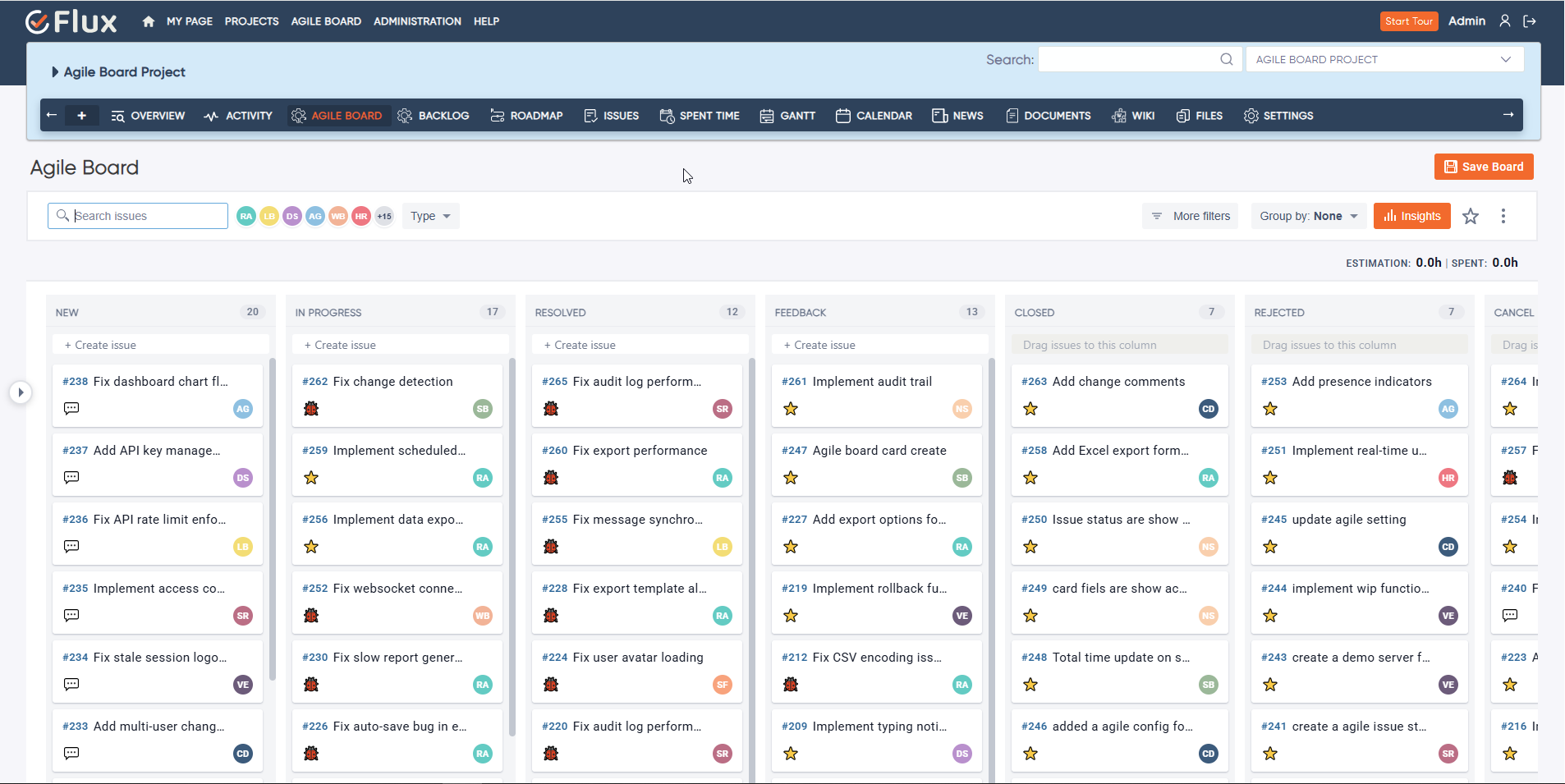
Redmine's built-in issue list is powerful but flat, which creates real operational friction for teams running Agile delivery. There is no visual redmine kanban board — only list views with no workflow state visibility at a glance. Sprint containers and velocity tracking across iterations are not available natively. Status changes require navigating to individual issues one by one, which slows down standups and planning sessions. Work in progress limits cannot be set or enforced, so bottlenecks go undetected until delivery is already affected. Story points and redmine swimlanes are unavailable in the default issue view.
The Redmineflux Agile Board Plugin adds a structured visual layer to Redmine's issue management. It provides redmine kanban boards, sprint containers, drag-and-drop status updates, story points, and swimlanes natively inside Redmine. Teams get the workflow visibility of a dedicated Agile tool — as the best agile Plugin for Redmine — without leaving the platform they already use.
The Agile Board Plugin works on top of Redmine without replacing it. Issues map to board columns, sprints carry clear scope and visible progress, and WIP limits surface bottlenecks before they slow delivery. Teams that ran separate sprint tools alongside Redmine can consolidate into one environment — less context switching, delivery data in one place. Redmine agile project management becomes a structured, visible process instead of a patchwork of tools.
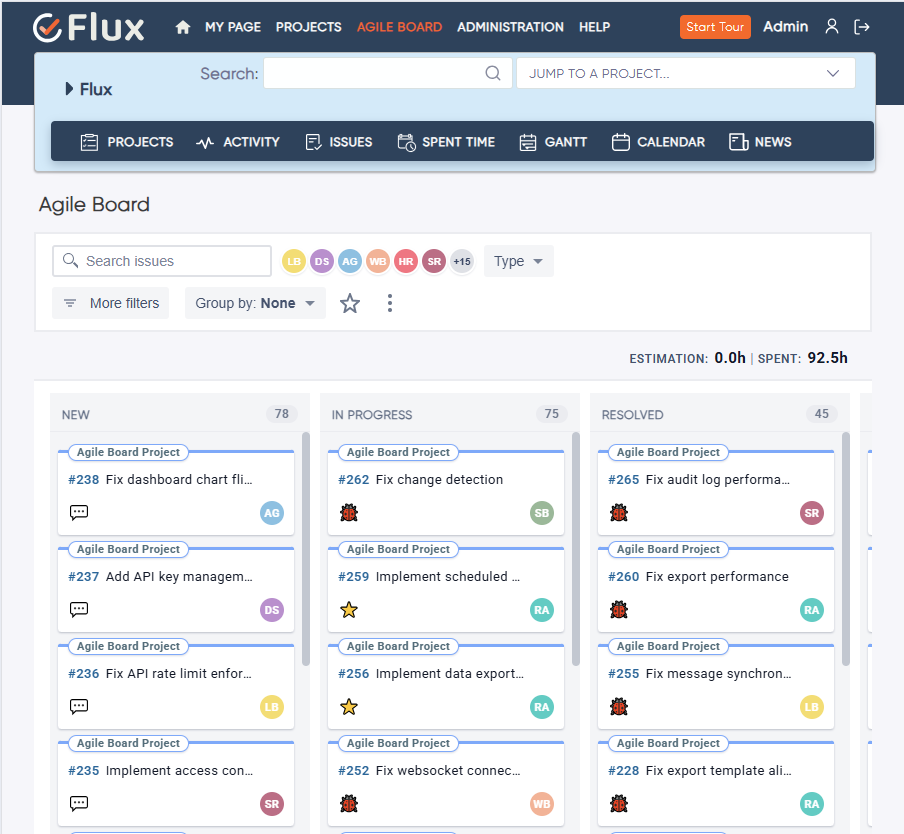
Every active issue is visible on the redmine kanban board by status and column. Blockers surface without a status meeting. Managers see flow state across the team without asking for individual updates.
Define sprint scope, track velocity across completed iterations, and review what carried over from the previous sprint — all from within the same Redmine environment where the work is being tracked. The redmine sprint management plugin capability covers the full scrum cycle from backlog grooming to sprint retrospective.
Drag issues between columns on the redmine drag and drop board to update their status in real time. Engineers and project managers spend less time on administrative issue management and more time on actual delivery.
When the redmine scrum board reflects the current state of every active issue, status reporting becomes a matter of reviewing the board rather than compiling a manual update. Standups become shorter and more focused.
Redmine agile project management stays inside Redmine — where time tracking, issue history, and delivery data already live. There is no synchronisation overhead between separate systems.
Sprint scope and delivery state from the Agile Board feed directly into timeline views in the Gantt Chart Plugin. Actual hours logged via the Timesheet Plugin appear alongside sprint board data without importing or exporting. Team capacity from the Workload Plugin informs sprint assignment before work reaches the board. All three plugins share the same Redmine issue foundation.

Project Manager, Newyork

Project Manager

Project Manager, Singapore

Project Lead, Spain

Team Lead, Rochester, U.S.

CEO, Brazil

Project Manager

Project Manager, Moscow, Russia


Redmineflux plugins have been a game-changer for our Redmine setup. The enhanced features like advanced time tracking, custom workflows, and improved reporting have significantly boosted our productivity. The integration was seamless, and the support team was fantastic. Highly recommend these plugins to any Redmine user!
Getting all of my business data organized in one place is all I wanted. With Redmineflux, I can filter data and simplify my agile operations.
Redmineflux themes have completely transformed the look and feel of our Redmine instance. We were looking for a way to make our Redmine more visually appealing and user-friendly, and these themes delivered on both fronts. The customization options are fantastic, allowing us to tailor the design to our company’s branding.
The Redmineflux Timesheet plugin has made it so much easier for our team to track their time. The ability to easily log time for multiple tasks at once and bulk edit or delete entries is a huge time saver.
Redmineflux Gantt Chart improved visibility and Efficiency, it provides a clear view of tasks, improves communication, & streamlines workflows for faster project completion.
Redmineflux themes are not just about aesthetics; they’re designed with user experience in mind. The improved navigation and clarity have streamlined our workflows significantly. The support team was also incredibly helpful in assisting us with customization.
Highly recommend!”
Redmineflux has an easy-to-use interface & is easily customizable. It helps active coordination and focuses project resources in one direction.
The self-hosted version of Redmineflux has transformed our enterprise project management. The customization options and reliable performance have greatly improved our workflows. The support team is responsive, ensuring our needs are met. Highly recommended for organization looking to streamline project management.
When deployed on your own infrastructure, your team manages server uptime, Redmine upgrades, backups, and plugin compatibility. The Agile Board Plugin adds sprint and Kanban visibility without changing who owns the infrastructure. Full control stays with your team.
The Agile Board Plugin runs within Redmineflux Managed Cloud. Infrastructure is fully managed by the Redmineflux team. Updates are automated, backups are secured, and uptime is SLA-backed. If infrastructure management is overhead your team does not need, Redmineflux Managed Cloud transfers that responsibility entirely.
| Role | What they gain |
|---|---|
| Project Manager | Sprint planning, delivery visibility, and iteration tracking in one environment |
| Engineering Lead | WIP limits, workflow clarity, and real-time team progress visibility |
| Scrum Master | Sprint tracking, velocity reporting, and story points without external Agile tools |
| CTO / IT Director | Agile governance inside the existing Redmine setup — no new platform required |
How do I set up a Kanban board in Redmine using this plugin?
Install the Agile Board Plugin and it maps your existing Redmine issue statuses to configurable board columns. Each project gets its own redmine kanban board view. Drag issues between columns to update their status in real time, set WIP limits per column to surface bottlenecks, and use swimlanes to organise issues by user or category — all without reconfiguring your existing Redmine workflow.
Is the Redmine Agile Board Plugin compatible with Redmine 6?
Yes. The Redmineflux Agile Board Plugin is tested and maintained against the three most recent stable Redmine releases, which includes Redmine 6. Compatibility is verified with each plugin update. Check the plugin documentation for the confirmed supported version list before installing on your instance.
Does the plugin support story points and swimlanes?
Yes. Story points are tracked at the issue level and rolled up to the sprint view, making the plugin a full redmine story points plugin for Scrum teams. Redmine swimlanes group issues by user, project, or category within the board view. Both features work without any modifications to your existing Redmine workflow configuration.
What is the best kanban board Plugin for Redmine in 2026?
For teams running both Kanban and Scrum inside Redmine, the Redmineflux Agile Board Plugin covers the full workflow: WIP limits, swimlanes, story points, drag-and-drop status updates, sprint management, backlog management, and inline editing. These capabilities are not available in the default Redmine issue board or free alternatives.
How long are updates and support included with a plugin purchase?
Every Redmineflux plugin purchase includes 12 months of technical support, bug fixes, and both minor and major version updates. After the initial 12-month period, you can renew your subscription for 30% of the plugin price to continue receiving support, bug fixes, and future updates for another year.