The Redmineflux Redmine Workload Plugin brings structured redmine workload management and resource allocation control inside Redmine. Project managers, delivery leads, and engineering leads get real workload data before committing to timelines — not estimates assembled from memory.
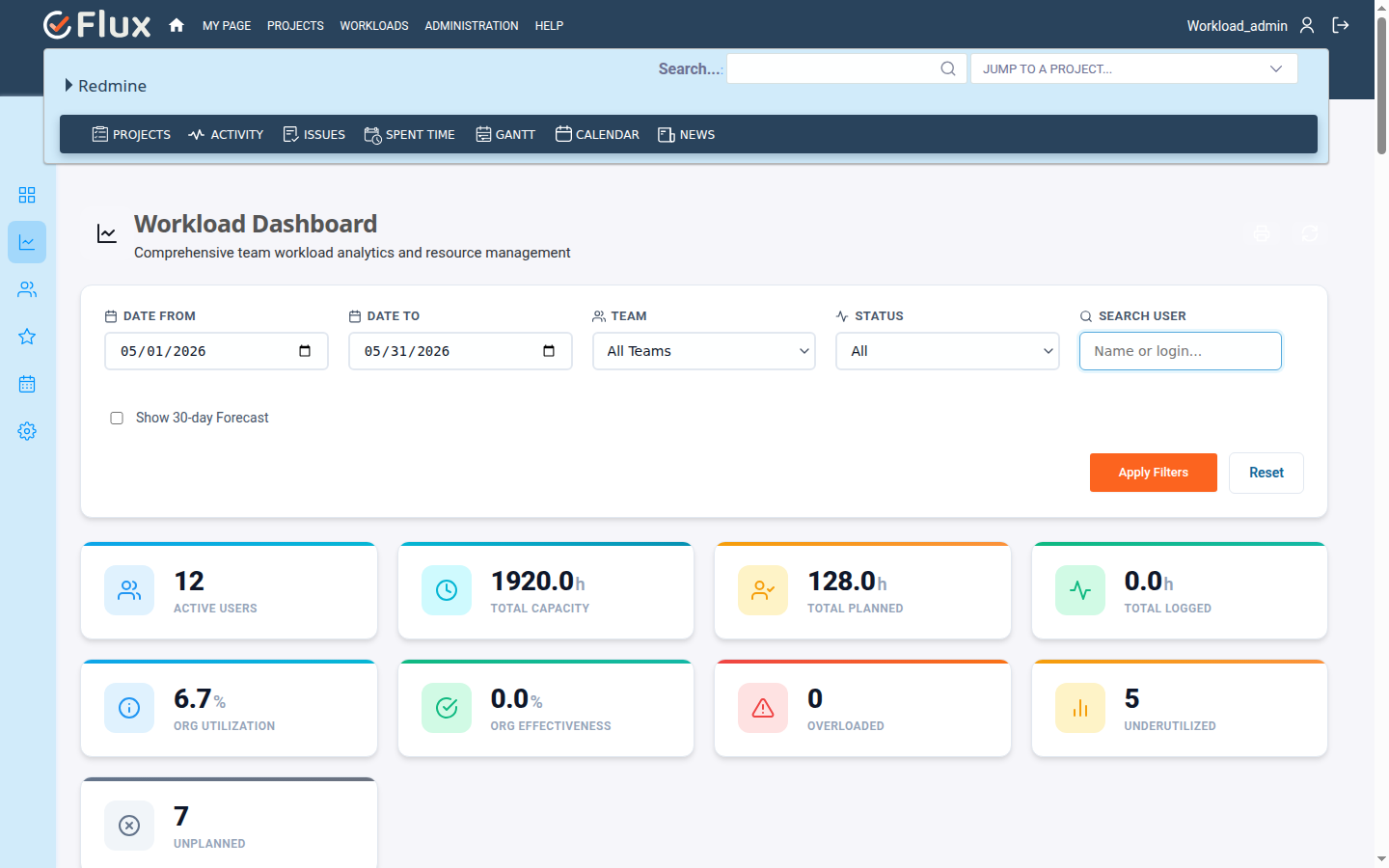
Without structured capacity management inside Redmine, teams run blind on allocation. Overload goes unnoticed until deadlines are already at risk. Capacity is estimated from memory rather than measured from real assignment data. Cross-project allocation conflicts surface too late to address without disrupting delivery. Forecasting becomes reactive — built on assumptions rather than actual availability. Managers absorb delivery pressure without the data needed to redistribute work or reset expectations.
The Redmineflux Workload Plugin is a structured redmine resource management and capacity planning tool built natively inside Redmine. It shows assigned hours against available hours across users, projects, and date ranges. Managers can identify workload imbalance and act on it before delivery is affected — without leaving Redmine.
The Workload Plugin gives every resource assignment in Redmine a measurable, structured view. Assignments reflect real availability through a dedicated redmine workload calendar showing capacity per user per day. Timeline decisions have actual data behind them. Managers stop guessing who has capacity and assign work with confidence. Delivery becomes more predictable, late-stage surprises drop, and the planning process scales without adding spreadsheet overhead.
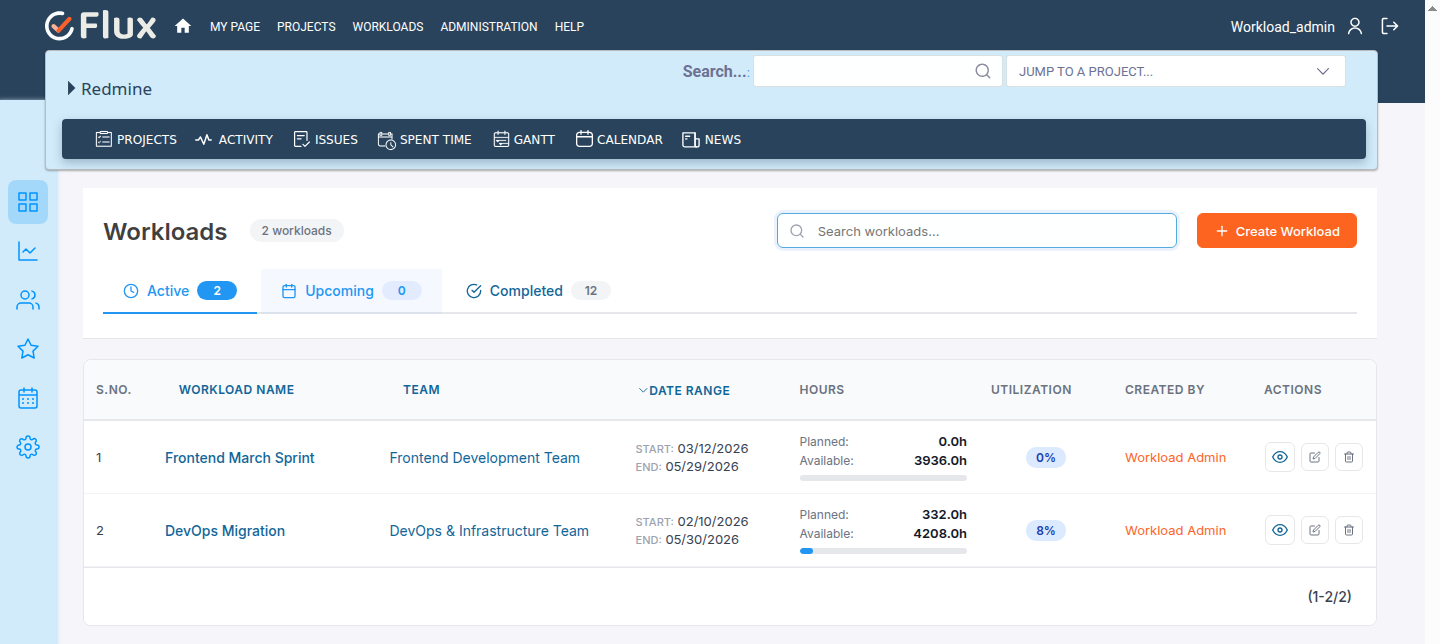
Project managers see exactly who is overloaded, available, or balanced across the current sprint period before assigning new work. Redmine resource planning decisions are grounded in real data rather than informal conversations.
When timelines are based on actual team availability rather than optimistic estimates, delivery confidence increases and late-stage reallocation becomes less frequent. The planning process becomes a reliable input to delivery, not an afterthought.
Spreadsheet-based capacity tracking requires constant maintenance. The Workload Plugin pulls redmine workload tracking data directly from Redmine task assignments, which means the view is always current without anyone needing to update it manually.
When workload imbalance is visible, it can be fixed. Managers who see overloaded engineers and spare capacity in the same view can redistribute work before performance suffers. The plugin makes resource overallocation a planning problem, not a delivery crisis.
Shared resources across multiple projects create allocation conflicts that stay hidden without a unified view. The Workload Plugin surfaces those conflicts at the planning stage, while they can still be resolved. Redmine resource planning for multiple projects becomes a structured process, not an improvised one.
The Workload Plugin shares the same Redmine issue base as all other Redmineflux plugins. Use the Timesheet Plugin alongside the Workload Plugin to compare planned capacity against actual time logged — past effort informs future allocation. Use the Gantt Chart Plugin to align timeline planning with workload data in the same environment. Use the Dashboard Plugin to surface team capacity summaries in executive project views without switching tools.

Project Manager, Newyork

Project Manager

Project Manager, Singapore

Project Lead, Spain

Team Lead, Rochester, U.S.

CEO, Brazil

Project Manager

Project Manager, Moscow, Russia


Redmineflux plugins have been a game-changer for our Redmine setup. The enhanced features like advanced time tracking, custom workflows, and improved reporting have significantly boosted our productivity. The integration was seamless, and the support team was fantastic. Highly recommend these plugins to any Redmine user!
Getting all of my business data organized in one place is all I wanted. With Redmineflux, I can filter data and simplify my agile operations.
Redmineflux themes have completely transformed the look and feel of our Redmine instance. We were looking for a way to make our Redmine more visually appealing and user-friendly, and these themes delivered on both fronts. The customization options are fantastic, allowing us to tailor the design to our company’s branding.
The Redmineflux Timesheet plugin has made it so much easier for our team to track their time. The ability to easily log time for multiple tasks at once and bulk edit or delete entries is a huge time saver.
Redmineflux Gantt Chart improved visibility and Efficiency, it provides a clear view of tasks, improves communication, & streamlines workflows for faster project completion.
Redmineflux themes are not just about aesthetics; they’re designed with user experience in mind. The improved navigation and clarity have streamlined our workflows significantly. The support team was also incredibly helpful in assisting us with customization.
Highly recommend!”
Redmineflux has an easy-to-use interface & is easily customizable. It helps active coordination and focuses project resources in one direction.
The self-hosted version of Redmineflux has transformed our enterprise project management. The customization options and reliable performance have greatly improved our workflows. The support team is responsive, ensuring our needs are met. Highly recommended for organization looking to streamline project management.
When deployed on your own infrastructure, your team manages server uptime, Redmine upgrades, backups, and plugin compatibility. The Workload Plugin adds capacity planning capability without changing who owns the infrastructure. Full control stays with your team.
The Workload Plugin runs within Redmineflux Managed Cloud. Infrastructure is fully managed by the Redmineflux team. Updates are automated, backups are secured, and uptime is SLA-backed. If infrastructure management is overhead your team does not need, Redmineflux Managed Cloud transfers that responsibility entirely.
| Role | What they gain |
|---|---|
| CTO / IT Director | Governance clarity, reduced delivery risk, and better operational oversight across projects |
| Project Manager | Accurate workload visibility and reliable data for sprint planning and timeline commitments |
| Engineering Lead | Balanced task distribution and realistic capacity planning per team member |
| Delivery Head | Portfolio-level visibility and predictable execution without spreadsheet-based reconciliation |
How do I manage workload in Redmine with this plugin?
Install the Workload Plugin on your Redmine instance and it immediately surfaces assigned hours against available hours for every team member across your configured projects. Project managers can view the redmine team workload dashboard, filter by user or project, and use drag-and-drop task assignment to rebalance work — all without leaving Redmine.
Is the Redmine Workload Plugin compatible with Redmine 6?
Yes. The Redmineflux Workload Plugin is tested and maintained against the three most recent stable Redmine releases, which includes Redmine 6. Compatibility is verified with each plugin update. Check the plugin documentation for the confirmed supported version list before installing on your instance.
How do I allocate resources in Redmine across multiple projects?
The Workload Plugin provides a unified portfolio view that displays every team member's assignments across all active projects in a single dashboard. You can identify overloaded engineers, underutilised capacity, and cross-project conflicts at a glance — then use drag-and-drop reassignment to resolve allocation conflicts before they affect delivery.
Can I see workload per user per day in Redmine?
Yes. The Workload Plugin includes a per-user, per-day capacity view that shows assigned hours against available hours at a daily granularity. Configure working hours, leave schedules, and holiday schemes so the availability data reflects actual person-days rather than calendar days. The today-line indicator marks the current position in the planning horizon.
How long are updates and support included with a plugin purchase?
Every Redmineflux plugin purchase includes 12 months of technical support, bug fixes, and both minor and major version updates. After the initial 12-month period, you can renew your subscription for 30% of the plugin price to continue receiving support, bug fixes, and future updates for another year.