Reusable templates ensure every task is created with the right fields, structure, and context. Every issue starts complete, consistent, and ready to work without back-and-forth clarification.
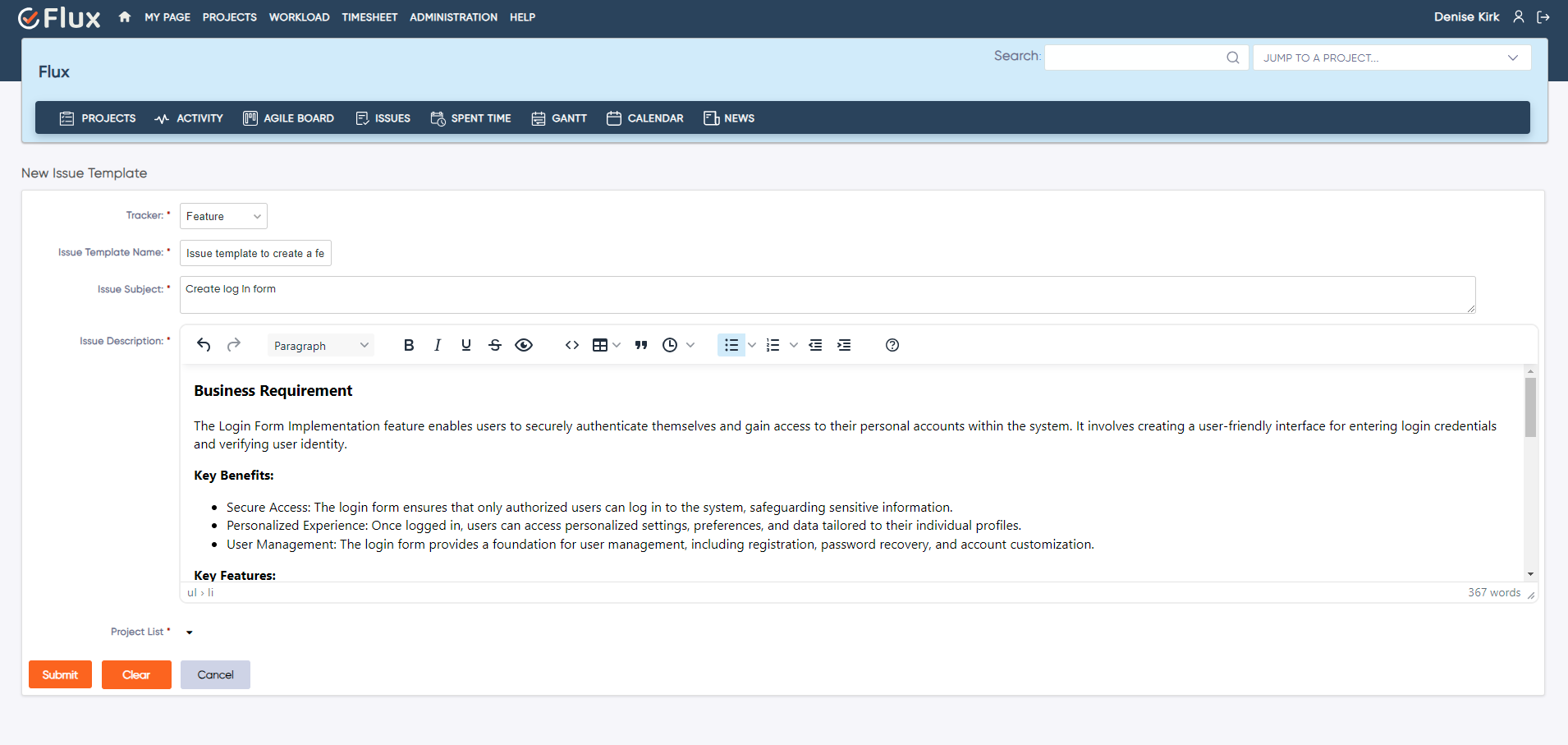
When teams create issues without a standard format, the problems compound across every sprint cycle. Required fields are discovered missing mid-sprint — work stops while context gets filled in retrospectively. Developers spend time asking for clarification on poorly written or incomplete issues instead of working on the task itself. Different team members use different formats, which creates inconsistency across trackers and projects that makes planning and triage slower. QA teams lack acceptance criteria and cannot test reliably when the definition of done was never written into the original issue.
The Redmineflux Issue Template Plugin adds reusable templates to Redmine’s issue creation flow. When a team member creates a new issue, they select the relevant template — and the required fields, description structure, default values, and checklist items are pre-filled instantly. Every issue starts complete.
The Issue Template Plugin enhances Redmine without replacing it. It works as a structured creation layer at the start of every task. Every template enforces the right format for its tracker type. Every issue created from a template carries the correct context from the first line. Teams that previously relied on convention — or on project managers correcting incomplete issues before sprint start — can replace that overhead with a structural standard that applies automatically whenever a new issue is created.
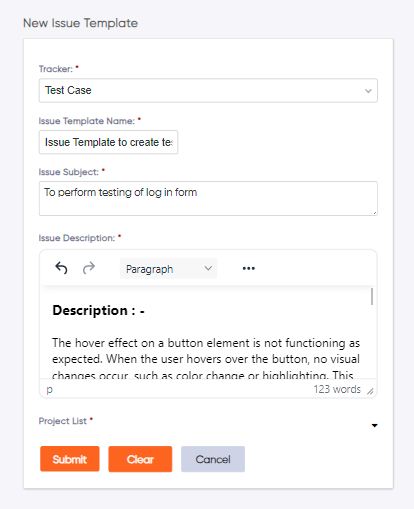
Every task created from a template contains complete information and the correct structure for its tracker type. There are no missing fields, no absent acceptance criteria, and no vague descriptions to correct before work can begin.
Missing context does not surface mid-sprint when it was never missing in the first place. Developers receive issues that contain everything they need to begin work without requesting clarification from the original reporter.
Well-formed issues require no repair before sprint assignment. Project managers spend less time correcting templates during planning and more time assessing priority and sequencing the work that actually delivers value.
Acceptance criteria are present from the moment of creation rather than added as an afterthought. QA teams can plan testing cycles before sprint work begins rather than waiting for requirements to be retrofitted into existing issues.
New engineers and project staff follow the right format from day one without needing to be trained on what each tracker type requires. The template enforces the standard structurally.
Issue templates set the standard at the start of every task. Templates that include checklist items work directly with the Checklist Plugin to enforce closure criteria from creation. Templates that include acceptance criteria descriptions connect naturally to test planning through the Test Case Management Plugin. Time estimate defaults in templates feed into capacity planning views in the Workload Plugin.

Project Manager, Newyork

Project Manager

Project Manager, Singapore

Project Lead, Spain

Team Lead, Rochester, U.S.

CEO, Brazil

Project Manager

Project Manager, Moscow, Russia


Redmineflux plugins have been a game-changer for our Redmine setup. The enhanced features like advanced time tracking, custom workflows, and improved reporting have significantly boosted our productivity. The integration was seamless, and the support team was fantastic. Highly recommend these plugins to any Redmine user!
Getting all of my business data organized in one place is all I wanted. With Redmineflux, I can filter data and simplify my agile operations.
Redmineflux themes have completely transformed the look and feel of our Redmine instance. We were looking for a way to make our Redmine more visually appealing and user-friendly, and these themes delivered on both fronts. The customization options are fantastic, allowing us to tailor the design to our company’s branding.
The Redmineflux Timesheet plugin has made it so much easier for our team to track their time. The ability to easily log time for multiple tasks at once and bulk edit or delete entries is a huge time saver.
Redmineflux Gantt Chart improved visibility and Efficiency, it provides a clear view of tasks, improves communication, & streamlines workflows for faster project completion.
Redmineflux themes are not just about aesthetics; they’re designed with user experience in mind. The improved navigation and clarity have streamlined our workflows significantly. The support team was also incredibly helpful in assisting us with customization.
Highly recommend!”
Redmineflux has an easy-to-use interface & is easily customizable. It helps active coordination and focuses project resources in one direction.
The self-hosted version of Redmineflux has transformed our enterprise project management. The customization options and reliable performance have greatly improved our workflows. The support team is responsive, ensuring our needs are met. Highly recommended for organization looking to streamline project management.
When deployed on your own infrastructure, your team manages server uptime, Redmine upgrades, backups, and plugin compatibility. The Issue Template Plugin adds structured creation standards without changing how Redmine works. Full control stays with your team.
The Issue Template Plugin runs within Redmineflux Managed Cloud. Infrastructure is fully managed by the Redmineflux team. Updates are automated, backups are secured, and uptime is SLA-backed. If infrastructure management is overhead your team does not need, Redmineflux Managed Cloud transfers that responsibility entirely.
| Role | What they gain |
|---|---|
| Project Manager | Consistent issue quality and faster triage across all projects and trackers |
| Engineering Lead | Clear, complete tasks from creation — no time lost correcting missing context |
| QA Lead | Acceptance criteria present in every issue before it reaches the QA stage |
| IT Director | Standardised workflow governance and consistent data across the full Redmine instance |
Can templates be assigned to specific projects or trackers?
Yes. Templates in the Redmineflux Issue Template Plugin can be scoped to specific projects, specific trackers, or both. When a team member creates a new issue, only the relevant templates for that project and tracker combination are shown. You can also configure a default template that loads automatically for a given tracker-project pairing.
Can I create multiple templates for the same tracker?
Yes. You can create as many templates as needed for a single tracker. A Bug tracker can have separate templates for frontend bugs, backend bugs, and performance issues — each with different default fields and description structures. The team member selects the most relevant template at creation time.
Do templates support custom fields?
Yes. Custom fields defined in your Redmine instance can be included in templates with pre-filled default values. This ensures that custom field data is captured consistently across all issues created from that template, without relying on team members to remember which custom fields are required for each tracker type.
Which Redmine versions are supported?
The Redmineflux Issue Template Plugin is tested and maintained against the three most recent stable Redmine releases. Compatibility is verified with each plugin update. Check the plugin documentation for the confirmed supported version list before installing on your instance.