The Redmineflux Redmine Timesheet Plugin adds structured time logging, multi-level redmine timesheet approval workflows, and audit-ready reporting inside Redmine. Project managers, IT directors, and engineering leads get accurate redmine time tracking without adding another system to manage.
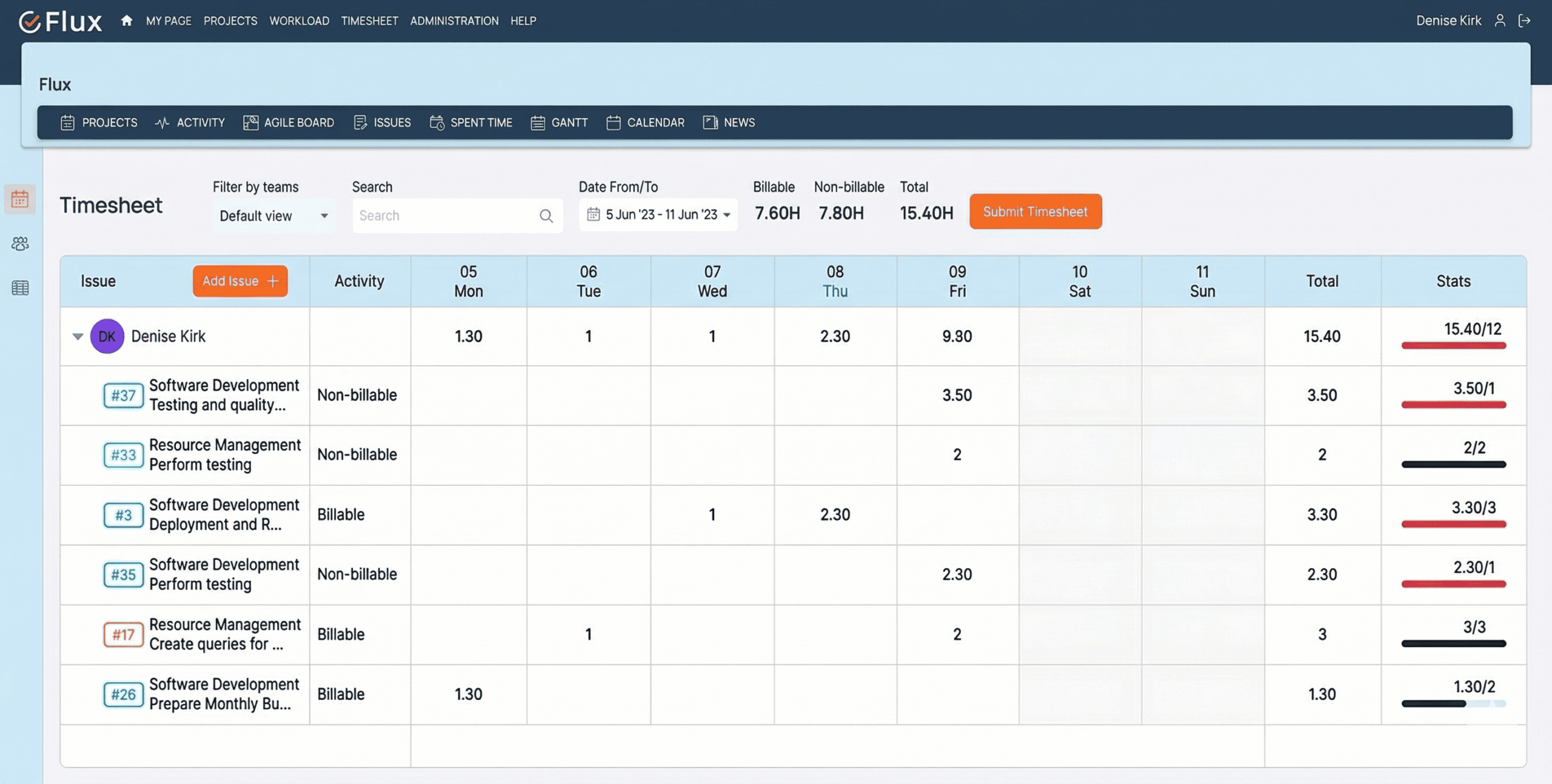
Without a structured timesheet solution inside Redmine, teams face predictable problems that compound over time. Worklogs are incomplete, inconsistent, or missing entirely, which means billing accuracy depends on spreadsheets and manual reconciliation. Approval processes have no structure and leave no audit trail. Project time decisions get made on outdated or estimated data rather than verified actuals. Compliance reporting requires significant manual effort before every audit cycle, taking time away from delivery work.
The Redmineflux Timesheet Plugin is a structured time logging and approval solution built natively inside Redmine. It captures every hour against a real task, routes entries through configurable redmine timesheet approval workflows, and generates reports for billing, payroll, or compliance — without requiring a separate tool or data export.
The Timesheet Plugin puts a governance layer over every hour logged in Redmine. Each time entry ties to a real task in the redmine time log, giving your team a full picture of redmine spent time across projects. Approval stages are traceable and role-controlled. Reports are exportable, filterable, and defensible. Teams that previously relied on spreadsheets can consolidate redmine time tracking into the same environment where work happens — less reconciliation overhead, more reliable billing data, and an audit trail your compliance team can stand behind.
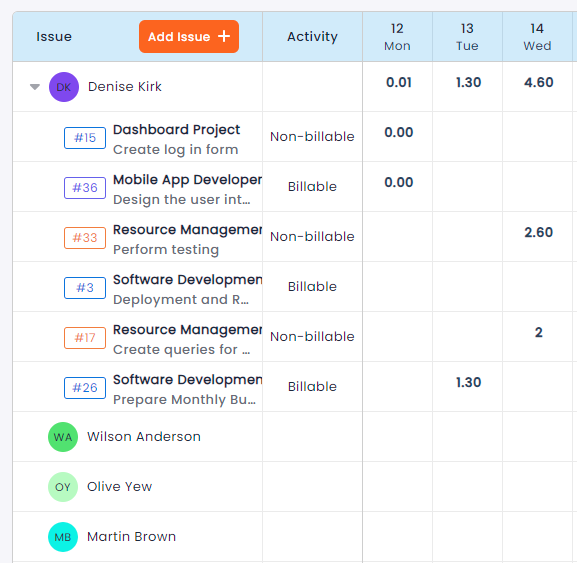
Every hour is captured directly against the task it belongs to, which eliminates the end-of-week reconstruction that spreadsheet-based teams rely on. Billing reports reflect what actually happened, not what someone remembered.
Project managers can see how time is distributed across projects and team members without waiting on manual updates. Resource decisions are made on current data rather than weekly estimates, which improves redmine resource allocation and capacity planning.
Compliance, payroll, and client billing reports are available on demand, filtered by project, user, date range, or activity type. Redmine timesheet export to PDF, Excel, or CSV takes one click — no preparation required before an audit.
Redmine timesheet approval workflows run automatically through configured role assignments. Managers review and approve without chasing people for submissions, and every action in the workflow is logged with a timestamp.
Timeline estimates and budget reviews are more reliable when the underlying redmine project hours tracking data is complete, approved, and structured — not estimated or reconstructed after the fact.
The Timesheet Plugin shares the same Redmine issue base as all other Redmineflux plugins, which means time data connects directly to delivery data without integration work. Use the Workload Plugin to plan capacity before assigning time budgets. Use the Dashboard Plugin to surface time summaries alongside project status in executive views. Use the Agile Board Plugin to manage sprint delivery and see actual time against estimated effort in one environment.

Project Manager, Newyork

Project Manager

Project Manager, Singapore

Project Lead, Spain

Team Lead, Rochester, U.S.

CEO, Brazil

Project Manager

Project Manager, Moscow, Russia


Redmineflux plugins have been a game-changer for our Redmine setup. The enhanced features like advanced time tracking, custom workflows, and improved reporting have significantly boosted our productivity. The integration was seamless, and the support team was fantastic. Highly recommend these plugins to any Redmine user!
Getting all of my business data organized in one place is all I wanted. With Redmineflux, I can filter data and simplify my agile operations.
Redmineflux themes have completely transformed the look and feel of our Redmine instance. We were looking for a way to make our Redmine more visually appealing and user-friendly, and these themes delivered on both fronts. The customization options are fantastic, allowing us to tailor the design to our company’s branding.
The Redmineflux Timesheet plugin has made it so much easier for our team to track their time. The ability to easily log time for multiple tasks at once and bulk edit or delete entries is a huge time saver.
Redmineflux Gantt Chart improved visibility and Efficiency, it provides a clear view of tasks, improves communication, & streamlines workflows for faster project completion.
Redmineflux themes are not just about aesthetics; they’re designed with user experience in mind. The improved navigation and clarity have streamlined our workflows significantly. The support team was also incredibly helpful in assisting us with customization.
Highly recommend!”
Redmineflux has an easy-to-use interface & is easily customizable. It helps active coordination and focuses project resources in one direction.
The self-hosted version of Redmineflux has transformed our enterprise project management. The customization options and reliable performance have greatly improved our workflows. The support team is responsive, ensuring our needs are met. Highly recommended for organization looking to streamline project management.
When deployed on your own infrastructure, your team manages server uptime, Redmine upgrades, backups, and plugin compatibility. The Timesheet Plugin adds time tracking and approval capability without changing who owns the infrastructure. Full control stays with your team.
The Timesheet Plugin runs within Redmineflux Managed Cloud. Infrastructure is fully managed by the Redmineflux team. Updates are automated, backups are secured, and uptime is SLA-backed. If infrastructure management is overhead your team does not need, Redmineflux Managed Cloud transfers that responsibility entirely.
| Role | What they gain |
|---|---|
| CTO / IT Director | Governance, compliance readiness, and financial clarity across all projects |
| Project Manager | Accurate timesheet visibility and reliable billing reports without spreadsheets |
| Engineering Lead | Structured worklog tracking and controlled approval workflows per team |
| Delivery Head | Verified time data that connects directly to timeline and budget decisions |
How do I track time in Redmine using the Timesheet Plugin?
Log time directly on any Redmine issue using the native time entry form. The Timesheet Plugin captures those entries, displays them in weekly and monthly views, and routes them through your configured approval workflow. No separate tool is required — redmine time tracking happens inside the same environment where work is managed.
Is the Redmine Timesheet Plugin compatible with Redmine 6?
The Redmineflux Timesheet Plugin is tested and maintained against the three most recent stable Redmine releases, which includes Redmine 6. Compatibility is verified with each plugin update. Check the plugin documentation for the confirmed supported version list before installing on your instance.
Can I export Redmine timesheet reports to PDF?
Yes. Redmine timesheet export supports PDF, Excel, and CSV formats. Filter by project, user, activity type, or date range before exporting. Billable and non-billable hours are segmented separately, which simplifies client billing handoffs and keeps internal time clearly separated from client-facing records.
Can approval workflows be configured differently per project?
Yes. Approval schemas are configurable at the project level. You can define one to five approval levels with role-based permissions at each stage. Different projects within the same Redmine instance can run entirely different redmine timesheet approval configurations, which allows teams to enforce the governance structure appropriate to each project's requirements.