
Get a Free Demo

Redmineflux MCP is live - connect any AI agent to Redmine.Explore More →

Redmineflux AI

The AI-native Redmine platform built for the agent era.

For Redmine teams shipping faster than their tools allow.

MCP server live todayOne key for the whole teamUp to 100 users per instanceEU + JP residency

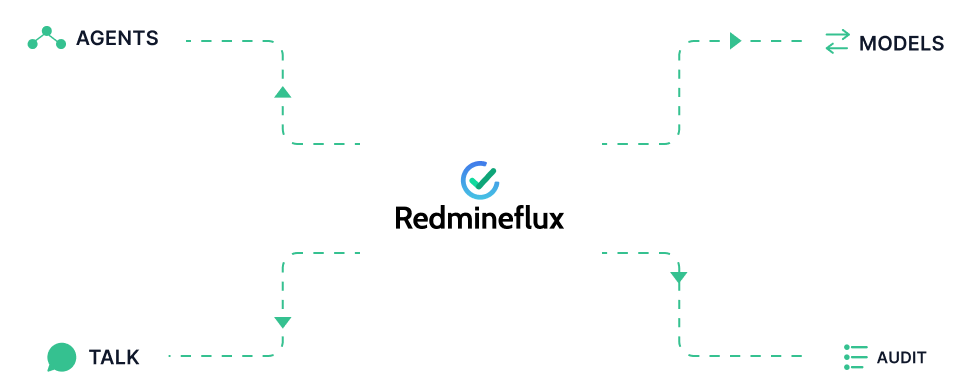
Redmineflux AI surfaces - chatbot, specialist agents, MCP server, and bring-your-own-LLM orbiting a Redmine core

The shift

Redmine never went away. It just got an agent layer.

A decade of issues, a decade of process, a decade of audit trails – kept exactly as they are. Redmineflux adds the AI surfaces around them: an MCP server next to your Redmine, a chatbot inside every page, specialist agents per plugin, and the option to bring your own model. No platform migration. No ripped-out workflows. The team you trained still runs the operation; the agents accelerate the work.

Talk to your Redmine

Your project answers in plain English.

“What should I work on first?” Three seconds later, a real answer drawn from your real project data.

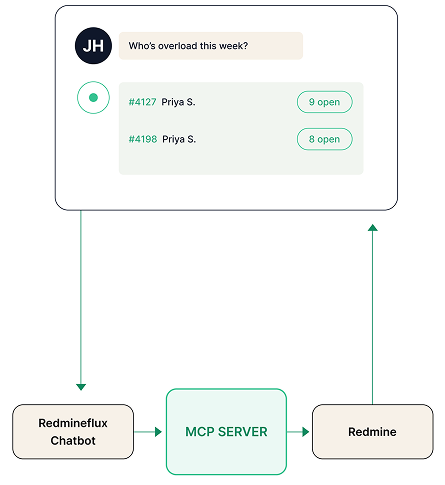
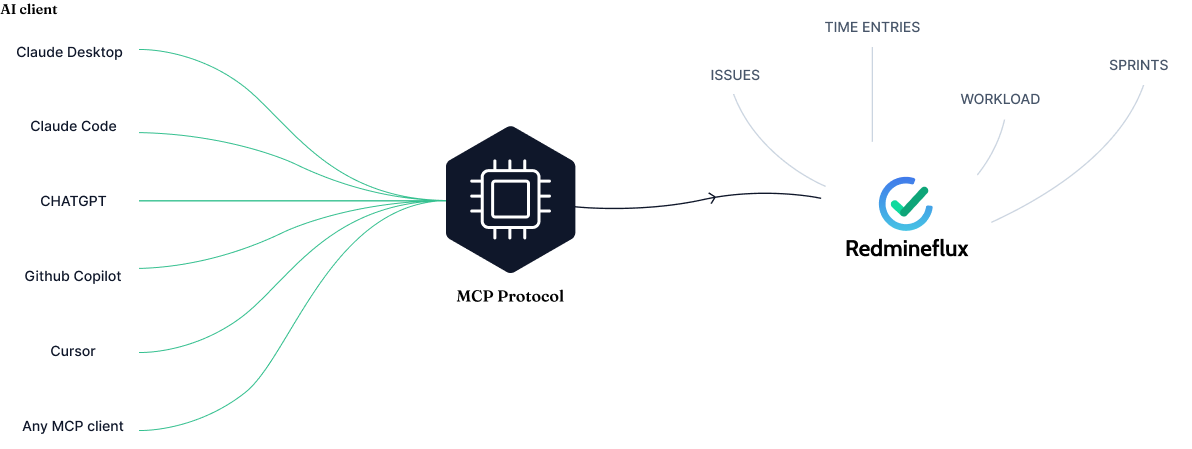
The MCP server is the bridge between Redmineflux and any AI agent. Two ways to use it: power users connect their existing tools – Claude Desktop, Claude Code, ChatGPT – directly to the MCP server. Everyone else uses the Redmineflux chatbot, built into every page of the product. Same MCP server underneath. One Anthropic or OpenAI key for the whole team – no per-seat subscriptions, no licence sprawl.

  • Read issues, draft status reports, log time, update progress – through your existing AI tool of choice.
  • The Redmineflux chatbot lives on every page; the MCP server lives next to your Redmine.
  • Plugin-aware: when an agent asks about workload, the Workload plugin’s data answers.
Read the MCP spec →
Chat window asking a workload question resolving through the MCP server into a Redmine issue list

Specialist agents per plugin

An agent that knows what your plugin knows.

Every plugin gets its own specialist agent. Scoped to that plugin’s data. No surprises.

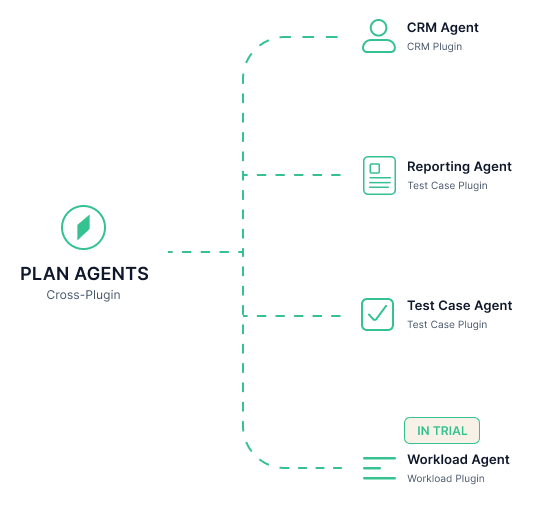
The Workload Agent reads capacity and reroutes work before standup. The Test Case Agent drafts test plans from spec docs. The Reporting Agent writes the Monday status from Friday’s commits. The CRM Agent pulls leads into projects without a copy-paste between tools.

Cross-plugin agents follow – a Plan Agent that sees Workload, Gantt, and Agile together; an Execute Agent that pairs Workload with DevOps and Agile. Bundled with the All Plugins Bundle and Cloud.

  • In trial: Workload Agent – capacity-aware work routing.
  • Rolling out: Test Case, Reporting, CRM agents – bundled with their plugins.
  • Coming this season: Plan and Execute Agents – cross-plugin coordination.
See the agent roadmap →
Specialist agent constellation - named agent badges for Workload, Test Case, Reporting, CRM, and Plan, each scoped to its plugin

Bring your own LLM

Your provider. Your key. Your call.

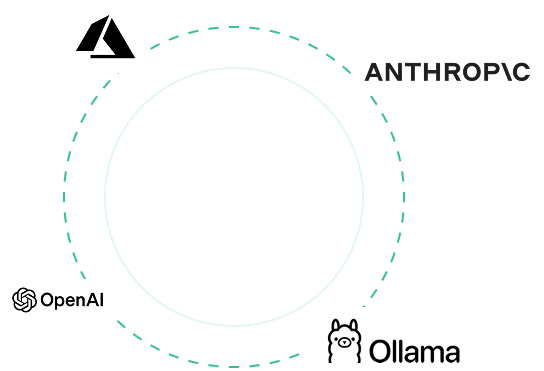
Anthropic, OpenAI, Azure OpenAI, a local Ollama, or our roadmap Qwen-3.5B fine-tune – pick one or pick all four.

Not every question needs Opus 4.7 with a 1-million-token context. Redmineflux routes each query to the model that gives the best cost-and-quality answer for that question – sometimes a local Qwen, sometimes Sonnet, sometimes a frontier model from your provider of choice. You set the policy. The system picks the model. Token spend stays sane.

  • One Anthropic or OpenAI key for the whole team – up to 100 users on a single instance.
  • LiteLLM under the hood; per-instance, per-user, or per-prompt provider selection.
  • Local Ollama works for sovereign-data shops – your prompts never leave your perimeter.
Pick your provider →
LLM provider routing diagram - a query splitting across Claude, GPT, Azure, and local Ollama lanes

Audit every step

Every AI action, written down.

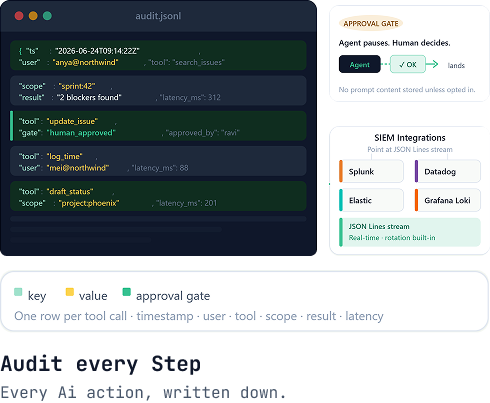
Who asked, which tool ran, which record changed. JSON Lines on disk. Stream-ready for your SIEM.

Every MCP tool call writes one structured row: timestamp, user, tool, scope, parameters, result, latency. No prompt content unless your team explicitly opts in. Human approval gates can be required for write actions – the agent waits, the human approves, the change lands.

Audit-ready by construction. Splunk, Datadog, Elastic, Grafana Loki – point them at the JSON Lines stream and your security team has the trail they need.

  • Structured JSON-Lines log; one row per tool call; rotation built-in.
  • SIEM-stream-ready – Splunk, Datadog, Elastic, Grafana Loki.
  • No prompt content stored unless opted-in; approval gates configurable for writes.
Read the audit-log spec →
Audit log close-up - JSON-Lines rows showing timestamp, user, tool, and result fields with SIEM integration logos

Connected to your stack

If it speaks MCP, it speaks Redmineflux.

Every MCP-capable client connects to your Redmine through one server. Bring the AI tools your team already trusts – no new logins, no new SaaS.

Integrations grid - 12 MCP-compatible client and provider tiles including Claude, ChatGPT, GitHub Copilot, Cursor, Azure, and Ollama
  • Claude Desktop
  • Claude Code
  • ChatGPT
  • GitHub Copilot
  • Cursor
  • Microsoft Azure
  • Anthropic
  • OpenAI
  • Local Ollama
  • Redmine
  • Custom MCP clients
  • Zehntech engineering

Trusted by Redmine teams

Tested where it lives – on a real Redmine.

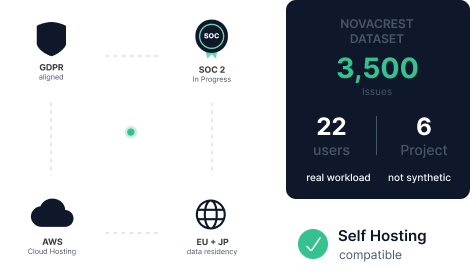
Redmineflux AI is graded against real workloads, not synthetic benchmarks. The MCP server has run against a 3,500-issue Redmine instance with twenty-two users across six projects, every working day, for the months leading to launch. Agents read what humans see; humans approve what agents change.

GDPR aligned AWS Cloud Hosting Self-Hosting compatible SOC 2 in progress EU + JP data residency
Trust composite - GDPR, SOC 2, AWS, and EU/JP certification glyphs above the NovaCrest dataset evidence plate

The NovaCrest dataset

A live Redmine instance running real product, helpdesk, and operations work. Every MCP tool, every agent prompt, every audit row was graded against this dataset before it shipped.

3,500 issues 22 users 6 projects

How it works

From “I have a Redmine” to “my AI talks to it” in three steps.

No platform migration, no per-seat licence, no rip-and-replace. Connect what you have.

STEP 01

Install the MCP server.

$ bundle install && rake redmine:plugins:migrate
→ MCP plugin v0.2 installed.

The MCP plugin runs on your Redmine – same Ruby and Rails versions you already support. Self-host on your existing instance, or pick it up bundled in Redmineflux Cloud Pro.

STEP 02

Add one LLM key.

ANTHROPIC_API_KEY=sk-ant-…
→ Configured for 100 users.

One Anthropic, OpenAI, Azure OpenAI, or local Ollama endpoint covers the whole team. No per-user licence sprawl. Set policy once; the system picks the model per query.

STEP 03

Connect your AI tool.

$ ask “What should I work on first?”
→ 264 open issues. Top priority: #2972.

Claude Desktop, Claude Code, ChatGPT, GitHub Copilot, Cursor – anything that speaks MCP. Point it at the server. Ask the question. Read the answer.

Roadmap

What’s shipping. What’s rolling out. What’s in trial.

Verbs, not quarters. Read top to bottom – that’s the order.

Live today

MCP Server (Premium+). Production-tested against the NovaCrest dataset. Self-host or bundled in Cloud Pro+.

Rolling out

AI Assistant inside Redmine. In-product chat with full project context, multi-step reasoning, write actions through MCP. Anthropic Sonnet/Opus default; provider-agnostic via LiteLLM.

Rolling out

Bring Your Own LLM. OpenAI, Anthropic, Azure OpenAI, local Ollama. Provider-agnostic AI Connection. Per-instance, per-user, or per-prompt policy.

In trial

First specialist agent – Workload Agent. Capacity-aware work routing bundled with the Workload plugin. More agents follow per-plugin (Test Case, Reporting, CRM).

Coming this season

Cross-plugin agents. Plan Agent (Workload + Gantt + Agile) and Execute Agent (Workload + DevOps + Agile) bundled with the All Plugins Bundle and Cloud.

On the horizon

Qwen-3.5B for Redmineflux. Locally-runnable specialist model for project work, mirroring the Odient pipeline for Odoo. Training infrastructure live; release tied to data-quality milestones.

Sovereignty by design

Your model. Your host. Your call.

Atlassian Rovo locks you to Atlassian’s managed model. Easy8 locks you to Easy8’s. Redmineflux locks you to nothing. Pick your provider – Anthropic, OpenAI, Azure OpenAI, a local Ollama runtime, or our roadmap Qwen-3.5B fine-tune. Your data goes where you say it goes. EU and JP data residency are first-class, not an upgrade tier.

Claude · Anthropic ChatGPT · OpenAI GitHub Copilot · Microsoft Azure OpenAI Ollama · local EU + JP residency Sovereign Cloud or self-host

Put AI on your project data

One platform. One key. One renewal.

Connect Claude or ChatGPT to your Redmine. Read the spec. The MCP server is live; the rest is rolling out with our next releases.

GDPR aligned · AWS Cloud Hosting · Self-Hosting compatible · SOC 2 in progress

Frequently asked

Questions before you connect an agent.

Seven honest answers about what’s live, what’s rolling out, and where your data goes.

What can I do with Redmineflux AI today?

Connect Claude Desktop, Claude Code, ChatGPT, GitHub Copilot, or any MCP-capable agent to your Redmine and start asking real questions. Read issues, log time, update progress, draft status reports – through your existing AI tools.

The MCP server is live. The in-product chatbot, specialist agents, and bring-your-own-LLM are rolling out.

How is Redmineflux AI different from Atlassian Rovo or Easy8 AI?

Rovo locks you to Atlassian’s managed model. Easy8 locks you to its own. Redmineflux locks you to nothing. Pick your provider – Anthropic, OpenAI, Azure OpenAI, a local Ollama runtime, or our roadmap Qwen-3.5B fine-tune.

Your data goes where you say it goes. EU and JP residency are first-class for Cloud, not an upgrade tier.

Do I pay per user for AI access?

No per-seat AI licensing. One Anthropic or OpenAI API key powers the whole team – configure it once in Redmineflux, every user gets the in-product chatbot.

Up to 100 users on a single instance. The MCP server is a Premium+ paid SKU on self-host; bundled in Cloud Pro+.

Where does my data go when I use AI features?

Your Redmine stays where it lives – on your server or in your Cloud region. The MCP server sits next to it.

Prompts go directly from Redmineflux to the LLM provider you configured; nothing routes through Redmineflux servers. EU and JP data residency are first-class for Cloud customers.

What does Redmineflux log when AI runs?

Every MCP tool call writes a JSON-Lines audit row: who asked, which tool, which Redmine record, the result. Stream it to your SIEM.

Prompt content is not stored unless your team explicitly opts in. Human approval gates can be required for write actions.

Will the AI features work on my self-hosted Redmine?

Yes. The MCP server runs on your Redmine – same Ruby and Rails versions you already support. Add your LLM API key. Connect Claude Desktop or any MCP client.

The same architecture works on Redmineflux Cloud, where the MCP server is bundled in Pro+.

Does Redmineflux train models on my data?

No. Redmineflux passes your prompts directly to the LLM provider you configured. Anthropic and OpenAI honour their no-training-on-API-data terms by default. Local Ollama keeps everything inside your perimeter.

Your project data trains nothing without an explicit, opt-in agreement.