Redmine AI Assistant: Ask Your Redmine Anything With Crux Chat
Crux Chat is a Redmine AI assistant that answers from live project data and shows every change for your approval first. See how it works.
Most teams already ask an AI assistant to draft plans, summaries and status notes. However, the assistant can’t see your projects, issues or people, so its answers only sound right. Crux Chat is a Redmine AI assistant that works inside your Redmine and answers from live data. Also, when a request would change something, Crux shows you the exact change first. Nothing in your issues, projects or records changes until a person clicks Confirm.
This guide explains what Crux Chat does, how it keeps your team in control, and what it costs.
See Crux Chat → · Get a free demo →
What Is Crux Chat?
Crux Chat is the chat assistant inside Redmineflux, and it forms the conversational part of Redmineflux AI. You ask questions about projects, issues and people in plain language. Crux then looks up the answer in your Redmine before it replies. When a request would change data, Crux first shows the change as a card. After that, it runs the change only when you confirm it.
Crux Chat is one of three Redmineflux AI products, and they work together:
- Redmineflux MCP Server connects AI tools to your Redmine.
- Crux Chat adds the conversation on top of that connection.
- Crux Agents adds more than 20 ready-made specialists, pipelines with approval gates, and the Run Ledger. For example, it includes specialists for Redmineflux plugins such as CRM, Helpdesk and Timesheet.
Crux also uses the same pages, permissions and look as the rest of Redmineflux. As a result, your team has no separate tool to learn.
Why Generic AI Assistants Fall Short in Redmine
A general AI chatbot helps with writing. However, it struggles with real project work, and teams usually run into the same four problems:
- It can’t see your work. For example, it doesn’t know your issues, versions, milestones, or who is busy this sprint.
- Copy and paste becomes the workflow. First, someone exports data and pastes it in. Then they copy the answer back into Redmine.
- Write access feels risky. If you give an assistant direct access, nobody can say what it changed or why.
- Cost stays invisible. Nobody knows what each answer costs until the monthly bill arrives.
As a result, the useful work still happens by hand, and the AI stays a drafting tool. Crux Chat closes that gap because it brings live data, approval cards and a visible cost to every answer.
How Does Crux Chat Answer Questions About Your Redmine Data?
Crux Chat answers from live Redmine data instead of memory or pasted exports. First, you ask a question. Then Crux hands it to the specialist whose skills match, and that specialist looks up the facts. As a result, the reply draws on real progress, milestones and risks. Every answer also shows its cost, while the model and tokens sit one hover away.
Three places to ask
You can reach Crux without leaving the page you are working on:
- The Ask Crux page: a full chat workspace that saves your conversations. In addition, you can keep useful answers and share a conversation with a teammate.
- The chat bubble: it sits on every Redmine page, and it knows which project or issue you are looking at.
- An @-mention in an issue comment: write
@cruxin a comment to ask from inside the issue. Crux then replies in the same thread.
The right specialist for each question
Crux sends each question to a matching specialist. For example, it can pick the Project Manager, CRM Agent, Helpdesk Agent, Timesheet Agent or Testcase Agent. However, when you know who should answer, you can pick the specialist yourself.
What a typical exchange looks like
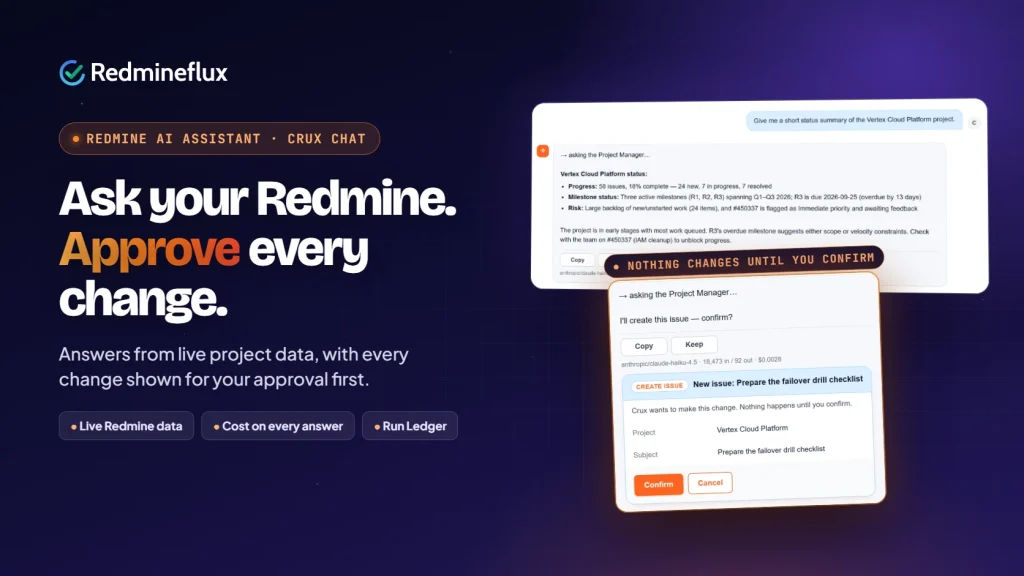
You: Give me a short status summary of the Vertex Cloud Platform project.
Crux (Project Manager): 58 issues, 18% complete. The R3 milestone is overdue. One issue has an Immediate flag and is waiting for feedback.
Crux shows the cost under the answer, along with the model and tokens.
This example comes from the product’s own demo project. Of course, your answers will reflect your own Redmine data.
Can Crux Chat Change Redmine Data Without Asking?
No. Crux Chat can’t change data unless a person approves it. Instead, Crux shows every proposed change as a card first. The card shows exactly what Crux will write, such as a new issue and its project. The change runs only after someone clicks Confirm. If they click Cancel, nothing happens. In addition, Crux records every action with its time and cost.
Crux builds control into four layers, so governance doesn’t depend on good intentions.
| Control | What it does |
|---|---|
| Approval cards | Crux shows every proposed change first, and it runs only after Confirm. |
| Role-based permissions | You grant Crux permissions per Redmine role, so access follows your existing setup. Also, Crux only sees what the signed-in user can see. |
| Frozen rules | These fields stay locked, so no agent can change them, whatever someone approves. |
| Spending limits | Admins set a daily chat cap per user. In addition, they set a monthly spending cap for each agent’s queued work. |
The Run Ledger also logs every run with its time, tokens, cost and outcome. As a result, IT and delivery leads get a full, auditable history of AI activity.
What Can Each Role Ask Crux Chat?
Crux Chat helps most when each role asks the questions it answers by hand today.
| Role | Ask Crux | What changes |
|---|---|---|
| Project Manager | “Summarise the project: progress, milestones and risks.” | Status updates come from live data. Then Crux creates follow-up issues after you confirm them. |
| Engineering Lead | “Which issues are blocked, and who is over capacity this sprint?” | Instead of a status meeting, you get a quick answer. |
| Support Lead | “Show this ticket’s history and the right knowledge base article.” | Crux proposes the ticket update, but nothing changes until you confirm. |
| CTO / IT Director | “Which agents are working right now, and is anything waiting for my approval?” | The Run Ledger shows the time, tokens, cost and outcome of every run. Also, per-user caps and role permissions keep AI spending predictable. |
Which AI Models Does Crux Chat Work With?
Crux Chat works with the AI provider you choose. Anthropic, OpenAI and Google Gemini come built in. In addition, you can add any OpenAI-compatible endpoint, including OpenRouter or a local Ollama server. Crux never shows an API key in full after you save it. Also, every answer shows which model produced it.
For example, teams that want model traffic to stay on their own infrastructure can use a local Ollama server. Your team can also use the Redmineflux MCP Server to connect other AI tools. For example, Claude, Cursor and VS Code can work with the same Redmine data.
Crux Chat vs a General AI Chatbot
| General AI chatbot | Crux Chat | |
|---|---|---|
| Knows your projects and issues | No, only what you paste in | Yes, it reads live Redmine data |
| Makes changes in Redmine | No, or with unchecked access | Yes, after a person confirms each change |
| Respects Redmine roles | No | Yes, you grant permissions per role |
| Shows cost per answer | No | Yes, on every reply |
| Audit trail | No | Yes, the Run Ledger records every run |
| Choice of model | Fixed to one vendor | Anthropic, OpenAI, Gemini or any compatible endpoint |
How Crux Chat, Crux Agents and the MCP Server Fit Together
The three products stack, so each one builds on the layer beneath it.
| Product | Role | Builds on |
|---|---|---|
| MCP Server | The connection. It lets AI tools read and update Redmine with the permissions of the Redmine user they connect as. | Redmine |
| Crux Chat | The conversation. You ask questions and approve proposed changes. | MCP Server |
| Crux Agents | The specialists. It adds more than 20 ready-made agents, pipelines with approval gates, and the Run Ledger. | Crux Chat |
With Crux Agents, larger goals run as work packages through stages such as plan, develop, test, review and deliver. However, work can’t pass an approval gate until a person signs it off. For more detail, read our Redmine MCP Server guide.
How Much Does Crux Chat Cost?
Crux Chat comes in the Redmineflux AI Bundle, together with the MCP Server and Crux Agents. The bundle costs $1,099 one-time for self-hosted Redmine, and it includes one year of support. After that, support renews at 30% per year. Each licence covers up to 100 users per installation, while Managed Cloud offers Redmineflux AI as a monthly add-on.
A few details also help with budgeting:
- Bundle saving. The three products cost $1,297 separately, so the bundle costs 15% less.
- No licence keys. You have nothing to activate, so you can install it and start right away.
- Model usage stays separate on self-hosted. You pay your AI provider directly, and Crux shows the cost of every answer.
- Managed Cloud pricing isn’t final yet. We meter the add-on with a usage cap, because Redmineflux pays for model usage there.
Finally, the Crux Chat page lists compatibility with Redmine 5.x, 6.x and 7.0.
How to Set Up Crux Chat
An administrator sets Crux up once. After that, everyone uses it from the chat bubble.
- First, install the Redmineflux MCP Server, the Crux core service and the Crux plugin.
- Next, connect Crux to the Crux core service, then click Test connection to check it.
- Then add an AI provider and its API key.
- After that, turn on the Crux module in each project that should use it.
- Finally, grant Crux permissions to the Redmine roles that need them.
Start with one project and one or two roles. Then review the Run Ledger after the first week, and widen access when you feel ready.
Try Crux Chat in Your Redmine
Crux Chat gives your team answers from live Redmine data, and a person approves every change. You can get it in the Redmineflux AI Bundle for self-hosted Redmine, or as a monthly add-on on Managed Cloud.
Buy the AI Bundle → · Get a free demo → · Explore Managed Cloud →
Frequently asked questions
What is a Redmine AI assistant?+
A Redmine AI assistant is a chat tool for your Redmine projects, issues and people. You ask in plain language, and it answers. Crux Chat is the Redmineflux AI assistant. It reads live Redmine data before it answers, and it shows every proposed change for your approval first.
Can Crux Chat change data without asking?+
No. A proposed change stays a card until a person confirms it. Also, with Crux Agents, work packages can’t pass an approval gate without a person. Frozen rules then set hard limits that no approval can bypass.
Which AI providers does Crux Chat support?+
Anthropic, OpenAI and Google Gemini come built in. In addition, you can add any OpenAI-compatible endpoint, such as OpenRouter or a local Ollama server. Crux never shows an API key in full after you save it.
Is Crux Chat available for self-hosted Redmine?+
Yes. Self-hosted teams get Crux Chat in the Redmineflux AI Bundle for $1,099 one-time. Each licence covers up to 100 users per installation. On Managed Cloud, however, it comes as a monthly add-on, and its pricing isn’t final yet.
Do I need the MCP Server to use Crux Chat?+
Yes. Crux Chat talks to your Redmine through the Redmineflux MCP Server. That is why we sell the MCP Server, Crux Chat and Crux Agents together as the Redmineflux AI Bundle.
Can I see what Crux Chat costs per question?+
Yes. Every answer shows its cost, along with the model and tokens used. Admins can also set a daily chat cap per user, and they can review every run in the Run Ledger.