
In practice, every development team working in Redmine eventually needs a Redmine knowledge base a structured place for requirements, architecture decisions, onboarding guides, API references, and deployment procedures. The question is where that place should be.
However, Redmine includes only a built-in wiki per project. Teams use it to capture notes and basic documentation. The problem emerges as projects grow and documentation accumulates: the wiki has no structure, no category system, no full-text search across projects, and no way to control who can read or edit specific articles. Everything lands in a flat list. Finding anything requires knowing where to look.
In short, the Redmineflux Knowledge Base Plugin adds structured documentation management directly to Redmine articles organised into categories, searchable across projects, versioned with full history, and governed by role-based access. Your team’s documentation lives in the same system as your issues, time logs, and project data without the structural limitations of the native wiki.
Does Redmine Have a Knowledge Base?
The short answer: Redmine includes a basic wiki per project a flat collection of pages with no categories, no cross-project search, and limited access control. The Redmineflux Knowledge Base Plugin transforms this into a structured documentation system with categories, full-text search, version history, and role-based access all inside your existing Redmine instance without a separate tool.
Get the Redmine Knowledge Base Plugin — One-Time Purchase
In practice, the native Redmine wiki works for small teams with limited documentation needs. It stores text, accepts links between pages, and keeps a basic edit history. When documentation grows beyond 20–30 pages, or when multiple teams need access to shared knowledge, the flat wiki structure creates more friction than it removes.
What the Knowledge Base Plugin Adds
The Redmineflux Knowledge Base Plugin adds a dedicated documentation layer to Redmine. It works alongside the native wiki rather than replacing it teams can maintain both, or migrate existing wiki content into the structured knowledge base.
Structured Categories
The plugin organises articles into a category tree. A software development team might structure their knowledge base as:
- Development → Architecture, API Reference, Code Standards
- Operations → Deployment Procedures, Monitoring Setup, Incident Runbooks
- Onboarding → New Developer Guide, Tool Setup, Team Processes
- Client Projects → Project-specific documentation per client
Specifically, categories can be nested to whatever depth the team needs. Articles belong to a category, making navigation and discovery predictable rather than dependent on remembering a page title.
Full-Text Search Across Projects
The Knowledge Base Plugin adds full-text search across all articles in the knowledge base including articles across multiple projects. A developer searching for “deployment procedure” finds every article containing those terms, regardless of which project it belongs to.
In contrast, native Redmine wiki search is limited and not optimised for documentation retrieval. The Knowledge Base search is fast, accurate, and returns results ranked by relevance.
Version History and Article Rollback
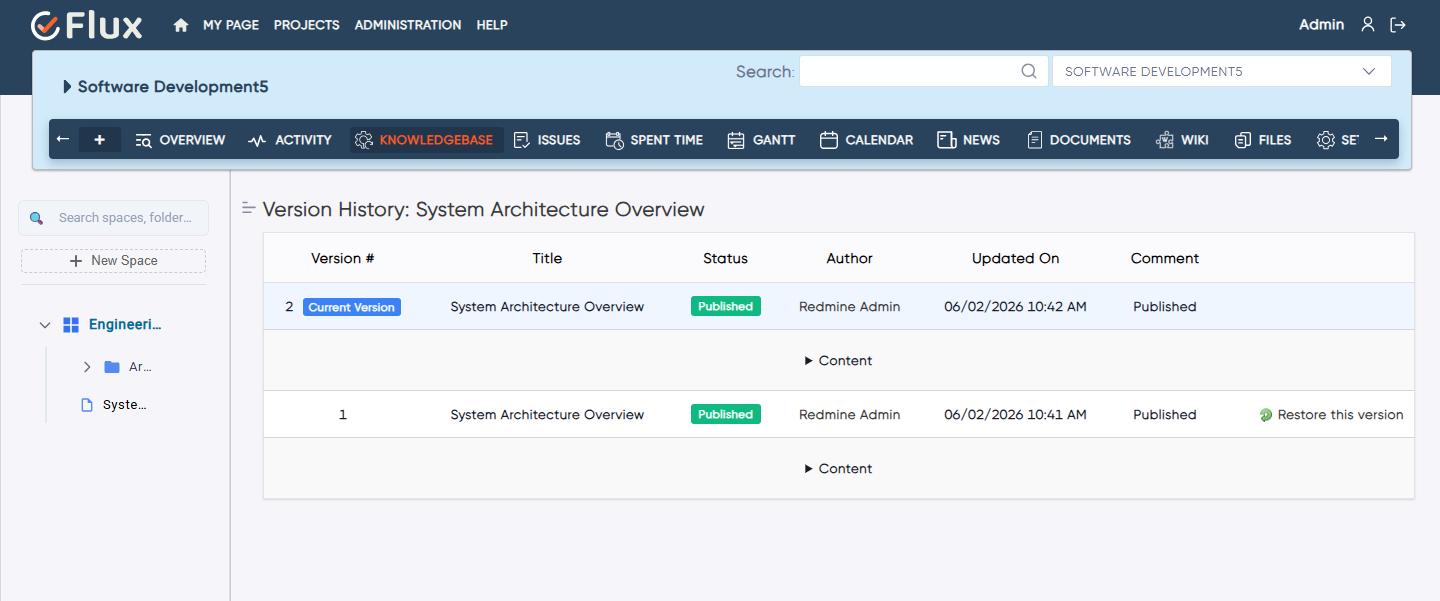
Every article update creates a new version. Specifically, the plugin stores the full version history who changed what, when, and what the previous version contained. Editors can compare any two versions side-by-side and roll back to a previous version if an update introduced an error.
For documentation that governs critical processes deployment procedures, compliance checklists, security configurations version history is a governance requirement, not a convenience.
Role-Based Access per Category
The plugin applies Redmine’s role-based access model to knowledge base categories. A category can be set to:
- Public — readable by all project members
- Private — readable only by specific roles (e.g., senior engineers, team leads)
- Read-only for certain roles — visible but not editable by junior team members
This means sensitive documentation architecture decisions, security configurations, client-specific procedures can live in the knowledge base without being exposed to everyone with a Redmine account.
Article Ratings and Feedback
Additionally, team members can rate articles and leave improvement suggestions. As a result, documentation owners gain visibility into which articles are useful and which need updating. Articles with low ratings or active improvement requests surface to the knowledge base maintainer automatically.
See How It Organises Documentation Inside Redmine — Book a Free Demo
How Teams Use the Knowledge Base in Practice
Onboarding New Team Members
In practice, the knowledge base is the first resource a new developer touches. The onboarding category contains environment setup instructions, tool access guides, team process documentation, and code standards. Everything is in one place, searchable, and up to date.
Without a structured knowledge base, new developers ask senior team members the same questions repeatedly. As a result, that informal knowledge transfer is slow, inconsistent, and invisible. A structured knowledge base makes onboarding self-service for the questions it covers.
Technical Documentation Alongside Development Work
Because the Knowledge Base Plugin lives inside Redmine, documentation can be linked directly to issues. An architecture article explaining a design decision can be linked from the issue where that decision was made. A deployment procedure can be linked from the version it applies to. Documentation and project work stay connected.
In contrast, this connection is not possible with external documentation tools like Confluence or Notion the link between “the decision” and “the documentation explaining it” requires manual maintenance across systems.
Client-Specific Documentation
For agencies and consultancies managing multiple client projects in Redmine, the knowledge base supports a separate category structure per client. Client-specific procedures, handover notes, and configuration documentation are organised under the client’s project category and accessible only to team members with the relevant role.
The Custom Dashboard Plugin adds a live project health view alongside your documentation — keeping delivery data and knowledge in the same workspace.
Knowledge Base vs Redmine Native Wiki — Key Differences
| Capability | Redmine Native Wiki | Knowledge Base Plugin |
|---|---|---|
| Article organisation | Flat list per project | Category tree, nested |
| Search | Basic, limited | Full-text, cross-project |
| Version history | Basic edit log | Full version comparison and rollback |
| Role-based access | Project-level only | Per-category control |
| Article ratings | None | Built in |
| Cross-project visibility | No | Yes |
Common Questions
Does Redmine have a knowledge base?
Redmine includes a basic wiki per project flat pages with no categories or cross-project search. The Redmineflux Knowledge Base Plugin adds a full knowledge base with structured categories, full-text search across projects, version history, rollback, and role-based access per category.
Can I search across all projects in the Redmine Knowledge Base?
Yes. The Knowledge Base Plugin supports full-text search across all articles in the knowledge base, including articles from multiple projects. Native Redmine wiki search is limited to the current project and does not support full-text retrieval.
Is there version history in the Redmine Knowledge Base Plugin?
Yes. Every article update creates a new version with a timestamp and the name of the editor. Previous versions are stored and accessible. Editors can compare any two versions and roll back to an earlier version at any time.
Can I restrict access to specific knowledge base articles or categories?
Yes. The Knowledge Base Plugin applies role-based access control at the category level. Specific categories can be set to private, read-only for certain roles, or fully public independently of the access settings on other categories.
Which Redmine versions does the Knowledge Base Plugin support?
The Redmineflux Knowledge Base Plugin supports Redmine 5.0.x, 5.1.x, and 6.0.x. Teams running Redmine 4.x should contact support before purchasing to confirm compatibility.
In short, documentation that lives outside your project management system is documentation your team will not use consistently. The Knowledge Base Plugin brings structured, searchable, governed documentation inside Redmine where your team already works. The wiki was a starting point. Consequently, the Knowledge Base Plugin is the destination.