The Redmineflux Redmine Checklist Plugin adds structured, trackable checklists to Redmine issues. Break every task into discrete steps, enforce completion criteria, and prevent partial delivery from being marked done — without adding a separate tool or relying on team convention.
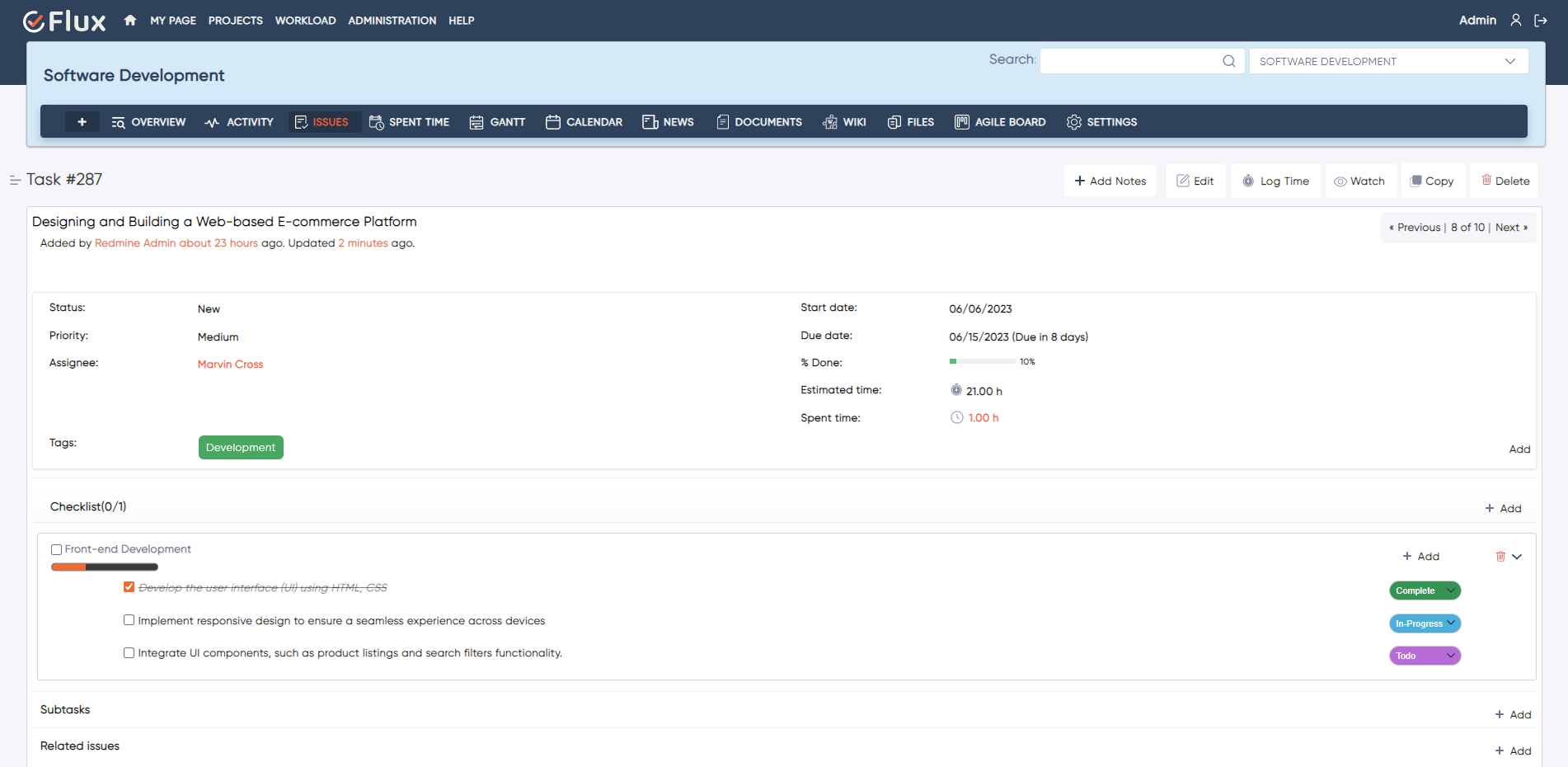
Without a structured definition of done inside each issue, partial delivery becomes invisible until it causes a problem downstream. Work marked done under deadline pressure leaves QA steps unverified. There is no structural visibility into which sub-steps are complete and which are still outstanding. Inconsistent "done" criteria across team members, projects, and sprints make sprint reviews longer and release confidence lower. Reviews take more time because completion status is not visible at a glance — it requires reading through comments and history to determine what actually happened.
The Redmineflux Checklist Plugin adds configurable checklists directly inside Redmine issues. Each checklist contains discrete steps that must be checked off before the issue can be closed. Teams can define reusable checklists, assign items to individuals, and enforce completion structurally — not by convention.
The Checklist Plugin enhances Redmine without replacing it. It works as a structured completion layer at the issue level. Every step is explicit. Every closure is verified. Teams that previously relied on informal review processes or end-of-sprint checking to catch incomplete work can replace that overhead with structural enforcement that operates automatically at the issue level. Redmine, upgraded for delivery discipline.
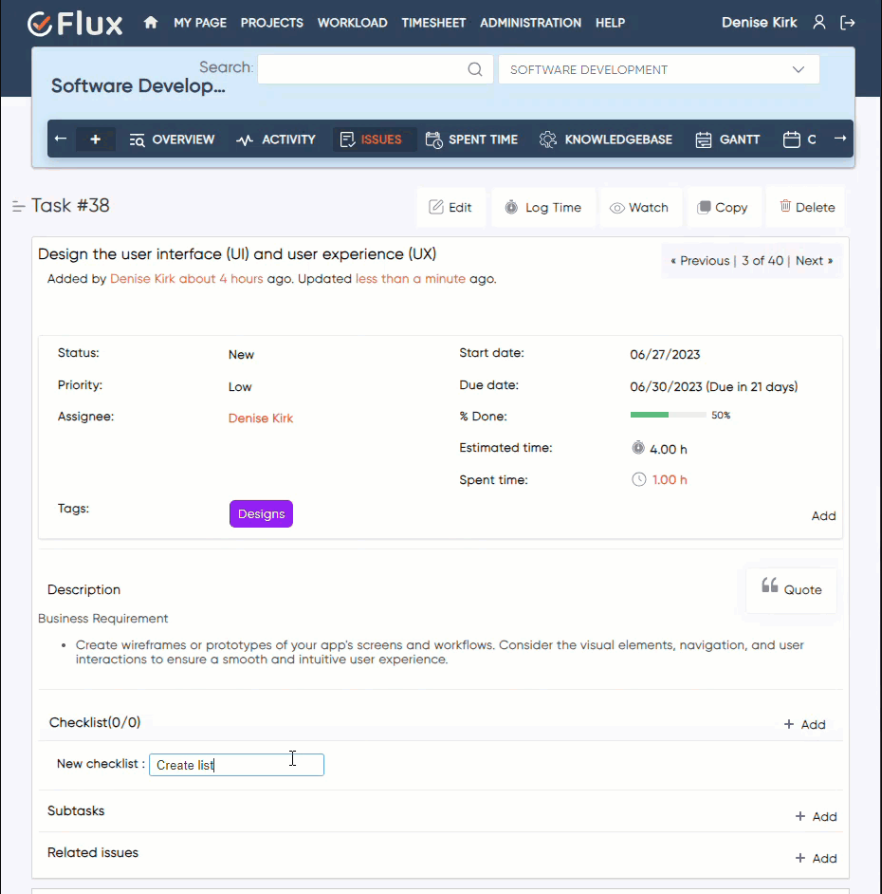
Structural enforcement means completion standards apply consistently without requiring project managers to manually review every issue before status changes are permitted. The tool enforces the rule automatically.
Review and testing steps defined as mandatory checklist items cannot be skipped. QA leads who previously discovered that testing steps were bypassed after closure now have a structural mechanism that prevents closure before testing is confirmed.
Every engineer, QA analyst, and project contributor works to the same completion standard. Convention-dependent processes — where some team members follow the standard and others do not — are replaced by structural enforcement that applies uniformly.
Completion progress is visible on the issue page without reading through comments or status history. Managers can see how many steps remain on an issue without opening it individually when checklist summaries appear in list views.
Reviewers and QA leads can assess issue readiness from the list view before opening individual issues. This reduces the time spent in review on issues that are not yet ready for inspection.
The Checklist Plugin connects directly to the task creation and delivery workflow managed through other Redmineflux plugins. Use the Issue Template Plugin to embed standard checklist items inside every new issue created from a template, so completion criteria are defined before work begins. Link checklist step completion to Test Case Management Plugin test execution, so QA sign-off is a structured step rather than a manual handoff. Completion data from checklists feeds into the delivery visibility provided by the Dashboard Plugin.

Project Manager, Newyork

Project Manager

Project Manager, Singapore

Project Lead, Spain

Team Lead, Rochester, U.S.

CEO, Brazil

Project Manager

Project Manager, Moscow, Russia


Redmineflux plugins have been a game-changer for our Redmine setup. The enhanced features like advanced time tracking, custom workflows, and improved reporting have significantly boosted our productivity. The integration was seamless, and the support team was fantastic. Highly recommend these plugins to any Redmine user!
Getting all of my business data organized in one place is all I wanted. With Redmineflux, I can filter data and simplify my agile operations.
Redmineflux themes have completely transformed the look and feel of our Redmine instance. We were looking for a way to make our Redmine more visually appealing and user-friendly, and these themes delivered on both fronts. The customization options are fantastic, allowing us to tailor the design to our company’s branding.
The Redmineflux Timesheet plugin has made it so much easier for our team to track their time. The ability to easily log time for multiple tasks at once and bulk edit or delete entries is a huge time saver.
Redmineflux Gantt Chart improved visibility and Efficiency, it provides a clear view of tasks, improves communication, & streamlines workflows for faster project completion.
Redmineflux themes are not just about aesthetics; they’re designed with user experience in mind. The improved navigation and clarity have streamlined our workflows significantly. The support team was also incredibly helpful in assisting us with customization.
Highly recommend!”
Redmineflux has an easy-to-use interface & is easily customizable. It helps active coordination and focuses project resources in one direction.
The self-hosted version of Redmineflux has transformed our enterprise project management. The customization options and reliable performance have greatly improved our workflows. The support team is responsive, ensuring our needs are met. Highly recommended for organization looking to streamline project management.
When deployed on your own infrastructure, your team manages server uptime, Redmine upgrades, backups, and plugin compatibility. The Checklist Plugin adds structured completion enforcement without changing who owns the infrastructure. Full control stays with your team.
The Checklist Plugin runs within Redmineflux Managed Cloud. Infrastructure is fully managed by the Redmineflux team. Updates are automated, backups are secured, and uptime is SLA-backed. If infrastructure management is overhead your team does not need, Redmineflux Managed Cloud transfers that responsibility entirely.
| Role | What they gain |
|---|---|
| Project Manager | Consistent closure criteria across all tasks, projects, and delivery cycles |
| QA Lead | QA and testing steps enforced structurally before any issue reaches closed status |
| Engineering Lead | Structured review, code check, and deployment checklists embedded in every issue |
| IT Director | Governance over delivery standards and audit-ready completion records |
Can checklist items be required before an issue can be closed?
Yes. Individual checklist items can be marked as mandatory. When mandatory items are present, the issue status cannot be changed to closed until all mandatory items are ticked. This enforcement is structural — it is not dependent on team members remembering to comply. The configuration is adjustable per tracker and project.
Can I reuse checklists across multiple issues?
Yes. Checklist templates can be saved and applied to new issues with a single action. Templates are managed at the project or global admin level. When you update a template, the change applies to future issues only — existing issues with that checklist are not affected retroactively, which prevents unintended changes to in-progress work.
Can checklist items be assigned to specific users?
Yes. Each checklist item can be assigned to a specific Redmine user. Assigned items appear in the user's activity feed and trigger email notifications. You can see who completed each item and when, which provides a clear audit trail for review and compliance purposes.
Which Redmine versions are supported?
The Redmineflux Checklist Plugin is tested and maintained against the three most recent stable Redmine releases. Compatibility is verified with each plugin update. Check the plugin documentation for the confirmed supported version list before installing on your instance.