

Redmine shows who is assigned to what. It does not show how much capacity each team member has left, whether anyone is overloaded across their project assignments, or whether the team has enough capacity to take on a new request without slipping existing commitments.
In practice, project managers working with default Redmine answer these questions by opening each developer’s assigned issue list, counting the open issues and estimated hours, and mentally building a capacity picture. This works for a team of three. However, it breaks down for a team of ten managing multiple concurrent projects.
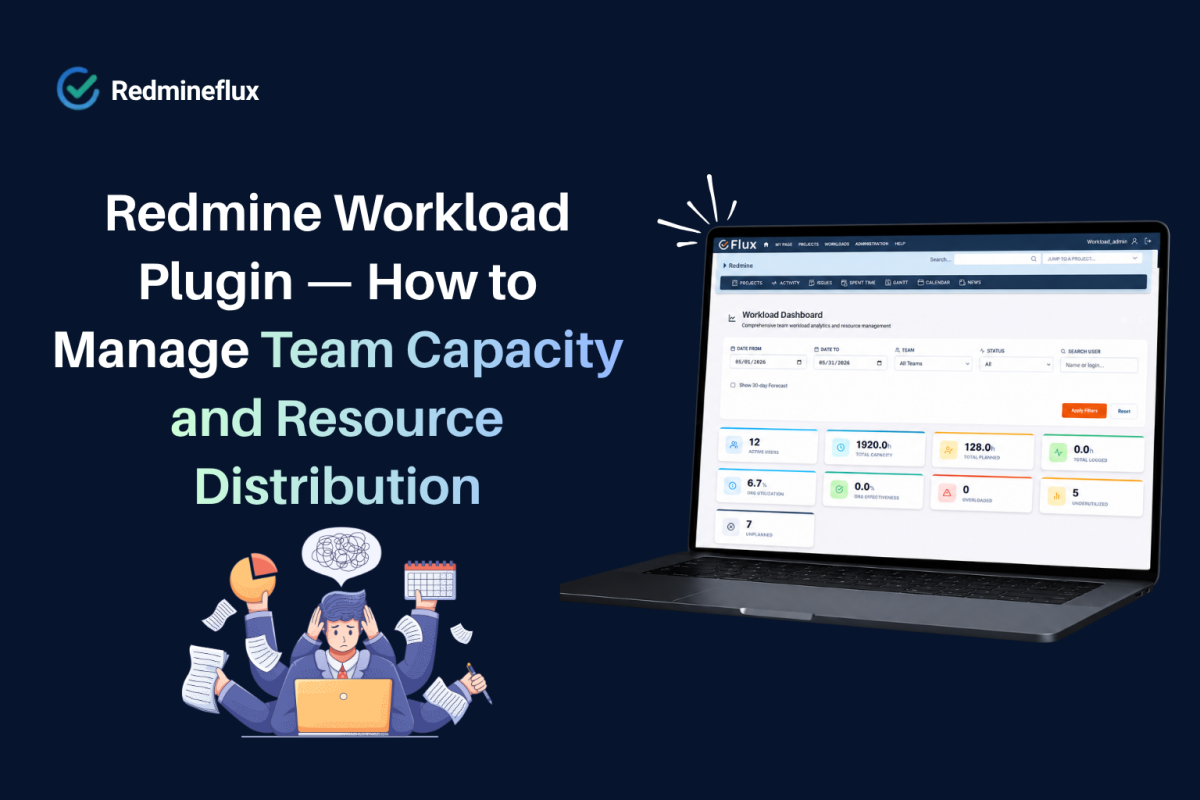
Specifically, the Redmineflux Workload Plugin adds a capacity view to Redmine. Project managers see every team member’s current load across all projects, across the sprint period in a single structured view. Overloaded team members are visible at a glance. As a result, available capacity is quantified rather than estimated.
What Does the Redmine Workload Plugin Show?
The short answer: The Redmineflux Workload Plugin adds a workload view to Redmine showing each team member’s assigned issue hours against their available capacity across all projects and configurable date ranges. Project managers see who is overloaded, who has capacity, and how work is distributed across the team. The view updates in real time as issues are assigned, completed, or rescheduled no manual calculation required.
What the Workload Plugin Adds
Team Capacity View
The plugin adds a workload view accessible from the project or global navigation. The view shows a matrix of team members against dates typically the current sprint or a configurable week/month range.
Each cell shows the number of hours assigned to that team member on that date, drawn from estimated hours on open issues due within the period. A colour-coded indicator flags:
- Green — within capacity (below the team member’s configured available hours per day)
- Amber — approaching capacity (80–100% utilised)
- Red — overloaded (assigned hours exceed available hours)
As a result, project managers read this view in seconds. Overloads are visible without opening individual issue lists or running reports.
Cross-Project Workload
The workload view aggregates assignments across all projects the team member participates in. A developer assigned to three concurrent projects shows their total load from all three not just the project the project manager is currently viewing.
In fact, this is the critical gap in native Redmine. Specifically, a project manager overseeing one project can only see assignments within that project. The Redmineflux Workload Plugin shows the full picture including work from projects the project manager may not have direct visibility into.
Sprint-Level Workload Planning
When used alongside the Agile Board Plugin, the workload view filters to show load within the current sprint period. Before sprint planning, the project manager checks the workload view to confirm each developer has sufficient capacity for their proposed sprint allocation.
Issues under consideration for the sprint but not yet assigned appear in a planning mode project managers can model the load impact of different sprint compositions before committing.
Individual Availability Configuration
Additionally, each team member’s available hours per day are configurable in the plugin settings. The plugin accounts accurately for part-time team members, those with recurring meetings, and those on reduced capacity due to leave so the workload calculation reflects real availability, not a generic eight-hour default.
Holiday and leave periods are also configurable. A team member on annual leave for a week shows zero available hours for that period issues scheduled during that period flag immediately as scheduling conflicts.
Workload Reports
The plugin generates workload summary reports over a selected period. Reports show:
- Total assigned hours vs available hours per team member
- Issues contributing to each team member’s load
- Overloaded periods and under-utilised periods
- Cross-project load distribution
Consequently, project managers use these reports for sprint retrospectives, resource allocation decisions, and capacity planning ahead of new project intake.
Want to see the workload view configured for a multi-project team in Redmine? Book a Free Demo →
How Workload Connects to the Rest of Redmine
The workload view draws from the same issues and time estimates the team already maintains. As a result, there is no parallel system to keep updated.
When a developer updates an issue’s estimated hours, the workload view reflects the change immediately. When an issue is closed, it drops out of the capacity calculation for future dates. The view is always current.
The Timesheet Plugin records actual time logged against issues. The workload view shows planned hours (from estimates); the timesheet shows actual hours logged. Together, they give project managers both sides of the capacity picture what was planned and what was actually spent.
The Gantt Chart Plugin shows the release timeline. Before rescheduling an issue to an earlier date on the Gantt, the project manager checks the workload view to confirm the assigned developer has capacity on those dates. This prevents rescheduling decisions that create downstream overloads.
The Custom Dashboard Plugin can surface workload summary widgets showing current team utilisation rate or flagging overloaded team members so project managers see capacity signals on their dashboard without navigating to the workload view separately.
Common Questions
Does Redmine show team workload?
Native Redmine shows individual assigned issue lists but has no team workload view. The Redmineflux Workload Plugin adds a capacity matrix showing each team member’s assigned hours against their available hours across all projects and sprint periods with colour-coded overload indicators.
How does the Redmine Workload Plugin calculate capacity?
The plugin uses the estimated hours on open issues due within the selected period, compared against each team member’s configured available hours per day. Part-time schedules, leave periods, and holidays are configured per team member for accurate capacity calculations.
Can I see workload across multiple projects in Redmine?
Yes. The Workload Plugin aggregates assignments across all projects each team member participates in not just the current project. This cross-project view is the primary capability that native Redmine does not provide.
Can I plan sprint allocations using the workload view?
Yes. The workload view supports a sprint planning mode where proposed issue allocations are modelled before being committed. Project managers check capacity impact before finalising sprint assignments preventing overloads before they happen rather than discovering them after stand-up.
Which Redmine versions does the Workload Plugin support?
The Redmineflux Workload Plugin supports Redmine 5.0.x, 5.1.x, and 6.0.x. Teams running Redmine 4.x should contact support before purchasing to confirm compatibility.
Capacity problems that are visible before sprint planning are solvable. Capacity problems discovered during delivery are expensive. The Workload Plugin moves the visibility point earlier so project managers make resourcing decisions with accurate data rather than optimistic estimates.
Explore Managed Cloud — Redmine with all plugins pre-installed, including Workload →