Categories
Informational

Redmine Gantt Chart for Release Planning — Dependencies, Milestones, and Baselines

Sprint planning and release planning are not the same problem.

Sprint planning is a two-week cycle. The team commits to a set of issues, delivers them, and closes the sprint. The Agile Board Plugin handles this well issues move through columns, daily stand-ups track blockers, and the sprint closes with a clear record of what shipped.

Release planning operates at a different scale. A software release typically spans multiple sprints. It has external dependencies — the API must be complete before the front-end can integrate, the staging environment must be ready before QA can run, legal review must finish before the release date is confirmed. It has milestone commitments made to clients or stakeholders. And it has a history  the original plan against which the current state must be compared at every sprint review.

The agile board does not handle that level. The Redmineflux Gantt Chart Plugin does with dependency tracking, milestone markers, and baseline comparison built directly inside Redmine.

What Makes Release Planning Different from Sprint Planning?

The short answer: Sprint boards track daily execution within a two-week cycle. Release planning requires a different layer phase dependencies showing which work blocks which, milestone markers representing external commitments, and baseline comparison showing how the timeline has moved from the original plan. The Redmineflux Gantt Chart Plugin adds all three directly inside Redmine, operating on the same issues the team tracks on the sprint board.

A typical software release involves phases that depend on each other in sequence. Design must finish before development begins. Development must be code-complete before QA can start a full regression. QA sign-off must happen before the deployment window opens.

Without dependency tracking, those relationships live only in the team’s collective memory. When design overruns by four days, someone needs to manually recalculate whether QA still has enough time before the release date. That calculation happens too late in a stand-up, after the damage is already done.

Furthermore, release plans are made to stakeholders and clients. The milestone “version 2.4 ships on June 15” is a commitment, not an estimate. When the timeline shifts, the project manager needs to show exactly how far the current schedule has moved from the original commitment. A sprint board cannot produce that view.

Setting Up the Redmine Gantt Chart Plugin for Release Planning

The setup for release planning on the Gantt chart follows a consistent pattern: map the release phases to Redmine issues and versions, link the phases with dependencies, mark the milestones, and save a baseline before work begins.

Map Release Phases to Redmine Versions

In Redmine, versions represent sprints or release milestones. For release planning, create one version per release phase Design, Development, QA, Deployment each with a target due date. Go to Project → Settings → Versions → New Version for each phase.

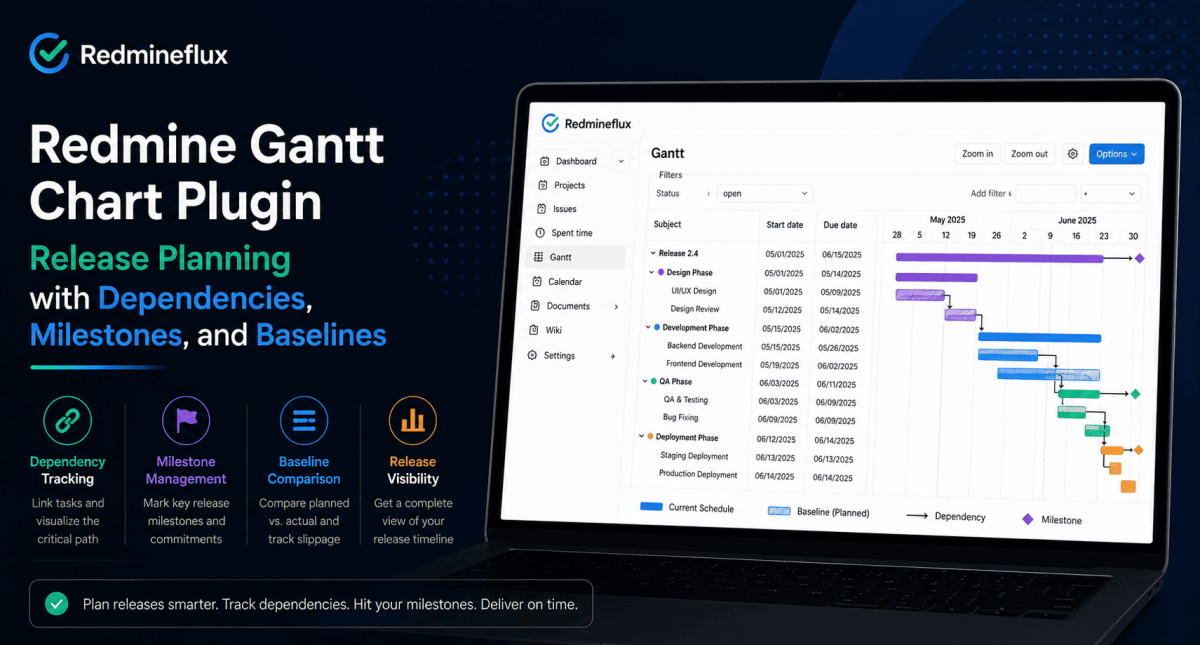
Each version appears on the Gantt chart as a milestone marker at its due date. The project manager sees the full release timeline phase by phase before any dependency lines are added.

Assign Issues to Phases

For each issue in the release, assign it to the version (phase) it belongs to. Design tasks go to the Design version, development tasks go to the Development version, and so on. Issues assigned to a version group together under that milestone on the Gantt chart.

This grouping shows at a glance how many issues sit in each phase and how they distribute across the timeline. If development issues are scheduled after the QA milestone, the Gantt makes that conflict visible immediately.

Add Finish-to-Start Dependencies

Open any issue that cannot start until another issue completes. In the Relations section of the issue, add a “follows” relation pointing to the predecessor. Save the issue.

Back on the Gantt chart, a dependency arrow appears between the two issues. When the predecessor’s due date is later than the dependent issue’s start date, the Gantt shows the conflict. For a release with four sequential phases, add three dependency links: Development follows Design, QA follows Development, Deployment follows QA.

That chain defines the critical path. Any slip in Design now shows its downstream impact on QA and the release date automatically without any manual calculation.

Save the Baseline at Kickoff

Before the release begins active execution, save the current schedule as a baseline. On the Gantt chart view, click Set Baseline. The plugin stores every issue’s start and due date as the reference plan.

From that point forward, the Gantt displays two bars for every issue: the baseline bar showing the original planned dates, and the current bar showing today’s dates. When an issue moves, the gap between the two bars shows the slippage no manual comparison needed.

Save a new baseline at the start of each sprint within the release cycle. That creates a record of how the release timeline evolved useful for retrospectives and client-facing reporting.

Want to see release planning with dependencies and baselines in a live Redmine environment? Book a Free Demo → 30 minutes covers the full release Gantt setup from phase mapping to baseline tracking.

Reading the Release Gantt at Sprint Reviews

The most practical use of the release Gantt is the sprint review check-in. At the end of each sprint within the release cycle, the project manager opens the Gantt and reads three signals:

How far have issue dates moved from the baseline?
The baseline comparison shows, for every remaining issue, how many days it has shifted from the original plan. An issue planned to start on June 1 but currently scheduled for June 7 shows a six-day slip on the baseline bar.

Are any dependencies now in conflict?
When issues slip, the dependency arrows show whether the slip has created a downstream conflict. If the Development phase slipped four days and QA was planned to start the day after Development’s original due date, the Gantt shows the overlap immediately.

Is the release milestone still achievable?
The milestone marker shows the committed release date. The project manager can see whether the current issue schedule still delivers before that date or whether the milestone needs to be renegotiated.

These three signals come from a single view. The project manager reads them in two minutes at the start of each sprint review rather than spending time rebuilding the picture manually from individual issue filters.

How the Gantt Chart Plugin Connects to the Rest of Redmine

The Gantt chart operates on the same issues the team tracks on the sprint board. There is no separate planning layer and no data to synchronise.

The Agile Board Plugin handles sprint-level execution. When a developer closes an issue on the sprint board, the corresponding bar on the Gantt chart updates automatically. The project manager and the development team are always looking at the same underlying data — from different angles.

Logged time from the Timesheet Plugin connects to the same issues displayed on the Gantt. When an issue takes longer than estimated, the time log explains why the bar moved. The project manager can see both the schedule impact and the effort variance from one system.

The Workload Plugin shows team capacity across the same timeline the Gantt displays. Before rescheduling an issue on the Gantt, the project manager can confirm the assigned developer has capacity on those dates — avoiding overloads that create further slips.

For teams that want the release health view alongside sprint metrics, the Custom Dashboard Plugin shows upcoming milestones from Gantt versions as a dashboard widget so the project manager sees release proximity without opening the Gantt view separately.

Common Questions

What is a Finish-to-Start dependency in Redmine Gantt?

A Finish-to-Start dependency means Issue B cannot start until Issue A is complete. In the Redmineflux Gantt Chart Plugin, you set this by adding a “follows” relation on Issue B pointing to Issue A. When Issue A slips, the chart shows the downstream impact on Issue B automatically no manual recalculation required.

How do I track release milestones on a Redmine Gantt chart?

Create a Redmine version with a due date for each milestone in Project → Settings → Versions. The Redmineflux Gantt Chart Plugin displays each version as a milestone marker on the Gantt timeline. Issues assigned to that version group under the milestone in a single view alongside all the issues working toward it.

What is a Gantt baseline and why does it matter for release planning?

A baseline is a saved snapshot of the release schedule at a specific point in time typically project kickoff or the start of each sprint. The plugin stores baseline dates separately from the live schedule. As the release progresses, the Gantt shows both the original plan and the current schedule side by side essential for client reporting and retrospective review.

Can I view multiple sprints on a single Gantt chart for release planning?

Yes. The Redmineflux Gantt Chart Plugin displays all issues across a project’s versions on a single timeline. You can view every sprint and phase within a release on one chart with milestone markers, dependency arrows, and baseline comparison across the full release scope.

Can I export the release Gantt to PDF for client reporting?

Yes. The Redmineflux Gantt Chart Plugin includes PDF and PNG export. The exported chart includes the current schedule, baseline comparison if a baseline has been saved, and dependency arrows formatted for client status reports and release sign-off documents.

Which Redmine versions does the Gantt Chart Plugin support?

Redmineflux tests and supports the Gantt Chart Plugin on Redmine 5.0.x, 5.1.x, and 6.0.x. Teams running Redmine 4.x should contact support before purchasing to confirm compatibility.

Sprint boards keep daily delivery on track. The Redmine Gantt Chart Plugin keeps the release on track with the dependency chain, milestone markers, and baseline comparison that tell the project manager whether the original commitment is still achievable. Both views draw from the same Redmine issues. The team sees the work from two angles without managing two systems.

Ready to Plan Releases with Full Dependency Tracking?

Explore Managed Cloud → Redmine with the Gantt Chart Plugin and full plugin suite pre-installed, hosted, and managed.
Categories
Informational

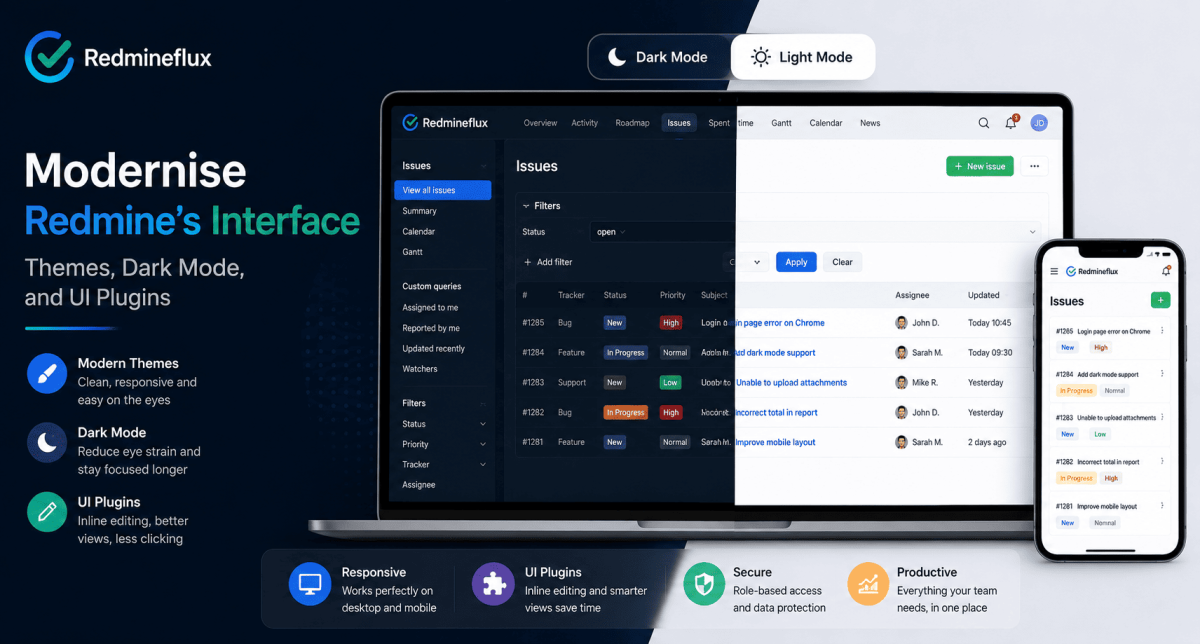
How to Modernise Redmine’s Interface — Themes, Dark Mode, and UI Plugins

Redmine’s default interface is functional. It is also dated. If your team’s first reaction to a new Redmine installation is “does this have a modern version?” that reaction is understandable, and it has a practical answer.

The functionality behind the interface is solid. The issue tracking model, role-based workflows, time tracking, and project structure are well-designed. But the visual layer was not a priority when Redmine was built, and the default theme reflects that.

The good news is that the interface is separate from the functionality. Redmineflux themes and UI plugins change what Redmine looks like without touching how it works. Your issues, workflows, custom fields, and project data stay exactly as they are. The team just stops working in a visually outdated environment.

This guide covers what Redmine’s modern UI options actually look like in practice themes, dark mode, inline editing, and mobile rendering.

What Does Redmine’s Interface Look Like by Default?

The short answer: Redmine’s default theme is functional but visually plain grey sidebar, table-heavy issue lists, and a dense layout that prioritises data density over usability. Redmine themes replace the visual layer without changing the underlying data or workflow. UI plugins like the Inline Editor Plugin go further adding interaction patterns that reduce clicks per action. Together, they make Redmine feel like a current tool rather than a legacy one.

The default Redmine interface ships with two built-in themes: Default and Alternate. Both are table-based, low-contrast, and not optimised for modern screens. They work. They do not feel good to use, particularly for teams coming from modern SaaS tools.

That gap in visual quality is often the first objection when an engineering manager evaluates Redmine against newer alternatives. It is also the easiest objection to resolve, because the interface is entirely separable from the platform.

What Redmine Themes Actually Change

A Redmine theme is a CSS and layout layer applied on top of the platform. It changes colours, typography, spacing, sidebar layout, and visual hierarchy without modifying any Redmine functionality.

A well-designed theme changes several things that affect daily usability:

Visual hierarchy — Redmine’s default layout treats all information as equally important. A good theme creates clear visual separation between primary content (the issue you are working on) and supporting content (the sidebar, the metadata, the related issues).

Navigation clarity — The default navigation bar is functional but cramped. Modern themes restructure it to be readable at a glance, particularly on wider screens.

Issue list readability — The default issue list is a dense table. Themes can open up the row spacing, improve contrast, and make priority and status indicators visually distinct rather than text-only.

Mobile rendering — The default theme does not adapt well to mobile screens. Responsive themes fix layout breakpoints so Redmine is usable on a phone or tablet relevant for teams that check project status outside the office.

What UI Plugins Add Beyond Visual Changes

Themes change how Redmine looks. UI plugins change how it behaves. The two work together, but they solve different problems.

The most impactful UI plugin for daily use is the Redmineflux Inline Editor Plugin. By default, editing a Redmine issue requires opening the full edit form, making changes, and saving. The Inline Editor Plugin lets team members update the status, assignee, priority, or custom fields directly on the issue detail page a single click rather than a form submission.

That interaction change reduces friction significantly in daily use. Developers moving issues through a sprint board, QA engineers updating test results, and project managers adjusting priorities all benefit from the reduced clicks per action.

Furthermore, improved issue detail views group related information more logically. Activity, related issues, time entries, and attachments get organised into clear sections rather than a single scrolling column. That organisation matters on issues with a long history the team can find what they need without scrolling through every comment.

The Redmineflux Theme — What It Adds

The Redmineflux theme is built specifically for Redmine 5.x and 6.x. It addresses the most common visual complaints about the default interface:

  • Clean, high-contrast layout with clear visual hierarchy
  • Responsive design that adapts correctly to laptop, desktop, and tablet screens
  • Improved navigation structure with clearer project switching
  • Modern typography and spacing that reduces visual fatigue on long sessions
  • Status and priority indicators that are colour-coded and immediately readable

The theme works across all Redmineflux plugins the Agile Board sprint view, Gantt Chart timeline, Custom Dashboard, and Timesheet views all inherit the same visual language. Teams do not see a mix of old and new interface styles as they move between the base Redmine views and plugin-added views.

Want to see what a fully themed and configured Redmine environment looks like? Book a Free Demo see the Redmineflux interface running live in 30 minutes.

Dark Mode in Redmine

Redmine does not include dark mode in its default themes. Dark mode requires either a third-party theme built with dark mode support or a custom CSS layer applied on top of an existing theme.

The Redmineflux theme includes a dark mode option. Teams that prefer dark mode for extended coding sessions or that work in low-light environments can switch without installing a separate tool or writing custom CSS.

Dark mode is applied at the user level in supported themes. Each team member sets their own preference without affecting anyone else’s view.

Mobile Redmine — The Honest Picture

Redmine’s core functionality works on mobile, but the default interface was not designed for it. Dense tables, small tap targets, and a navigation structure built for wide screens make the default Redmine experience on a phone frustrating.

Responsive themes fix the layout layer. They reflow the sidebar, enlarge tap targets, and collapse the navigation into a usable mobile menu. However, some Redmine workflows creating complex issues, managing the Gantt chart, reviewing sprint boards remain better suited to desktop even with a responsive theme applied.

For teams that only need to check issue status, update a field, or log time from a mobile device, a responsive theme makes that genuinely usable. For teams that need to do complex project management work on mobile, Redmine is not the right tool regardless of theme.

How to Apply a Theme in Redmine

Applying a theme in Redmine is an administration task, not a development task.

  1. Download or install the theme files into the public/themes/ directory on your Redmine server
  2. Restart the Redmine application
  3. Go to Administration → Display and select the theme from the dropdown
  4. Save the theme applies immediately across the entire instance

For managed hosting environments including Redmineflux Managed Cloud the theme is pre-installed and pre-configured. No file access or server restart is needed.

Common Questions

Does Redmine have a modern UI?

Redmine’s default interface is functional but dated. The underlying platform is modern and actively maintained. The visual layer the default themes has not changed significantly in several years. Third-party themes and UI plugins, including the Redmineflux theme, bring the interface up to current standards without affecting the platform’s functionality.

Can I change the Redmine theme?

Yes. Redmine supports custom themes applied through the administration panel. Themes are installed into the public/themes/ directory and selected in Administration → Display. No custom development is required to switch themes. The Redmineflux theme is compatible with Redmine 5.0.x, 5.1.x, and 6.0.x.

Does Redmine have dark mode?

Not natively. Dark mode requires a theme that includes it. The Redmineflux theme includes a dark mode option that individual users can enable from their account settings without affecting other team members’ views.

What is the best Redmine theme in 2026?

For development teams running Redmineflux plugins, the Redmineflux theme is the practical choice it is built specifically for the Redmine versions Redmineflux supports and is visually consistent across all plugin-added views including the Agile Board, Gantt Chart, and Custom Dashboard.

Will changing the Redmine theme affect my data or workflows?

No. A theme is a visual layer only. Changing the theme does not affect issues, workflows, custom fields, project data, or any configuration. The theme change is immediate and fully reversible switching back to the default theme restores the original appearance with no data loss.

Do Redmineflux themes work on all Redmine versions?

Redmineflux tests and supports its theme on Redmine 5.0.x, 5.1.x, and 6.0.x. Teams running Redmine 4.x should contact support before purchasing to confirm compatibility.

Redmine’s interface is one of the most common reasons teams hesitate to adopt it. That hesitation is reasonable given the default theme but it is also the most straightforward problem to solve. A properly configured Redmine environment with the right theme and UI plugins looks and feels like a current tool. The functionality was always there. The visual layer just needed updating.

See the Redmineflux interface running live in a demo

Related Reading

Categories
Informational

Redmine Pricing Explained — What You Pay and What Stays Free

Redmine pricing confuses a lot of teams at first. The software itself is free. The plugins are not. Hosting is a separate decision. And unlike most project management tools, there are no per-user fees at any stage.

That cost model is one of the strongest reasons development teams choose Redmine but only once they understand how it actually works. Teams that approach Redmine expecting a SaaS pricing page are often surprised. Teams that understand the structure from the start make much better decisions about what to buy and when.

This guide explains Redmine pricing across all three layers the software, the plugins, and the hosting so you can plan the full cost before committing.

Redmine Pricing in 2026 — How the Cost Model Works

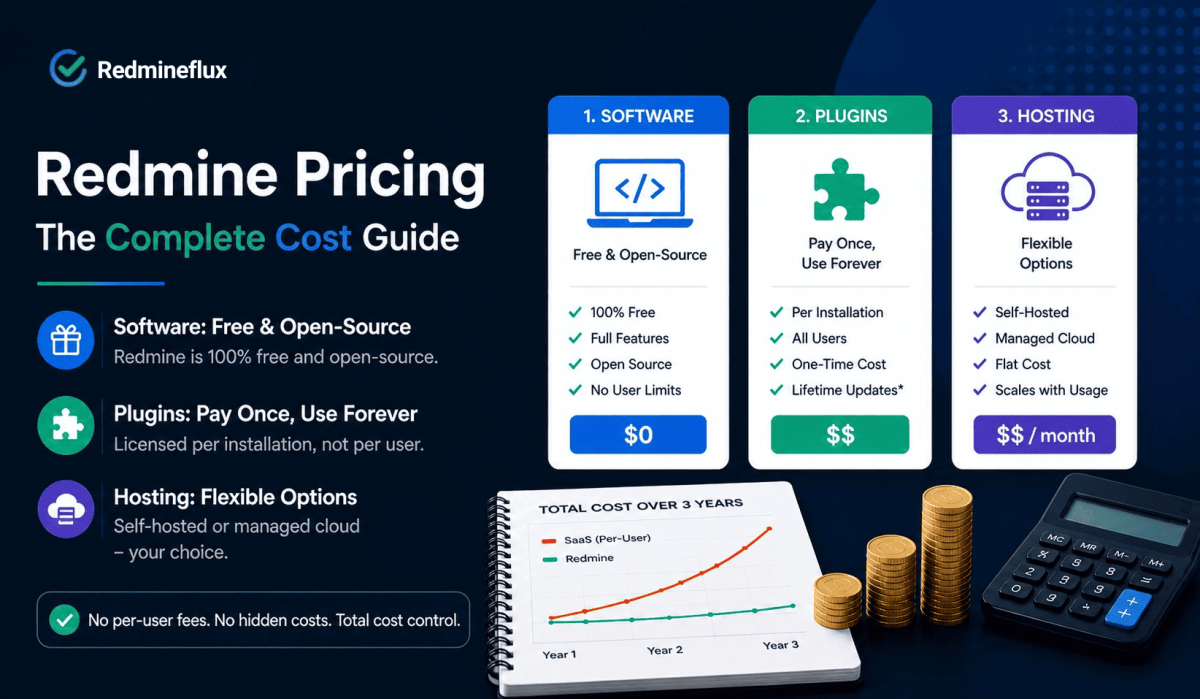
The short answer: Redmine the software is free and open-source you can install it at no cost on your own server. Plugins are licensed per installation, not per user, so a team of ten and a team of one hundred pay the same licence fee. Hosting adds a server cost if you self-host, or a flat managed hosting fee if you use a service like Redmineflux Managed Cloud. There are no per-seat fees, no pricing tiers, and no feature paywalls based on team size.

The three cost layers are independent of each other.

Redmine can be run for free on your own infrastructure without requiring any plugins. Plugins can be added later without needing to modify your hosting setup. If needed, you can also switch to managed hosting without affecting your existing plugin licenses. Each layer is a separate decision.

Redmine Software: Free and Open-Source

Redmine is released under the GNU General Public License. The full software issue tracking, project wikis, time tracking, role management, Gantt view, and email notifications is available at no cost. There is no paid version of Redmine itself. The community maintains and updates it actively; Redmine 6.x is the current stable release.

What “free” means in practice: you download and install Redmine on a server you control. The server has a cost either a cloud VM, a physical machine, or a managed hosting service. The software itself has none.

What “open-source” means in practice: you can inspect the code, modify it, and self-host it indefinitely. You are not locked into any vendor’s upgrade schedule or pricing decisions. If Redmine releases a new version, you upgrade on your own timeline. If you want to run an older version, nothing forces you to upgrade.

Plugin Pricing: Per Installation, Not Per User

Most Redmine plugins including all Redmineflux plugins are licensed per installation. You buy the plugin once and it runs on your Redmine instance for all users, across all projects. The licence fee does not change whether you have 5 users or 500.

That model is the key cost difference between Redmine and SaaS project management tools. SaaS tools charge per user per month. As your team grows, the bill grows at the same rate. Redmine plugin licences stay flat.

What this means across a 3-year horizon:

A team that grows from 15 to 40 people on a typical SaaS tool sees their subscription cost nearly triple over those three years. On Redmine with Redmineflux plugins, the plugin licence does not change. The only cost that grows is the server and server costs scale on infrastructure usage, not headcount.

Plugin options from Redmineflux:

You can buy plugins individually or as a bundle. The All Plugins Pack covers the full Redmineflux suite Agile Board, Gantt Chart, Timesheet, Workload, Custom Dashboard, Test Case Management, Issue Template, and more at a lower combined cost than buying each plugin separately. For teams that need more than two or three plugins, the pack is the practical choice.

See exact plugin pricing on the Redmineflux pricing page.

Hosting: Three Options at Different Cost Points

Self-Hosted on Your Own Server

You manage the server infrastructure. You handle installation, upgrades, backups, and security patches. The cost is your server bill typically a VPS or dedicated machine from a cloud provider.

For a team of 20 to 50 people, a mid-range VPS handles Redmine comfortably. That is the only recurring cost beyond any plugin licences you have purchased.

Best for: Teams with server management experience who want full data control and the lowest possible running cost.

Redmineflux Managed Cloud

Redmineflux manages the server, handles Redmine upgrades, runs backups, and provides support. Your team gets a fully configured Redmine environment with the plugin suite pre-installed. You own the data and the configuration. Redmineflux handles the infrastructure layer.

The cost is a flat managed hosting fee not per user. It does not change as your team grows.

Best for: Teams that want self-hosted data ownership without the administration overhead of running their own server.

Third-Party Managed Hosting

Several hosting providers offer managed Redmine environments. The quality and pricing vary significantly. These are not Redmineflux products confirm plugin compatibility before purchasing.

What Redmine Costs in Practice — A Real Example

Consider a 25-person development team that needs sprint boards, Gantt planning, time tracking, and QA management.

On a typical SaaS project management tool at the feature tier required for all four capabilities, that team spends a meaningful amount monthly and the bill increases every time a new developer joins.

With Redmine and the Redmineflux All Plugins Pack:

  • Redmine software: free
  • All Plugins Pack: one-time or annual licence, fixed regardless of headcount
  • Managed Cloud hosting: flat monthly fee the same whether the team is 25 or 50

At 25 people the cost difference is noticeable. At 50 people it is significant. Over three years with a growing team, the total cost of ownership for Redmine is typically a fraction of what the equivalent SaaS subscription costs.

Redmine Pricing vs SaaS Project Management Tools — 3-Year Comparison

Redmine + Redmineflux (Self-Hosted) Jira (Standard) Monday.com (Standard)
Per-user fee None — ever ~$8.15/user/month ~$12/user/month ~$12/user/month
25 users / month ~$30–50 (server only) ~$204 ~$300 ~$300
50 users / month ~$40–70 (server only) ~$408 ~$600 ~$600
Plugin licences Per install — e.g. Agile Board $499, Gantt $499, Timesheet $499, Workload $499 Included in plan Included in plan Included in plan
3-year cost (25 users)* ~$3,436 total ~$7,335 ~$10,800 ~$10,800
3-year cost (50 users)* ~$3,976 total ~$14,670 ~$21,600 ~$21,600
Cost grows with team? No — plugin licence is per install, not per user Yes — linearly Yes — linearly Yes — linearly
Data ownership Full Vendor-hosted Vendor-hosted Vendor-hosted

Self-hosted 3-year estimate: 4 core plugin licences (Agile Board + Gantt + Timesheet + Workload = $1,996 one-time per installation) + VPS server (~$40–60/month). Plugin cost does not increase as your team grows from 25 to 50 to 100 users. SaaS prices based on published 2026 rates — verify current pricing with each vendor.

Prefer managed hosting? Redmineflux Managed Cloud (Pro plan) is $3.99/seat/month billed monthly, or $3.27/seat/month billed yearly (save 18%). For 25 users: $99.75/month — less than half the cost of Jira Standard at the same headcount. For 50 users: $199.50/month vs $408/month on Jira.

For exact figures, see the Redmineflux pricing page.

Want to see the full Redmineflux stack running before you make any decisions? Book a Free Demo — 30 minutes in a live environment answers most pricing questions more clearly than any guide can.

What Affects Your Actual Redmine Budget

Four factors determine what Redmine genuinely costs your team:

1. How many plugins you need A team that only needs the Agile Board Plugin pays far less than a team that needs the full suite. Start with the plugins that close your most pressing workflow gaps.

2. Whether you self-host or use managed hosting Self-hosting has lower ongoing costs but requires internal administration time. Managed hosting trades a higher monthly fee for zero administration overhead. For most teams, the administration time is the larger real cost.

3. Team size — but only for server costs Plugin licences do not change with headcount. Server costs do scale slightly as usage grows, but the relationship is not linear. A server handling 30 users handles 60 users with a modest upgrade not a doubled bill.

4. How long you plan to stay on Redmine If your team commits to Redmine for three or more years, the per-installation plugin model becomes significantly more cost-effective than SaaS subscriptions. The savings compound with team growth and time.

Common Questions

Is Redmine free to use?

Yes. Redmine is free and open-source software released under the GNU General Public License. You can install, use, and modify it at no cost. You need a server to run it either your own or a managed hosting service. The software itself has no licence fee.

How much do Redmine plugins cost?

Redmineflux plugins are licensed per installation, not per user. You pay once for the plugin and it runs for all users on that Redmine instance. Individual plugin prices and bundle options are listed on the Redmineflux pricing page. The All Plugins Pack covers the full suite at a lower combined cost than individual purchases.

Does Redmine charge per user?

No. Redmine itself has no per-user fee. Redmineflux plugin licences are also per installation, not per user. A team of 10 and a team of 100 pay the same plugin licence fee. This is one of the primary reasons growing development teams choose Redmine over per-seat SaaS tools.

What is the cheapest way to run Redmine for a growing team?

Install Redmine on a VPS (typically low monthly cost), add only the plugins your team needs from Redmineflux, and manage the server yourself if you have the capacity. As the team grows, the plugin costs stay flat and server costs scale modestly with usage. This approach delivers the lowest total cost of ownership over a three-to-five year horizon.

What does Redmineflux Managed Cloud include?

Redmineflux Managed Cloud includes a fully configured Redmine environment with the Redmineflux plugin suite pre-installed, ongoing server management, automated backups, Redmine upgrades, and technical support. It is a flat monthly fee — not per user. You own the data and configuration. Redmineflux manages everything at the infrastructure layer.

Which Redmine versions do Redmineflux plugins support?

Redmineflux tests and supports all plugins on Redmine 5.0.x, 5.1.x, and 6.0.x. Teams running Redmine 4.x should contact support before purchasing to confirm compatibility.

Redmine pricing works differently from almost every other project management tool in the market. The software is free. The plugins are flat-rate per installation. Hosting is a separate cost that scales with infrastructure, not headcount. For teams that plan to grow, that model produces a total cost of ownership significantly lower than per-seat alternatives and the gap widens every time a new team member joins.

Categories
Informational

Jira Alternatives for Small Teams — A Practical Guide for 2026

Small teams find Jira the same way. Someone on the team has used it before, or it comes up in a recommendation thread, or it is simply the most visible name in the space. The setup happens quickly. The first sprint starts. Everything feels manageable.

Then the team grows. The bill grows with it. The workflow schemes that seemed straightforward at setup start accumulating configuration debt. Someone needs to know why the notification rules behave unexpectedly. A new project manager joins and spends two weeks learning how Jira works before they can run a sprint.

At some point, a reasonable question surfaces: is Jira the right tool for a team of this size, or is it a tool built for a scale that this team has not reached yet?

This guide is for teams at that point. It covers what to look for in a Jira alternative for small teams and what a purpose-built solution that fits the actual workflow looks like in 2026.

Why Small Teams Look for Jira Alternatives

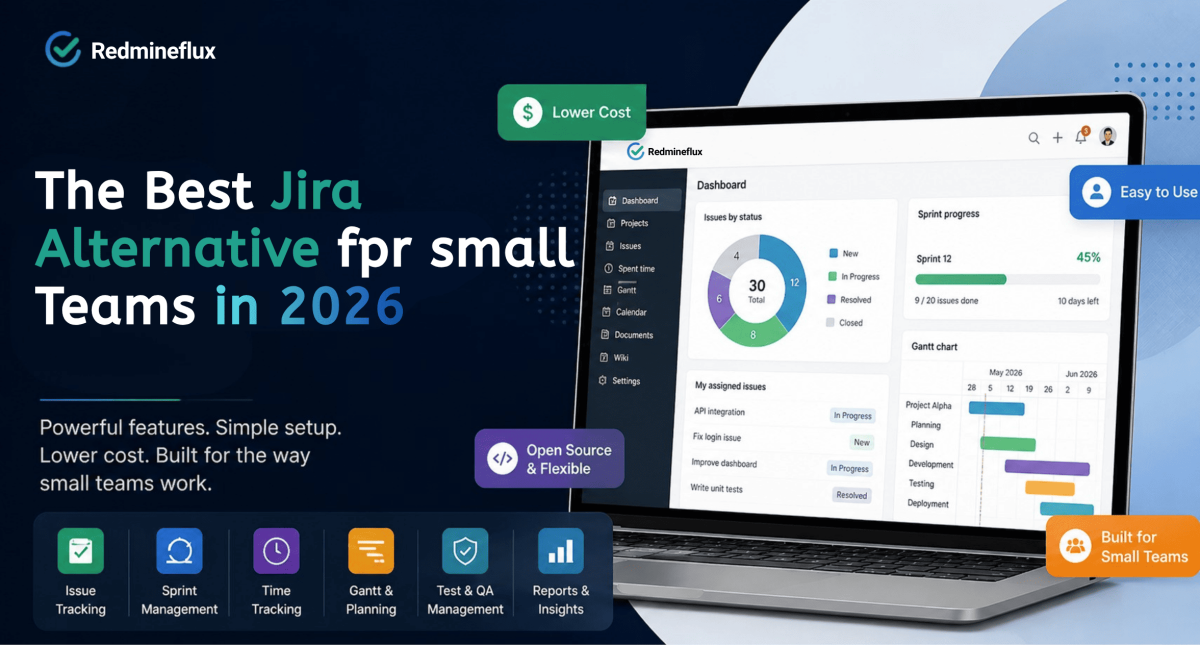
The short answer: Jira is a powerful tool built for large engineering organisations. For small teams, the per-seat pricing grows linearly with headcount, the administration overhead requires ongoing expertise, and full capability depends on the wider Atlassian ecosystem at additional cost. A good Jira alternative for small teams delivers the same workflow coverage issue tracking, sprint management, time tracking, and reporting at lower cost and with simpler administration.

The reasons small teams look for Jira alternatives are almost always the same three.

Cost that grows with headcount

Jira charges per user per month. The Standard plan runs approximately $8.15 per user per month. The Premium plan required for Advanced Roadmaps, automation, and cross-team capacity planning runs approximately $16 per user per month. For a 15-person team on Premium, that is roughly $2,900 per year for Jira alone. Add Confluence for documentation and the bill climbs further.

Administration complexity that requires expertise

Jira’s power comes from its scheme-based configuration model. Workflow schemes, permission schemes, issue type schemes, and notification schemes give administrators precise control over how the tool behaves. That is genuinely useful at scale, where dozens of projects and multiple teams need consistent, governed configuration.

For a small team, that same system is often more configuration than the team has capacity to maintain well. Without a dedicated Jira administrator, schemes drift. Permissions become inconsistent. Automations conflict with each other. The tool that was supposed to reduce overhead starts adding it.

Capability that requires the full Atlassian stack

Jira is designed to work alongside the rest of the Atlassian ecosystem. Documentation lives in Confluence. Support tickets live in Jira Service Management. Test cases live in Xray or Zephyr. Advanced portfolio planning lives in Advanced Roadmaps on the Premium tier.

For a small team that just needs to track work, run sprints, and report time against issues, subscribing to multiple Atlassian products to unlock core capabilities is a poor cost-to-value trade.

What a Good Jira Alternative for Small Teams Actually Needs

Not every cheaper tool is a good Jira alternative. The right alternative needs to cover the same workflow surface without the cost structure or administration overhead that drove the search in the first place.

A credible Jira alternative for a small development team needs to deliver:

  • Issue tracking with real workflow control — trackers, statuses, and role-based transitions, not just task cards
  • Sprint and backlog management — planning, velocity tracking, and scope management across releases
  • Time tracking against issues — hours logged directly against work items, not in a separate tool
  • Gantt and timeline planning — delivery timeline visibility with dependencies and milestones
  • Test case and QA management — without a third-party add-on at additional cost
  • Simple administration — manageable without a dedicated tool administrator
  • Predictable pricing — a cost model that does not grow linearly with headcount

A tool that covers four of those seven is a partial answer. A tool that covers all seven at lower cost and with simpler configuration is a genuine alternative.

Evaluating Redmineflux as your Jira alternative? Book a Free Demosee every capability above running in a live Redmine environment in 30 minutes.

Jira Alternatives for Small Teams — Compared Side by Side

The tools small teams most commonly evaluate when leaving Jira are Redmine with Redmineflux, ClickUp, Linear, and Plane. Here is how they compare on the factors that matter most for a team under 50 people.

Redmine + Redmineflux ClickUp Linear Plane
Pricing model Plugin: per-install one-time · Cloud: from $1.99/seat/month Per-user/month Per-user/month Free / per-user
15-person annual cost ~$1,977 yr 1 · ~$480/yr after† ~$1,260–2,160/yr ~$1,440/yr Free / ~$900/yr
50-person annual cost ~$2,476 yr 1 · ~$480/yr after† ~$4,200–7,200/yr ~$4,800/yr Per-user scales
Self-hosted option ✅ Yes ❌ No ❌ No ✅ Yes
Sprint / Kanban boards ✅ Agile Board Plugin ✅ Built-in ✅ Built-in ✅ Built-in
Gantt chart ✅ Gantt Plugin ✅ Paid plan only ❌ Roadmap only ⚠️ Basic
Time tracking ✅ Native + Timesheet Plugin ✅ Built-in ❌ No ❌ No
Test case management ✅ Testcase Plugin ❌ No ❌ No ❌ No
Issue workflow control ✅ Full workflow builder ⚠️ Status-based only ⚠️ Status-based only ⚠️ Status-based only
Data ownership ✅ Full (self-hosted) ❌ Vendor-hosted ❌ Vendor-hosted ✅ Self-hosted option
Admin complexity Low–Medium Low Low Low

Self-hosted: 3 core plugins (Agile Board + Gantt + Timesheet at $499 each = $1,497 one-time per installation) + VPS server (~$40/month). Adding Workload brings the total to $1,996. Plugin licence does not change as the team grows from 15 to 50 to 100 users.

What this table shows: Redmine with Redmineflux is the only option in this list with flat per-installation pricing, full self-hosting, native time tracking, and built-in test case management. ClickUp and Linear are simpler to set up but cost more as headcount grows and offer no self-hosted deployment. Plane is open-source but lacks time tracking and QA management out of the box.

For small teams that need structured issue workflows, time reporting for billing, or QA tracking inside the issue tracker — and want costs that stay flat as the team grows — Redmine with Redmineflux is the most complete answer in this group.

Why Redmine with Redmineflux Is the Right Answer for Small Teams

Redmine is an open-source project management and issue tracking platform. Developers have maintained it actively since 2006. Small teams around the world use it as the foundation for structured development workflows and it covers the core of what Jira does without the per-seat pricing model.

What Redmine Delivers Out of the Box

Redmine includes structured issue tracking with tracker types, configurable statuses, and role-based workflow transitions. Time tracking is native hours log directly against issues and projects without a third-party add-on. Role and permission management is granular. Project wikis, document management, and a basic Gantt view all ship with the base platform.

The administration model is simpler than Jira’s scheme-based system. A project manager at a small team can configure Redmine’s workflows, permissions, and trackers without becoming a Jira-certified administrator. That difference matters when no one on the team has dedicated tool-admin capacity.

Redmine is free and open-source. Your data stays on your server. You can back it up, export it, and migrate it without asking permission from a vendor.

What Redmineflux Adds on Top

The base Redmine platform covers the foundation. Redmineflux adds the workflow layer that makes it a complete Jira replacement for small teams.

The Agile Board Plugin — sprint boards and backlog management for Redmine delivers Scrum and Kanban boards, sprint planning, WIP limits, swimlanes, and velocity tracking. Every card on the board is a live Redmine issue. There is no sync, no duplication, and no data living in two places at once.

The Gantt Chart Plugin — delivery timelines, dependencies, and baseline tracking adds Finish-to-Start dependencies, milestone markers, baseline comparison, and drag-and-drop rescheduling. When a task slips, the downstream impact on the release date shows immediately. No separate roadmap tool is needed.

The Timesheet Plugin — billing-quality time reports against your Redmine issues adds detailed time reporting, approval workflows, and export formats for client billing all drawing from the same time entries your team logs against issues every day.

The Test Case Management Plugin — QA workflow and test runs inside your issue tracker keeps test case management inside Redmine. Test cases link directly to the issues they cover. Sign-off happens in the same system where development work lives not in a spreadsheet alongside it.

Together, these four plugins cover everything a small development team typically relies on Jira for at a per-installation licence fee that does not grow as the team grows.

See the full plugin suite find which plugins cover your team’s current Jira use cases.

The Cost Difference Over Three Years

This is where the Jira alternative question becomes concrete for most small teams.

A 20-person team on Jira Premium pays approximately $3,840 per year. That is Jira alone — no Confluence, no Jira Service Management, no test case add-on. If the team grows to 30 people, the bill reaches $5,760. Over three years at that growth rate, the total Jira spend approaches $15,000 to $20,000 for the base product.

Redmineflux plugins are licensed per installation, not per user. Four core plugins — Agile Board ($499), Gantt Chart ($499), Timesheet ($499), Workload ($499) — cost $1,996 as a one-time per-installation licence. Self-hosting on a VPS adds approximately $480/year. Total Year 1: ~$2,476. From Year 2, the only recurring cost is the server. Over three years, total cost is approximately $3,436 — versus $11,520 for Jira Premium at 20 users over the same period.

For teams that prefer managed hosting, Redmineflux Managed Cloud (Pro plan) is $3.99/seat/month billed monthly, or $3.27/seat/month billed yearly (save 18%). For 20 users: $79.80/month, or $65.40/month on the yearly plan — less than a quarter of Jira Premium at equivalent headcount.

Over three years, the cost difference is significant. For many teams, that gap alone closes the evaluation.

What the Switch Actually Looks Like

Moving from Jira to Redmine is a documented process with clear steps. The concern most teams have that the migration will be painful is usually larger in anticipation than in practice.

Export from Jira using the built-in CSV export or the Jira API. The export captures issues, projects, attachments, and field data. Import into Redmine using the CSV import feature, mapping Jira issue types to Redmine trackers and Jira workflow statuses to Redmine statuses. The field mapping step takes planning but not expertise.

Install the Redmineflux plugins that cover your team’s Jira use cases. Configure the Agile Board for sprint execution. Set up the Gantt Chart Plugin for release planning. Enable the Timesheet Plugin for time reporting. The guide to setting up Redmine issue tracking covers the tracker and workflow configuration that underpins all of these.

Run both systems in parallel for 30 days before cutting over. That window gives the team time to verify data completeness, adjust workflow configuration, and confirm that the new system covers everything the old one did.

Most small teams complete the full migration from export to working Redmineflux environment within two to three weeks.

Common Questions

Is Redmine a good Jira alternative for small development teams?

Yes. Redmine covers the core Jira use case structured issue tracking with workflow control, role-based permissions, time tracking, and project reporting without per-seat pricing. With Redmineflux plugins, it adds sprint boards, Gantt planning, test case management, and workload visibility. For small teams under 30 people, it delivers comparable daily workflow capability at significantly lower cost.

What does it cost to replace Jira with Redmine?

Redmine is free and open-source. Hosting costs the price of a server or managed cloud service. Redmineflux plugins are licensed per installation, not per user so the cost stays flat as the team grows. The total first-year cost for Redmine with the full Redmineflux plugin suite is typically a fraction of equivalent Jira Premium pricing for a 15–20 person team.

Can Redmine do sprints and Kanban boards like Jira?

Yes, with the Redmineflux Agile Board Plugin. Scrum sprint planning, backlog grooming, Kanban boards, WIP limits, swimlanes, and velocity tracking all work within Redmine. Every board card is a live Redmine issue no separate board tool, no sync required.

How long does it take to migrate from Jira to Redmine?

Most small teams complete the migration in two to three weeks. The process involves exporting from Jira, importing into Redmine with field mapping, installing Redmineflux plugins, and running both systems in parallel for 30 days before cutting over. The migration complexity depends on the number of custom fields and workflow configurations in the existing Jira setup.

Do I need a dedicated administrator to run Redmine?

No. Redmine’s administration model is simpler than Jira’s scheme-based configuration. A project manager or team lead at a small organisation can configure trackers, statuses, workflow transitions, and permissions without specialised tool administration knowledge. Redmineflux plugin configuration follows the same straightforward approach.

Which Redmine versions do Redmineflux plugins support?

Redmineflux tests and supports all plugins on Redmine 5.0.x, 5.1.x, and 6.0.x. Teams running Redmine 4.x should contact support before purchasing to confirm compatibility.

The right Jira alternative for a small team is not just a cheaper tool. It is a tool that covers the same workflow needs sprint management, issue tracking, time reporting, and release planning with simpler administration and a cost model that stays flat as the team grows. Redmine with Redmineflux delivers exactly that.

If your team is ready to make the move, the fastest next step is seeing it in action.

Book a Free Demo — see Redmineflux running live in 30 minutes, no commitment Explore the Plugin Suite — find which plugins cover your Jira use cases Explore Managed Cloud — full Redmineflux stack hosted and maintained for you

Categories
Informational

Best Project Management Software for Development Teams 2026

Most project management tools are built for everyone. That sounds like a strength. In practice, it means they are optimised for no one in particular and development teams feel that gap the most.

A development team’s workflow is not a generic task list. It involves issue tracking, sprint planning, time logging against issues, QA runs tied to the work being tested, and cross-project visibility for engineering leads. Tools that handle marketing campaigns or agency retainers elegantly often handle this combination poorly.

This guide covers what the best project management software for development teams needs to do. It also covers what a purpose-built solution looks like in practice.

What the Best Project Management Software for Development Teams Must Do

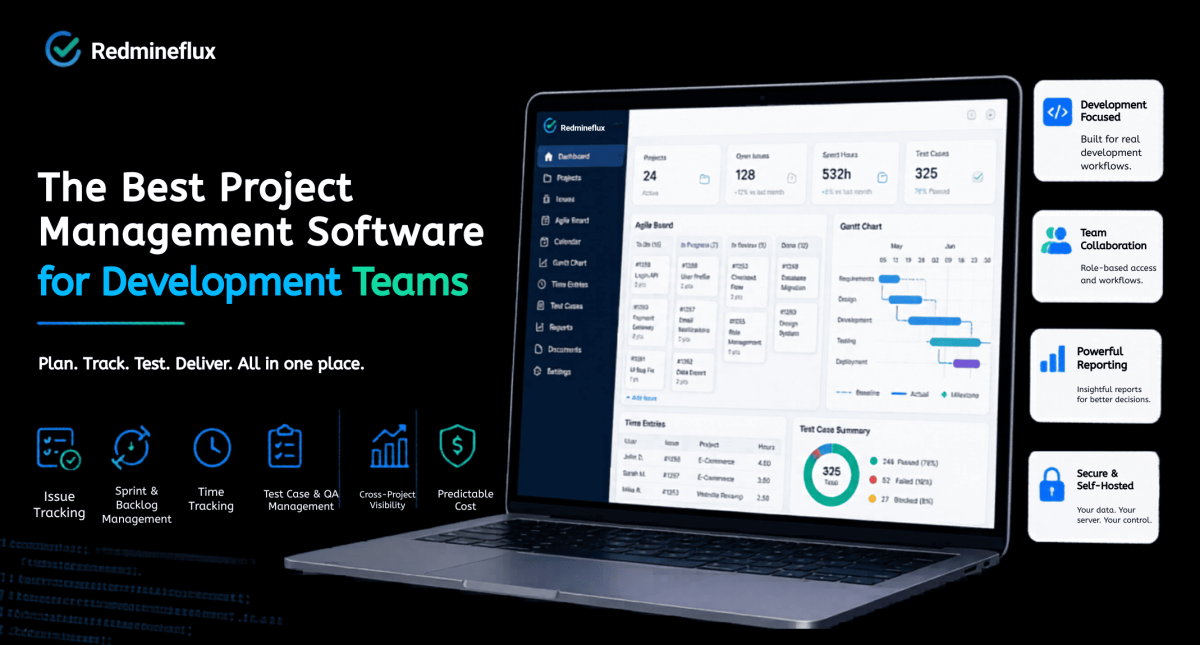
The short answer: Development teams need issue tracking with workflow control, sprint and backlog management, time tracking against issues, and ideally QA or test case management in the same system. Generic project management tools often handle one or two of these well. A purpose-built solution handles the full set with a cost model that does not penalise team growth.

Before evaluating any tool, it helps to be specific about what a development team actually needs. Most teams need all of the following:

  • Issue tracking with real workflow control — not just task cards, but tracker-level workflows with role-based status transitions
  • Sprint and backlog management — planning velocity, adjusting scope mid-sprint, and maintaining history across releases
  • Time tracking against work items — hours logged directly against issues and projects, not in a separate disconnected tool
  • Test case and QA workflow — a place to manage test runs and sign-off without switching to a completely separate system
  • Cross-project visibility — for engineering leads and project managers overseeing more than one workstream at once
  • Predictable cost as the team grows — pricing that does not double when headcount doubles

Not every team needs all six from day one. But a tool that cannot grow into all of them is usually a workaround waiting to happen.

Already on Redmine and want to see the full solution? Get a Free Demo – see every capability above running together in a live environment in 30 minutes.

Why Most Generic Tools Fall Short

Most project management software starts from a task card. You have a list of tasks, you assign them, you mark them done. That model works for operational work, campaign management, and internal coordination.

Development work is different. A bug is not the same kind of work as a feature. A support ticket should not follow the same workflow as a QA task. As a result, generic tools flatten all of that into one task type. Teams end up building workarounds to compensate. QA tracking moves to a spreadsheet because the tool has no test case model. Sprint velocity gets managed in a separate document because the board does not connect to a backlog with history. For billing, time data gets exported to another system because the tool cannot report hours against projects.

Each workaround feels small at first. Together, however, they create a system where no single view shows the complete picture. Delivery suffers. Reporting becomes unreliable. Eventually, the team gradually stops trusting the tool.

Instead, the right solution for a development team is a platform built around how development work actually moves. Backlog to sprint. Issue to resolution. Estimate to logged time.

What Purpose-Built Project Management Looks Like

Redmine as the Foundation

Redmine is an open-source project management and issue tracking platform. Developers have maintained it actively since 2006. Redmine handles the kind of structured, multi-role workflow that development teams run not as an afterthought, but as the core design.

The base platform gives you issue tracking with trackers, statuses, and role-based workflow transitions. Time tracking is native hours log directly against issues and projects. Role and permission management is granular. Project wikis, forums, and document management are all included. A basic Gantt view ships with the platform.

Most importantly, Redmine separates work by type. A Bug follows different rules from a Feature. A Support ticket has different required fields and different status transitions. That structure is what makes reporting reliable and what prevents the “everything is just a task” problem that generic tools create.

Redmine is free and open-source. You host it on your own server, which means your data stays in your database available for backup, export, or migration at any time.

Redmineflux — The Layer That Completes the Workflow

As a foundation, the base Redmine platform covers the essentials well. The gaps appear when teams need agile execution, advanced timeline planning, and detailed time reporting all connected to the same issues they are already tracking.

That is exactly what Redmineflux is built to add.

The Agile Board Plugin — sprint planning and Kanban boards built for Redmine brings Scrum and Kanban boards, sprint planning, WIP limits, swimlanes, and backlog management. Every board card is a Redmine issue — no duplication, no sync problems.

For release planning, the Gantt Chart Plugin — dependencies, baselines, and drag-and-drop scheduling adds milestone tracking, Finish-to-Start dependencies, baseline comparison, and resource loading. When a task slips, the downstream impact shows immediately on the chart.

Time reporting gets equally strong coverage — the Timesheet Plugin — billing-quality time reports against your Redmine issues adds detailed reporting, approval workflows, and export formats suitable for client billing, without a separate time-tracking application.

QA workflow stays inside the same system through the Test Case Management Plugin — test runs and sign-off inside your issue tracker. Test cases link directly to the issues they cover. Sign-off happens in Redmine, not in a disconnected spreadsheet.

Finally, the Workload Plugin — team capacity visible before you make commitments shows who has capacity on which dates. You see resource conflicts before they affect delivery, not after.

Teams that delay setting up proper tooling pay a compounding price. Manual workarounds become habits. Sprint data ends up in spreadsheets. Consequently, QA gaps surface at release time instead of during planning. The sooner the workflow is structured correctly, the less cleanup is needed later.

Explore how Redmineflux Plugins brings all development tools together

The Cost Model That Makes Sense for Growing Teams

Most project management tools charge per user per month. At small team sizes, that feels manageable. As the team grows from 10 to 30 to 50 people the cost grows at the same rate. Add advanced features and the bill grows faster still. For development teams at growing organisations, that pricing model becomes a significant constraint over a three to five year horizon.

In contrast, Redmineflux licenses plugins per installation, not per user. A 10-person team and a 100-person team pay the same plugin licence fee. As headcount grows, the cost stays flat. The full plugin suite Agile Board, Gantt Chart, Timesheet, Workload, Dashboard, Test Case Management, and more is available as an All Plugins Pack at a fraction of what comparable per-seat tooling costs at scale.

Additionally, Redmine itself is free and open-source. Hosting costs the price of a server. For teams that want managed hosting without the administration overhead, Redmineflux Managed Cloud provides a fully configured Redmine environment maintained, updated, and supported without the SaaS vendor dependency that comes with most cloud tools.

What This Looks Like for a Real Development Team

Consider a 25-person development team running three concurrent projects. They need sprint boards for day-to-day delivery, a Gantt chart for release planning, time tracking for client billing, and a QA workflow that does not live in a separate spreadsheet.

For example, with per-seat project management software at the feature tier required for all of those capabilities, that team spends a significant sum annually and the bill grows every time a new developer joins.

Instead, with Redmine and the Redmineflux plugin suite, the same team pays one plugin licence regardless of whether they grow to 40 or 50 people. Every capability boards, Gantt, time tracking, QA, workload management sits in one system, drawing from the same issue data. When a developer logs time or closes a test case, the project manager sees it immediately on the same dashboard.

As a result, that is what purpose-built project management looks like in practice. Not more features better integration of the features the team already needs.

Choosing the Right Setup for Your Team

If your team is self-hosted and technical

First, install Redmine on your own server. Then add the Redmineflux plugins that cover your team’s current gaps. Start with the Agile Board Plugin for sprint execution and the Gantt Chart Plugin for release planning those two changes cover most of what development teams find missing from the base Redmine installation. Additionally, the guide to setting up Redmine issue tracking covers the workflow foundations that make every plugin more effective.

If your team wants managed hosting

Redmineflux Managed Cloud provides a fully configured Redmine environment with the plugin suite pre-installed. Your team gets the full capability without anyone on the team managing infrastructure, handling upgrades, or troubleshooting server issues. You own the data. Redmineflux handles everything else.

If your team is evaluating from scratch

Start with the free demo. It shows the complete Redmineflux workflow issue tracking, sprint boards, Gantt chart, time tracking, and QA running together in a live environment. Thirty minutes in the demo answers most of the questions that would otherwise take weeks of evaluation to resolve.

Start with a demo.

Book a free demo and explore the full workflow in action

Common Questions

1. What is the best project management software for small development teams?

For small development teams under 20 people, Redmine with a focused Redmineflux plugin set delivers the best capability-to-cost ratio. The administration model is straightforward, the pricing does not grow with headcount, and the feature set covers the full development workflow issue tracking, sprint boards, time tracking, and test case management without requiring separate tools for each function.

2. Does development team project management software need built-in time tracking?

Yes, for most development teams. When time tracking sits in a separate tool, hours do not connect to the issues they were spent on. Reporting becomes manual and unreliable. Redmine’s native time tracking logs hours directly against issues and projects. The Redmineflux Timesheet Plugin adds the reporting depth and approval workflows that billing and project review require.

3. What project management software supports self-hosted deployment for development teams?

Redmine is the most established self-hosted project management platform for development teams. It is open-source, free to install, and runs on standard server infrastructure. Redmineflux plugins extend it with agile boards, Gantt planning, time reporting, and QA workflow all self-hosted, with no SaaS dependency.

4. Do development teams need separate tools for project management and bug tracking?

Not if the project management tool has a real issue tracking model. Redmine handles both in one system bugs are a tracker type within the same issue model as features, tasks, and support tickets. Each tracker type can have its own workflow, required fields, and status transitions. No separate bug tracking tool is needed.

5. What is the most cost-effective project management tool for a growing development team?

Redmine with Redmineflux is the most cost-effective option for growing teams. Plugin licences do not increase with headcount, and Redmine itself is free and open-source. Hosting costs scale predictably with infrastructure rather than with user count. For teams projecting growth beyond 20–30 people, the cost difference versus per-seat tools compounds significantly over three to five years.

The best project management software for a development team is not the one with the most features or the highest review score. It is the one built around how development work actually moves from backlog to sprint, from issue to resolution, from estimate to logged time with a cost model that does not penalise the team for growing.

If your team is ready to move beyond basic issue tracking into a fully structured development workflow, the next step is simple.

Explore Managed Cloud — full Redmineflux stack, hosted and maintained for you